
Microsoft Defender for Cloud is a collective infrastructure that promotes security management within the Azure services space. The primary role of Microsoft Defender for Cloud is to strengthen the entire security posture of Azure data centers. It doesn't matter if you're in the Azure cloud or not; Microsoft Defender for Cloud has the potential to offer threat management for all types of hybrid workloads across different clouds. In this article we are going to take a deeper look at what Microsoft Defender for Cloud is, how it works and what are the main differences with other Azure services dedicated to cybersecurity
.png)
In today's digital landscape, security is a fundamental concern for any application hosted or built, both on-premises and in the cloud, and it is the responsibility of developers to prevent unauthorized access to applications and mitigate other security-related issues.
In particular, it has been a concern for companies considering adopting the public cloud. This is because public cloud providers use a multi-tenant architecture, where several users share the underlying hardware. As a result, many vendors have developed security tools and methods, such as encryption, access management, and authentication, for public cloud implementations.
Microsoft is actively integrating various physical, operational and infrastructural controls to help to secure Azure cloud services, including Microsoft Defender for Cloud.
Microsoft Defender for Cloud is a management system to protect data in the Azure cloud that offers advanced threat protection for various workloads, including those of other cloud or on-premises providers.
Microsoft Defender for Cloud has the potential to safeguard workloads from the moment they are enabled and will reinforce the cloud security aspects of the infrastructure, with the aim of offering protection against all types of hybrid workloads, both within Azure than in other clouds. Let's see more about how in the next sections.
Cloud security is a shared responsibility between the cloud provider and the customer. While the cloud provider ensures the security of the underlying infrastructure, the customer is responsible for the data, applications, and configurations within the cloud environment. Customers play a critical role in maintaining a robust security posture.
This goal can be achieved by raising employee awareness of cybersecurity best practices, to help them identify and avoid phishing attempts. In addition, implementing strict access controls and data encryption practices reduces the risk of unauthorized access.
Organizations face a wide range of threats in the cloud, including:
Relying solely on reactive responses to security incidents isn't enough. A proactive approach in the cloud exploits the capabilities of numerous tools to achieve specific security objectives.
Microsoft Defender for Cloud from Microsoft is a solution that offers unified security management for hybrid cloud workloads. It provides threat protection for both cloud and on-premise data centers. The platform also works with hybrid clouds that are not part of the Azure ecosystem.
Microsoft Defender for Cloud is a central point for protecting the Azure cloud environment and a complete Cloud Native Application Protection Platform (CNAPP) solution, which unifies Cloud Security Posture Management (CSPM), Cloud Workload Protection Platform (CWPP), and Development Security Operations (DevSecOps), which offers visibility, threat detection, and security posture management.
It's designed to solve an urgent problem when an organization migrates to the cloud. Cloud customers must assume greater responsibility when moving to Infrastructure-as-a-Service (IaaS) solutions, compared to solutions such as Platform-as-a-Service (PaaS) and Software-as-a-Service (SaaS), where the cloud service provider takes care of most of the tasks related to network and service security.
Moving to an IaaS solution requires protecting the network ecosystem and the services migrated to the cloud in a new way, since you take responsibility for the processes that the cloud provider managed in a SaaS or PaaS environment.
Microsoft Defender for Cloud offers a unified platform for protecting and managing rapidly evolving workloads and addressing security challenges in hybrid cloud workloads. The platform helps organizations:
With Microsoft Defender for Cloud, organizations can control the security of an ever increasing number of services, constantly threatened by increasingly sophisticated malware.
We have created the Infrastructure & Security team, focused on the Azure cloud, to better respond to the needs of our customers who involve us in technical and strategic decisions. In addition to configuring and managing the tenant, we also take care of:
With Dev4Side, you have a reliable partner that supports you across the entire Microsoft application ecosystem.
You don't need to specifically deploy Microsoft Defender for Cloud if your organization already uses Microsoft Azure. Microsoft Defender for Cloud natively monitors and protects Azure PaaS services, such as Service Fabric, SQL Database, SQL Managed Instance, and storage accounts.
Let's now look at some of its main features.
The tool also protects non-Azure Windows and Linux servers, on which you run cloud or on-premise services. Microsoft Defender for Cloud automatically protects virtual machines in such environments, using integration with Microsoft Defender for Endpoint.
Next, Microsoft Defender for Cloud processes and analyzes the events collected by agents and Azure to provide personalized recommendations on how to protect workloads. Generate security alerts for the IT team, helping them evaluate and prevent malicious code intrusion attempts.
With Microsoft Defender for Cloud active, you will begin to receive security recommendations and alerts that help strengthen network security in the cloud. This way, the team can easily identify steps to take and apply recommendations to strengthen security across the entire IT ecosystem, including servers, endpoints, data services, and running business applications.
Microsoft Defender for Cloud allows you to apply specific security policies to different environments, including non-Azure servers, Azure virtual machines, and Azure PaaS services. This allows you to ensure that all devices and services comply with security policies and recommended best practices.
Because organizations create new subscriptions on a regular basis, Microsoft Defender for Cloud offers a feature that identifies and labels subscriptions. Shadow IT. This functionality allows the team to quickly identify new unprotected Shadow IT subscriptions and take immediate action to ensure that they are compliant and protected.
A medium or large organization runs dynamic workloads where new resources are deployed every day. Automatic resource discovery is one of the features of Microsoft Defender for Cloud, which allows you to verify if any new resources comply with security best practices.
Microsoft Defender for Cloud generates lists of recommendations on what needs to be corrected and improved to better protect digital assets. When Microsoft Defender for Cloud finds new distributed resources, it assigns them a Secure Score and groups the recommendations into security controls, to make it easier to prioritize security measures to be implemented urgently.
Microsoft Defender for Cloud creates a network map (note: requires Defender for Servers Plan 2), showing the topology of workloads and allowing you to verify that each node is configured as required for maximum security.
Having a complex network topology requires such a tool to have a complete view of the available network connections and evaluate potential weaknesses. The network map is essential for identifying network nodes where unwanted connections could allow an attacker to overcome defenses.
Although security recommendations and network maps are considered to be among the most powerful features of Microsoft Defender for Cloud, the solution is complete with proactive protection against cyberthreats.
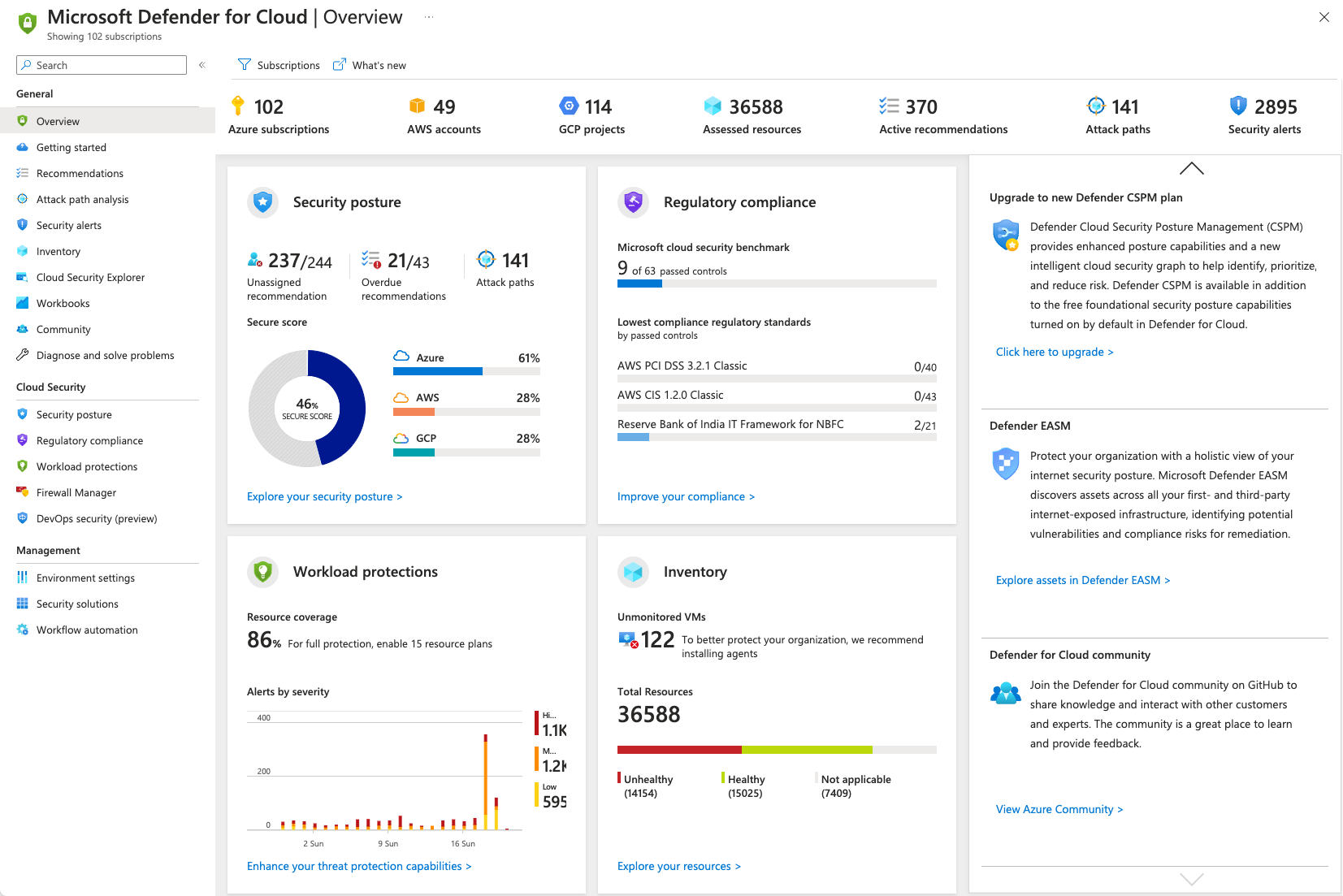
Microsoft Defender for Cloud can identify and prevent both IaaS and PaaS threats in Azure, offering the same protection for non-Azure servers on all networks. The tool offers forensic analysis capabilities, allowing the team to investigate how and where an attack originated, how it spread, and what resources it affected.
Microsoft Defender for Cloud natively integrates with Microsoft Defender for Endpoint to automatically protect Windows and Linux machines. You can automate application control policies on server environments with Adaptive Application Controls and by taking advantage of an end-to-end application allowlist for Windows servers. The process is fully automated, so there is no need to create rules and control violations.
With these security features active, you'll get:
Because Microsoft Defender for Cloud is part of a larger product offering, organizations can easily integrate it with other solutions such as Microsoft Defender for Cloud Apps and Microsoft Defender for Endpoint. At the same time, a native integration is available for Azure policies and Azure Monitor logs.

Microsoft Defender for Cloud isn't the only security tool provided by Azure. In fact, the Microsoft cloud computing platform has numerous services dedicated to cybersecurity, each with its specific objectives and uses.
But as always, when the options are numerous, the level of confusion also increases in proportion to which tool does what and in which contexts to use one rather than the other, especially if you are just starting to familiarize yourself with the Azure platform.
So let's take a moment to clarify the differences between Microsoft Defender for Cloud and two of the main services dedicated to security provided by Microsoft's cloud platform, namely Microsoft Sentinel and the Defender Plans. We may even discover that these services are not mutually exclusive but different links of the same tight security network.
Microsoft Sentinel is a cloud-native Security Information and Event Management (SIEM) and Security Orchestration, Automation and Response (SOAR) solution designed to detect and respond to threats. Microsoft Defender for Cloud, on the other hand, is a Cloud Security Posture Management (CSPM) system, which automatically verifies the presence of misconfiguration in the cloud environment.
There is some overlap between what these two tools can accomplish. Both play important roles in collecting security data and detecting (or analyzing) problems. However, for Microsoft Defender for Cloud, this is the main focus of the product: detecting security issues in cloud services. Sentinel goes further, covering the entire cybersecurity lifecycle, as it investigates incidents and automatically responds to them.
In the context of collection and survey, these two tools perform slightly different activities. Microsoft Sentinel is a SIEM, so the product base lies in data logs, although modern products like Sentinel seek to expand their reach. Microsoft Defender for Cloud, on the other hand, is focused on completing compliance checklists, ensuring that your organization's cloud services meet cybersecurity regulations and best practices.
An organization will use Microsoft Defender for Cloud so that the security team can continuously verify that cloud services are secure and up to date. Because software updates and installations happen frequently, it's important to have a dashboard that tells you when you need to take action.
Microsoft Sentinel can be seen as an organization's artificial 'watchdog', powered by Microsoft's artificial intelligence. There is no need to constantly train it or constantly provide it with instructions, as Sentinel independently explores possible threats in your cloud environment. It may attempt to resolve issues on its own or alert the security team, but it's a valuable support, not a substitute for the team.
They are different products, offering different functionalities. For example, Microsoft Sentinel would not be used to verify compliance with local regulations: for this purpose, Microsoft Defender for Cloud would be used. Similarly, you wouldn't use Microsoft Defender for Cloud to respond to threats, since the software isn't designed for that.
However, both can work in parallel to ensure the security of the services. Microsoft Defender for Cloud and Microsoft itself recommends to use both in combination with each other.
Ultimately, the choice to use both services depends on the needs of your organization, as both provide significant advantages for the security of cloud services. The point isn't so much Microsoft Sentinel versus Microsoft Defender for Cloud, but understanding their differences and how to use them together.
While the Foundational CSPM plan (free) provides a holistic view of the cloud security posture, the Defender Plans (Defender for Servers, Defender for Containers, etc.) go deeper, offering advanced threat protection for specific workloads within the Azure environment. It is a suite of security services designed to protect virtual machines, containers, databases and cloud applications and among its main services we can find:
Microsoft Defender for Cloud is primarily used for:
Also in this case, we can observe how the two services have a slight degree of overlap, which, however, does not make them the same service or mutually exclusive.
In fact, by using Microsoft Defender for Cloud together with Microsoft Defender for Cloud, organizations can create a robust security posture for their Azure environment. Defender’s targeted protection for specific workloads complements the broader security management capabilities of Microsoft Defender for Cloud.
As anyone who has followed even in passing has been able to see, cybersecurity and the adoption of measures to control and prevent cyber threats have never been as hot topics as in recent years.
With the increase in the quantity and quality of contemporary cyber threats, for organizations, having efficient and cutting-edge cybersecurity infrastructures is no longer an option but a major responsibility.
Therefore, it is necessary to evaluate your security posture and, for those who already use Microsoft's cloud platform (or for those interested in moving their work to it), a solid solution like Microsoft Defender for Cloud can help you understand how to move and act safely within cloud environments and beyond.
1. What is Microsoft Defender for Cloud?
Microsoft Defender for Cloud is a cloud-native security solution that helps manage and improve security posture (CSPM) and protect workloads (CWPP) across Azure, on-premises, and multi-cloud environments.
2. Is Microsoft Defender for Cloud only for Azure?
No. Although it is natively integrated into Azure, it can extend monitoring and protection to hybrid workloads and resources outside Azure, including on-premises environments and other cloud platforms.
3. Is Microsoft Defender for Cloud free?
A free base tier (Foundational CSPM) is available for visibility and posture management. Advanced workload protection features require enabling Defender plans (for example, Defender for Servers, Defender for Containers).
4. What's the difference between Microsoft Defender for Cloud and Microsoft Sentinel?
Defender for Cloud primarily focuses on posture management and workload protection (misconfigurations, recommendations, and alerts on cloud resources). Microsoft Sentinel is a SIEM/SOAR solution designed to collect logs, correlate events, investigate incidents, and orchestrate automated responses.
5. Can Defender for Cloud and Sentinel be used together?
Yes. In fact, they often complement each other: Defender for Cloud identifies configuration issues and threats on workloads, while Sentinel centralizes logs, correlates signals, and enables investigations and response automation.
The Infra & Security team focuses on the management and evolution of our customers' Microsoft Azure tenants. Besides configuring and managing these tenants, the team is responsible for creating application deployments through DevOps pipelines. It also monitors and manages all security aspects of the tenants and supports Security Operations Centers (SOC).


