
Power Apps vs. AppSheet: the two low-code giants compared
Power Apps or AppSheet? A comparison between the two low-code platforms: features, integrations, security, and use cases to help you choose the right solution.
.png)
Power Apps vs. AppSheet: A Brief Introduction
Power Apps vs AppSheet is the comparison between Microsoft’s low-code app platform and Google’s no-code app builder. Power Apps integrates natively with Microsoft 365, Azure, Dataverse, and Teams; AppSheet integrates with Google Workspace, Sheets, and Drive. Power Apps suits organisations in the Microsoft ecosystem; AppSheet suits Google Workspace-first organisations or those needing very fast no-code deployments.
So let’s try to compare the two solutions in the next sections, but first a brief review.
What are Power Apps and AppSheet
So, in this section, let’s see the two contenders individually and let’s try to get to know them a little better.
Microsoft Power Apps
Microsoft Power Apps It is one of the products made available by Power Platform, the suite created by Microsoft to assist and simplify the development of internal business telematic processes. Within the Power Platform we find included Power Automate to create and manage automation systems, Power BI for data analysis and the creation of dynamic reports and Power Apps for the development of customized applications.
In short, it is an app development solution based on cloud technology that allows you to create tailor-made applications without having to start from scratch and without the need for any programming knowledge, thanks to a very versatile and intuitive system, similar to a virtual construction set (an approach defined as low-code).
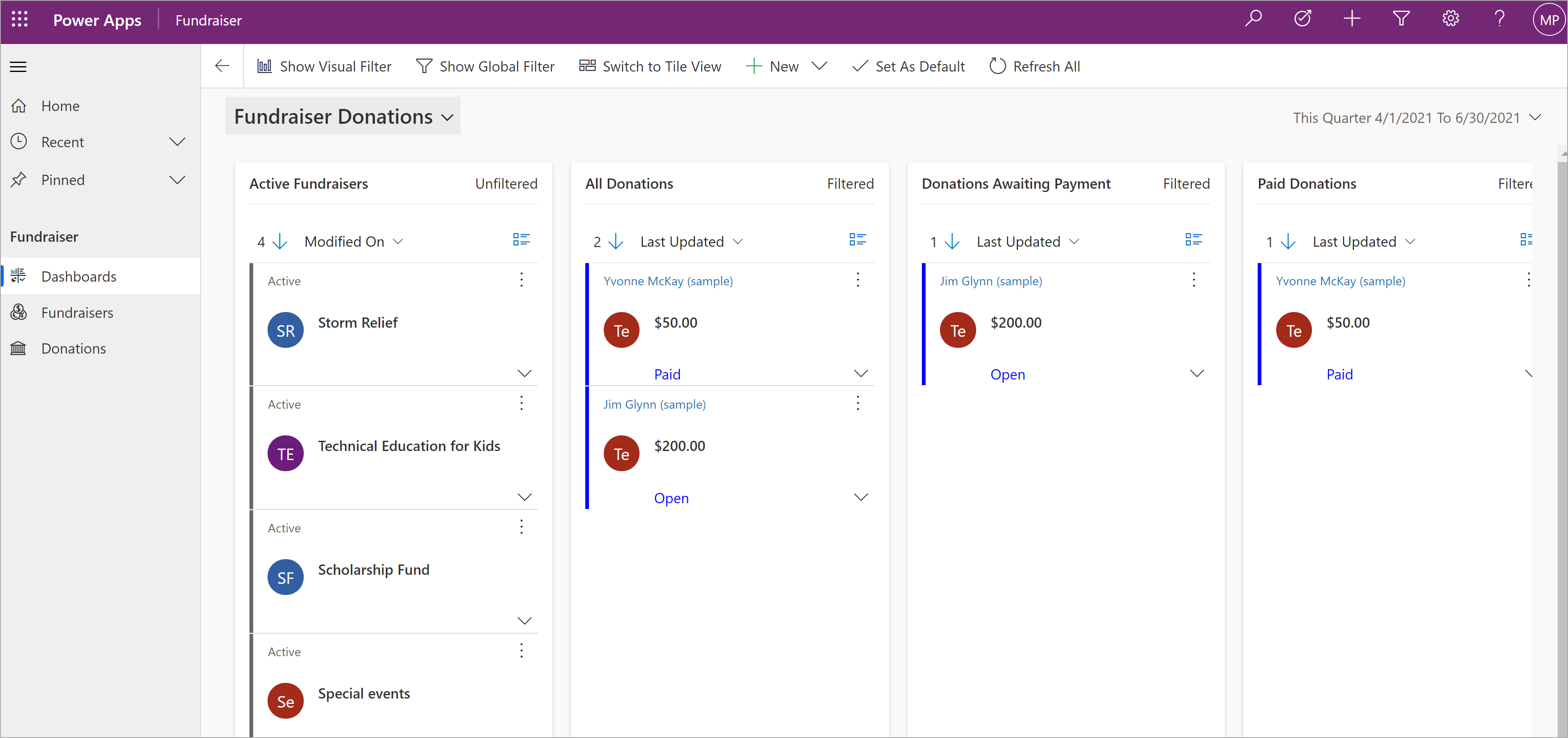 Microsoft Power Apps’ dashboardWith Power Apps you can design the appearance and the operation of the app, connect it to different types of data, such as Excel sheets or databases, and have it run on computers, tablets or phones using a complete and functional development environment, saving on programming and distribution costs without sacrificing quality.
Power Apps, thanks to an interfaceDrag & Drop, allows you to choose from a collection of predefined and reusable components and drag them directly onto the work screen to model the structure and contents of an application.
These elements cover common use cases, such as human resources administration and order management, and provide a solid base from which to start during the design and development phases.
The platform also includes numerous tools to connect to a wide range of data sources, including Microsoft 365, Dynamics 365,SharePoint, SQL Server and Common Data Service.
Once connected to one of these data sources, the app will allow users to access and to use the information relevant to their needs without complications and with the certainty that it is always up to date.
Continuing on the subject of integration, Power Apps is able to interface with other Microsoft services and products, such as Microsoft Teams, Power BI andAzure. This allows companies to take advantage of the additional functionality offered by these services within their apps, improving the experience for their users and ensuring the efficiency and security of Microsoft environments.
Creating a business app with Power Apps can be extremely easy and fast. To get started, you need to sign in to the Power Apps portal with your Microsoft account.
Once you arrive on the Power Apps home page, just click on ‘Create’ to select the type of app you want to work on and start working on its features and contents.
To do this, we will be sent back to Power Apps Studio, its integrated development environment (Integrated Development Environment or IDE) that allows the development of apps in low-code mode. The interface and the content development process in Power Apps Studio may be very similar to that of a PowerPoint presentation for users (especially those who are less experienced).
AppSheet
AppSheetis a no-code development platform for application software, which allows users to create mobile, tablet and web applications. Since 2020, AppSheet has been owned and operated by Google. It allows you to use data sources such as Google Drive, DropBox, Office 365 and other cloud-based platforms for spreadsheets and databases.
The platform allows users to create mobile apps from cloud-based spreadsheets and databases. Apps can also be created directly as an add-on from spreadsheet platforms such as Google Sheets.
AppSheet is available with both a self-service model and an enterprise licensing model for larger organizations, with additional options for governance, data analysis, and performance.
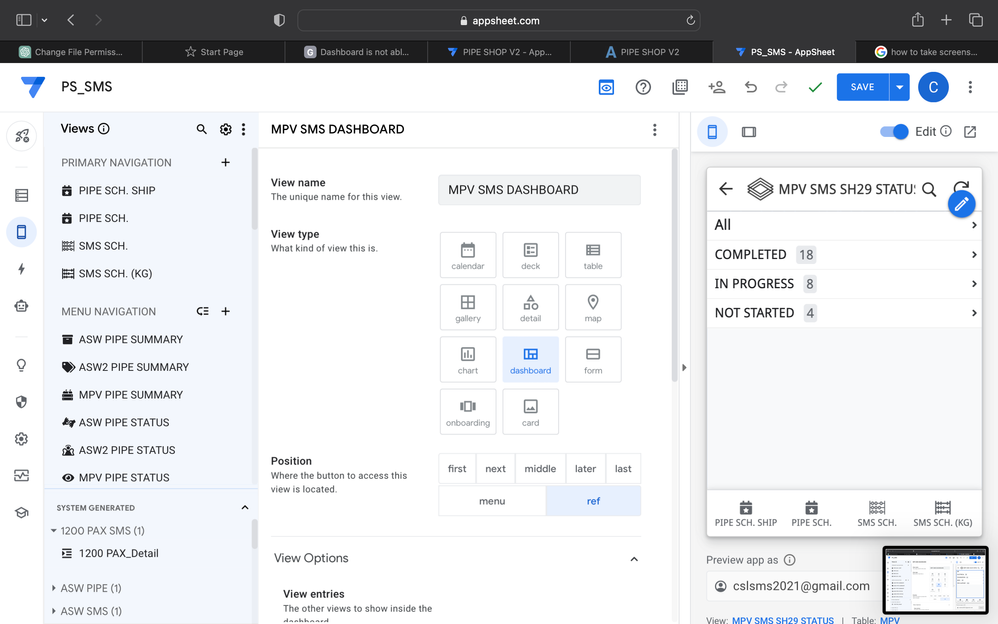 AppSheet’s pageCompared to low-code development platforms, which allow developers to iterate faster, AppSheet is, as mentioned at the beginning, a no-code platform that allows business users, familiar with basic spreadsheet and database operations, to create apps.
Before you start developing an application on AppSheet, you must prepare the data in a spreadsheet. AppSheet can read data from a Google Sheets’ sheet, but also from Forms, Excel, and others.
Once the data is structured in a spreadsheet and connected to AppSheet, the application will automatically generate itself. Then, it is necessary to check if the data entry is correct or if it needs to be improved.
With the integrated editor, you can modify properties, create new ways to view information (calendars, forms, galleries, charts, etc.), create smaller data sets and build customizable views to adapt the application to the maximum.
Once the app is fully configured, it’s time to put it online and invite users to download it. One of the advantages of AppSheet is that you can continue to modify it later, to respond to user feedback and evolve its functionality.
Some of the most popular and popular features of AppSheet include the following:
- It can create customized applications based on business needs.
- It offers the possibility of using barcodes, forms, photos, signatures, etc.
- It helps in the development of bots for automation.
- Users can integrate advanced technological inventions into the application.
- The platform integrates with Google Sheets, Gmail, etc.
- You can use the platform to integrate with SQL databases, REST API, etc.
- The platform offers numerous application models.
Power Apps vs. AppSheet: the two compared
Introducing the two contenders, it’s time to see them in comparison. We will then compare them on all the main criteria that can guide a business in choosing a low-code/no-code solution for the development of custom applications and we will try to understand together which of the two may represent the best choice.
Advanced Features
Google is continuously deepening the integration of its AppSheet platform with Google Workspace, offering users new possibilities to work with their data.
Power Apps, despite being a bit more complex given its low-code nature, is still easy to use for non-technical users, who can take advantage of its advanced features. However, even professional developers can take advantage of their programming experience to create and customize apps.
Developers can improve the standard Power Apps offerings by:
- Creation and management of data and metadata;
- Implementation of server-side logic using Azure Functions, plugins and workflow extensions;
- Application of client-side logic with JavaScript;
- Integration of external data through virtual entities and webhooks;
- Custom connector construction for seamless data exchange.
In addition, Power Apps allows developers to embed apps on websites. This can greatly improve the user experience with more integrated and interactive pages.
Ease of use
AppSheet allows the creation of web and mobile apps directly from Google Sheets, Excel files, Airtable bases, and external databases, including MySQL and PostgreSQL, which are commonly used and is designed for ease of use. The platform allows users to create apps quickly with a no-code approach.
However, for users who are used to modern solutions, the interface might seem rather dated. Therefore, it may be difficult to navigate, especially when managing databases.
Power Apps is included in the Microsoft ecosystem and allows users to create customized web and mobile apps through a graphical interface.
The platform supports a low-code approach for app development. It may have a steeper learning curve for beginners. However, it offers extensive documentation and resources to support users who are just starting out.
 Microsoft Power Apps’ resources
Personalisation
AppSheet offers extensive customization opportunities in aspects such as functionality, security, UX, and branding.
Even users without a solid technical background can easily introduce customized workflows, designs, and applications. This is very convenient when it comes to business-specific use cases. All of this is done pretty easily.
For example, when a user needs to customize the visual part of an app, all the necessary tools can be found in the UX section of the editor.
You can change the theme, accent colors, and fonts based on brand needs, as well as localize apps.
Power Apps also allows users to customize their applications. For example, the platform offers tools to customize the user interface, introduce custom connectors, and implement security features based on user needs.
There are also a few branding options. However, it is not the aspect on which the platform focuses the most and this is where Google earns some points on the Microsoft platform
Components and templates
AppSheet offers users completely no-code experiences. For this reason, while creating their custom apps, users have access to a canvas of components that they can apply to create the interfaces of their solutions.
In addition to that, the platform has a rich library of common app templates. These can be copied and customized according to the specific needs of each project. For example, it offers templates such as the app structure for creating surveys or forms, a template for booking workstations, a personalized onboarding tool, a template for monitoring marketing campaigns, and many others.
Power Apps also has a rich collection of components and models designed to meet different business needs. In addition, users can create their own components, which will be saved in their libraries and later reused in other products. The templates can also be created by the users themselves or simply chosen from the available collection and then customized, if necessary.
The available templates cover most standard business cases, including dashboards, onboarding tools, CRM systems, inventory management apps, etc.
Automation
With AppSheet, you can enable automated actions within your apps based on predefined conditions or events. For example, you can configure a rule to instantly send push notifications to managers when field personnel report a high-priority issue.
Users can easily create bots for their apps to automate various functions. To do this, simply select the relevant option and then add the description of the bot’s task. Bots can send notifications, emails, and SMS messages, update data, and generate and edit reports.
And Power Apps? The Microsoft platform allows users to automate laborious and time-consuming processes and tasks based on their unique needs. All of this is available through Power Automate. To perform some standard tasks such as sending notifications, you can apply predefined templates for workflows.
In addition to that, the platform supports cross-platform automation. Thanks to this functionality, it becomes possible to synchronize operations within the Microsoft ecosystem and with third-party services.
 AppSheet: bot management’s page
Integrations and connectors
AppSheet supports connections to a variety of data sources, including spreadsheets, databases, cloud services, and APIs. The platform integrates seamlessly with Google Sheets, Excel, MySQL, Salesforce, and other widely used data sources. In addition to the default integrations, AppSheet supports connections to third-party tools through webhooks.
As a Google product, it also offers native connectors for key services such as Google Drive and Calendar.
In our analysis between PowerApps and AppSheet, we should emphasize that the AppSheet connector library is not as extensive as that offered by Power Apps. However, the functionality of webhooks compensates for this disadvantage, making AppSheet a simpler and more immediate solution, ideal for rapid prototypes or applications based on Google Sheets and the Google ecosystem.
And speaking of the Microsoft platform, users can easily connect Power Apps to a variety of Redmond data sources, including, but not limited to, Excel, SharePoint and SQL Server, as well as business applications such as Dynamics 365 for ERP and CRM solutions.
Power Apps also integrates with Power Automate to optimize workflows and Power BI for advanced data visualization. In addition to this, the platform offers connectors for numerous other services and data sources, which reach an impressive figure of more than a hundred. The use of standard connectors then does not require special licenses, which is very convenient, especially if it is necessary to integrate the app with more than one service.
A list of Power Apps connectors is available on the Microsoft Learn website.
In this context, therefore, Power Apps confirms itself as a more powerful platform that is deeply integrated with the Microsoft ecosystem, particularly suitable for enterprise scenarios and complex application solutions.
Performance
Here, Google’s solution begins to show its side and if its app developed with AppSheets loads large amounts of data, its performance begins to decrease significantly. This leads to an increase in the likelihood of ‘out of memory’ errors.
However, AppSheet offers some options for scaling, at least for a particular category of apps called “partitionable.” Such applications can contain a large number of rows of data, but each user only accesses a smaller subset. For example, an app for managing employee timesheets, where users interact only with their own records, is an example of such a solution.
These apps can be scaled using security filters or through data partitioning.
AppSheet, on the other hand, is less effective for non-partitionable apps, where all users access the entire data set. In these cases, all data must be retrieved and processed at every step. This leads to significant performance issues as the dataset grows, making the app potentially unusable due to slowness.
On the contrary, Power Apps can guarantee smooth scalability even for companies with enterprise needs, especially those that have already invested in Microsoft products.
A key advantage of the Redmond giant’s platform is in fact its ability to manage data on a large scale. With Microsoft Dataverse, businesses can create solutions that manage large data sets while maintaining data integrity and compliance with industry regulations.
By exploiting Dataverse with Power Apps, companies can efficiently centralize the storage and management of data from multiple systems, seamlessly integrating their apps with external platforms such as Dynamics 365, Office 365 and Azure, and manage high-volume data and complex relationships to support large scale operations.
Security and compliance
AppSheet app data is protected with built-in encryption and can be securely accessed from any device. All data is encrypted via HTTPS using TLS. Users can fully manage access to their apps and it is possible to define roles and teams that can work with certain data.
In addition, companies have the ability to monitor the usage of their applications, and AppSheet allows them to view who opened the app, what features were used, etc.
As part of the Google Cloud family of products, AppSheet complies with data privacy regulatory initiatives such as GDPR and CCPA. It supports the app’s compliance with HIPAA and for the latter it offers users an Implementation guide, which can help them adapt the data they send to AppSheet.
The platform also follows ISO 27001, 27017 and 27018 standards for information security management. In addition to this, AppSheet is subject to SOC2 type 2 audits, and platform customers can access SOC reports on request.
And Power Apps? As we all know, Microsoft has always been committed to meeting the highest standards of trust, transparency, and regulatory compliance. For this reason, it’s no surprise that Power Apps, which is included in its suite of cloud products, is designed to meet the strict security and privacy needs of businesses in various industries.
The platform offers extensive possibilities for managing access to apps and data, and organizations can restrict access to some information to a very small group of users. Data loss prevention (DLP) policies then help control the movement of data and restrict the sharing of sensitive data with unauthorized apps or services.
Power Apps naturally supports compliance with global standards such as GDPR, ISO 27001 and HIPAA, and thanks to this, the platform can be commonly used in industries with strict regulatory requirements. The tight integration with Microsoft Dataverse then guarantees a secure data archive and supports compliance with various industry standards.
In addition, Power Automate offers tools to monitor and enforce compliance with your company’s data governance policies. This helps prevent accidental non-compliance in automated workflows.
Power Apps vs. AppSheet: which one to choose?
After reviewing the strengths and limitations of both platforms, the key question remains: which one should you choose to build applications that truly help your business work better—today and tomorrow?
The truth is that, although Power Apps and AppSheet belong to the same low-code/no-code universe, they play on different fields. AppSheet is often associated with fast, lightweight projects that are closely tied to spreadsheets. Power Apps, on the other hand, is designed to support digital transformation with a more structured, more integrated approach—one that is especially suited to handling complexity and long-term growth.
Let’s look at the criteria to determine which of the two apps is the most solid choice for a company.
Growth
One of AppSheet’s biggest advantages is speed: with a well-structured data source (Google Sheets, Excel, or a cloud database), the app can be generated automatically and then refined with views, forms, filters, and rules. It’s a pure no-code approach that works well when the goal is to quickly deliver an operational app—often for use cases like field data collection, simple request management, checklists, or “lightweight” inventory tracking.
The limitation appears when the app is no longer “simple.” AppSheet can start to struggle in projects with many users and large data volumes, especially when everyone needs access to the full dataset rather than subsets (the classic “non-partitionable” apps).
This is where Power Apps shows its advantage: it’s not only designed to get you started quickly, but also to remain stable as complexity increases. With tools like Microsoft Dataverse, data and relationships can be managed more robustly, maintaining structure and control even in enterprise scenarios.
Integration
AppSheet integrates naturally with the Google Workspace ecosystem, which is a real advantage for organizations that already rely on Google Drive, Gmail, and Google Sheets. It can also connect to external data sources and databases such as MySQL and PostgreSQL, and it supports webhooks to extend integrations with third-party tools.
That said, when a company is already built around Microsoft 365, Power Apps becomes an almost inevitable choice. Teams, SharePoint, Outlook, Excel, Entra ID, and often Dynamics 365 and Azure are part of everyday operations. In this context, Power Apps isn’t just “compatible”—it’s part of the same ecosystem.
The result is clear: less integration complexity, faster time to production, and, above all, the ability to build apps that communicate natively with tools already adopted and governed by IT.
Automation
AppSheet provides automation features through bots: you can trigger automated actions based on events or conditions, send notifications and emails, update data, and generate reports. For many operational use cases—especially in lean environments—this is more than enough.
Power Apps, however, operates on a broader level: automation is not an add-on, it’s a pillar. Integration with Power Automate enables structured, cross-platform workflows with an orchestration level that becomes essential when processes involve multiple systems, multiple roles, and complex rules.
In practice: AppSheet helps automate inside the app. Power Apps, together with Power Automate, enables you to automate the entire business process end-to-end.
Governance and security
AppSheet provides encryption, access management, and usage monitoring tools. And because it is part of the Google Cloud ecosystem, it aligns with relevant compliance standards and privacy initiatives (GDPR and other security frameworks). For many organizations—especially small and mid-sized businesses—this can be an adequate level of coverage.
But when a company truly scales its low-code adoption, one requirement often becomes the deciding factor: governance. Who can build what? Which connectors can be used? On which data? Under which policies?
Power Apps is designed precisely for this scenario. Environment management, access controls, and policies such as DLP (Data Loss Prevention) help avoid the most common risk of “democratization without rules”: lots of useful apps, but difficult to control, maintain, and secure.
Conclusions
So, at the end, what’s the verdict?
Both AppSheet and Power Apps are powerful low-code/no-code platforms for building business applications. Even without in-depth programming knowledge, users can create apps to meet their specific business needs.
However, as we have been able to observe, these platforms are quite different in their characteristics, integration capabilities and in the most appropriate use cases.
AppSheet will be the best choice if you need a simple and quick to build app with integration into the Google ecosystem and basic functionality. This platform is often chosen by small teams and companies that don’t have specific complex requirements for their tools.
Power Apps, on the other hand, is for those looking for enterprise-level apps with advanced features. The solutions created are able to scale and manage large data sets and complex business logic. What’s more, what makes this platform special is its deep integration into the Microsoft ecosystem.
So if you are looking for a solution for your custom apps that is versatile, secure and has ample room for maneuver in terms of requirements and integrations, Power Apps wins hands down once again and remains the best possible choice in the business and enterprise sector at the moment.
FAQs about Power Apps vs. AppSheet
1. What is the main difference between Power Apps and AppSheet?
Power Apps is a low-code platform, meaning it can be extended with advanced logic and integrations. AppSheet is primarily no-code and is designed to quickly build apps starting from already structured data, often stored in spreadsheets.
2. Is Power Apps suitable for people who don’t know how to code?
Yes. Power Apps is designed to be usable even by non-technical users thanks to prebuilt components and a visual interface. When needed, it can be extended by more technical profiles to handle complex projects.
3. Is AppSheet really only for simple apps?
AppSheet can cover many operational scenarios, especially when the app is built on Google Sheets or databases and has standard requirements. In general, however, as complexity, data volume, and advanced logic increase, it can become more limiting compared to platforms designed for enterprise use.
4. Which platform is faster to create a first version (MVP)?
In many cases, AppSheet is faster for building an MVP because it can automatically generate an app from a spreadsheet or table. Power Apps may require more initial effort, but it offers greater control and scalability.
5. Which one is easier to use for people coming from Excel or Google Sheets?
AppSheet is often more immediate if the starting point is a well-structured spreadsheet. Power Apps remains accessible but may require more familiarity with the Microsoft environment and low-code logic.

Written by
Federico Terranova
Modern Work · Dev4Side
Dev4Side Software · Microsoft Gold Partner
Need help implementing this in your company?
Our specialist teams have delivered 200+ Microsoft implementations across Italy. Contact us for a free, no-obligation evaluation of your project.
Related articles
Power Apps Consulting Services: What are they and who to trust?
Power Apps Consulting Services: find the right partner to build low-code business applications. See how Dev4Side helps companies design and deploy Power Apps.
Microsoft Power Platform: low-code solutions to business problems
Microsoft Power Platform: combine Power Apps, Automate, BI, and Copilot Studio to digitize processes with low-code tools — no programming skills required.
Concat Power Apps: How to Use It and Differences Explained
Power Apps' Concat concatenates the result of a formula across table records. Here's how to use it and what sets it apart from the Concatenate function.