
The democratization of Business Intelligence has brought an unprecedented revolution in the way organizations access and use data. Today, managers of all levels, business analysts, and even first-line operators can explore interactive dashboards, create customized reports, and make real-time, data-driven decisions. But this widespread accessibility brings with it a fundamental challenge: how to ensure that each user sees only the data they have the right to see, without compromising the fluidity of the user experience or infinitely multiplying the number of reports to keep? Let's imagine a typical scenario: a multinational company with hundreds of sellers distributed in different regions, each of whom must access their sales data but not those of their colleagues. Or a hospital where doctors, nurses, and administrators need different levels of access to patient information. Without a robust access control mechanism, organizations are faced with an impossible dilemma: renounce data sharing or risk violations of privacy and compliance. Row-Level Security (RLS) in Power BI represents the elegant and scalable answer to this challenge. This is not simply a filtering mechanism, but a complete paradigm that allows you to build truly enterprise Business Intelligence solutions, where security is integrated into the very fabric of the solution instead of being an afterthought added later.

Row-level security (RLS) in Power BI is a mechanism that allows you to restrict access to data at a granular level, automatically filtering the rows that each user can view based on their identity and assigned roles. Unlike traditional approaches that require the creation of separate reports for each group of users or the implementation of complex application logic, RLS operates directly at the semantic model level, ensuring that security filters are applied consistently across all reports, dashboards, and visualizations that use that model.
The true power of RLS emerges when we consider the scale and complexity of modern Business Intelligence implementations. In an organization with thousands of users and dozens of different security dimensions, the traditional approach of creating separate reports quickly becomes unsustainable. RLS allows you to maintain a single data model and a single set of reports that automatically adapt to the user who is viewing them. Not only does this dramatically reduce the maintenance burden, but it also ensures consistency in calculations, metrics, and visualizations across the entire organization.
The implementation of RLS in Power BI goes beyond simple data security. It becomes an enabler for sophisticated business scenarios such as multi-tenancy in SaaS solutions, where a single report can serve hundreds of different customers, each seeing only their own data. Or for competitive benchmarking implementations where each participant can see their detailed data but only aggregated anonymous for competitors. The flexibility of RLS transforms Power BI from a reporting tool to a truly enterprise Business Intelligence platform.
The operation of RLS in Power BI is based on a multi-level architecture that begins with the definition of roles in the data model and extends through the Power BI service to the end user experience. When a user accesses a report, Power BI automatically identifies the user through their User Principal Name (UPN), determines the roles to which they are assigned, and applies the DAX filters associated with those roles before performing any queries on the data. This process takes place in a completely transparent way for the user, who simply sees the data they have access to without any indication of the filters applied.
The definition of roles takes place in Power BI Desktop through an intuitive interface that allows you to create filtering rules using both a visual editor and DAX expressions. Each role consists of one or more rules that define which rows of which tables are visible to users assigned to that role. These rules can be simple static filters such as [Region] = “Europe” or complex dynamic expressions that use functions such as USERNAME () or USERPRINCIPALNAME () to adapt to the identity of the current user. The ability to use the entire DAX language to define security rules offers virtually unlimited flexibility in modeling complex security scenarios.
The application of RLS in the Power BI service takes place through the assignment of users and security groups to the roles defined in the model. This separation between rule definition and user assignment allows for flexible management where data modelers can focus on security logic while administrators manage user assignment. Support for Microsoft Entra ID (formerly Azure AD) security groups means that RLS can integrate seamlessly with the organization's existing identity management infrastructure, automatically inheriting organizational changes, new hires, and terminations without manual intervention.

When a query is run on a model with RLS enabled, Power BI automatically injects security filters into the DAX query before execution. This happens at a very low level in the processing engine, ensuring that there is no way for a user to bypass filters by manipulating queries or views. RLS filters are applied as additional predicates that propagate through model relationships, affecting not only directly filtered tables but also all related tables through active relationships.
The performance impact of RLS depends on the complexity of the rules and the structure of the model. Simple filters on dimensional tables generally have minimal impact, while complex rules involving multiple tables or dynamic calculations can significantly affect response times. The best practice is to apply RLS filters primarily on dimensional tables rather than fact tables, exploiting automatic propagation through relationships to effectively filter data. This approach not only improves performance but also makes the security model more maintainable and understandable.
Managing the cache in the presence of RLS presents unique challenges. Power BI maintains separate caches for each unique combination of security roles, meaning that in scenarios with many different roles, the effectiveness of the cache may be reduced. Techniques such as aggregating data at appropriate levels and the strategic use of aggregation tables can mitigate these impacts, allowing optimal performance to be maintained even in the presence of complex security requirements.
The implementation of RLS in Power BI can follow two main paradigms: static security and dynamic security, each with its own advantages and optimal use cases. Static security uses fixed values in DAX rules to define access to data. For example, a “Sales Europe” role might have a [Territory] = “Europe” rule that guarantees access only to European data. This approach is simple to implement and understand, making it ideal for organizations with relatively stable security structures and a limited number of access combinations.
Dynamic security, on the other hand, uses DAX functions such as USERNAME () or USERPRINCIPALNAME () to adapt filters based on the identity of the current user. Instead of creating a role for each sales territory, you can create a single role with a rule such as [SalesPersonEmail] = USERPRINCIPALNAME () that automatically filters data based on the email of the connected user. This approach scales beautifully for scenarios with hundreds or thousands of users, where maintaining individual static roles would be prohibitive. However, dynamic security requires careful design of the data model, including security tables that map users to their permissions.
The choice between static and dynamic security is not always binary. Many enterprise implementations use a hybrid approach that combines elements of both. For example, static roles might define access at the department or region level, while dynamic rules within these roles further filter data based on the user's specific identity. This approach offers the best of both worlds: the simplicity and predictability of static security for high-level divisions, combined with the scalability and granularity of dynamic security for fine filtering.
We develop solutions based on artificial intelligence, with particular attention to modern technologies for information management. We work on projects that apply RAG, Machine Learning and natural language processing to improve productivity, customer experience and data analysis in any sector.
Our services include design and implementation of complex RLS architectures for Power BI, migration from legacy reporting solutions to Power BI with integrated security, performance optimization for models with RLS, auditing and compliance for Business Intelligence implementations, development of multi-tenant solutions with Power BI Embedded, training and support on security best practices in Power BI.
Trust our experience to make your business smarter.
We have created the Infrastructure & Security team, focused on the Azure cloud, to better respond to the needs of our customers who involve us in technical and strategic decisions. In addition to configuring and managing the tenant, we also take care of:
With Dev4Side, you have a reliable partner that supports you across the entire Microsoft application ecosystem.
Implementing RLS in enterprise environments often requires the application of sophisticated patterns that go beyond simple user or role filters. One of the most powerful patterns is the security hierarchy, where managers can see the data of their direct and indirect subordinates. This requires modeling a security table that captures the organizational structure and using recursive DAX functions such as PATH and PATHCONTAINS to navigate the hierarchy. The complexity increases when considering scenarios such as interim managers, cross-functional teams or matrix structures where an employee can report to multiple lines of management.
Managing exceptions and overrides represents another common challenge in enterprise implementations. While most users follow standard security rules, there are always special cases: the executive who needs full access for strategic presentations, the auditor who must see normally confidential data, or the external consultant with limited temporary access. Implementing these scenarios requires careful design that balances flexibility and maintainability. An effective approach is the use of exception tables that can override standard rules, allowing granular management without overcomplicating the basic logic.
Multi-tenancy in SaaS or service provider solutions has unique requirements where the segregation of data between tenants must be absolute and verifiable. In these scenarios, RLS becomes a critical part of the security architecture, often combined with row-level security at the database level and physical segregation of data for critical tenants. The design must consider not only current security but also future scalability, the possibility of data migrations between tenants, and auditing and compliance requirements that may vary by tenant. Patterns such as the 'tenant switcher' allow authorized users to change context between tenants while maintaining full access traceability.
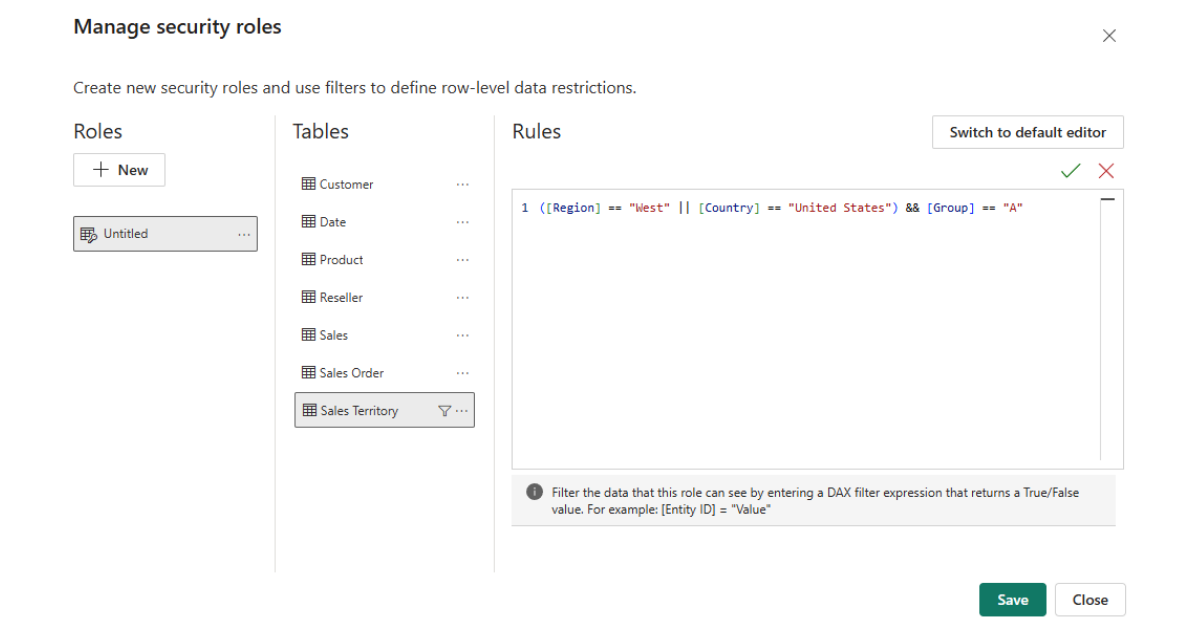
The validation of complex RLS implementations represents a significant challenge that requires systematic approaches and appropriate tools. Power BI Desktop offers the “View as Role” functionality that allows you to test how data appears for different roles during development. However, in dynamic security scenarios, this local testing has limitations because the USERNAME () and USERPRINCIPALNAME () functions do not return realistic values in the development environment. It is therefore essential to have a test environment in the Power BI service where realistic scenarios can be validated with test users representative of each access category.
The Power BI service extends testing capabilities with the “Test as Role” functionality that allows administrators to see exactly what a specific user or combination of roles sees. This functionality is critical for validating complex scenarios where a user may belong to multiple roles and the rules are combined in ways that are not obvious. The creation of automated test suites using Power BI APIs and tools such as Power BI REST API or PowerShell makes it possible to systematically validate that each combination of user and role produces the expected results, essential for maintaining confidence in the security of the system.
The documentation and governance of RLS implementations are often overlooked but critical to long-term success. Maintaining a security matrix that documents who can see what and why, along with testing and validation procedures, is essential for auditing, troubleshooting, and onboarding new administrators. Tools such as DAX Studio can be used to analyze and document queries generated with different security contexts, providing insights into performance and correctness of the implementation.
RLS in Power BI does not operate in isolation but integrates deeply with the entire Microsoft security ecosystem. The integration with Microsoft Enter ID (formerly Azure Active Directory) allows you to take advantage of the existing identity management infrastructure, automatically synchronizing security groups, user attributes and organizational structures. This means that changes in the organization, such as promotions, transfers or new hires, are automatically reflected in access to data without manual intervention on Power BI reports.
The integration with Power BI Embedded opens up completely new scenarios where RLS becomes part of the custom application architecture. In these scenarios, the host application generates embed tokens that include the user's effective identity, allowing RLS to be applied even for users who do not have Power BI accounts. This is especially powerful for B2C scenarios where external customers access personalized dashboards through web portals. Managing identities in these scenarios requires careful design to balance security, performance, and licensing costs.
The evolution of security in Power BI is following broader trends in the industry towards zero trust architecture and privacy-preserving analytics. Microsoft is investing heavily in capabilities that allow it to apply security not only at the row level but also at the column level (Object-Level Security) and even at the level of individual cells, allowing scenarios such as dynamic data masking where different users see different levels of detail for the same data. The integration with Microsoft Purview for data governance and automated compliance promises to simplify security management in complex environments.
Artificial intelligence is transforming how we think about data security. Copilot in Power BI must respect RLS when it generates insights or answers questions in natural language, creating unique challenges in balancing utility and security. Future developments could include AI-driven security recommendations that analyze access patterns and suggest optimizations to RLS rules, or anomaly detection that identifies potential security breaches based on unusual usage patterns.
The growing importance of data privacy, driven by regulations such as GDPR and CCPA, is driving new capabilities such as differential privacy and federated analytics. These approaches make it possible to derive insights from sensitive data without exposing the underlying data, complementing traditional RLS with additional layers of protection. The integration of these technologies into Power BI will allow scenarios such as competitive benchmarking where organizations can compare their performance with industry aggregates without exposing individual data.
The movement toward data mesh and decentralized architectures presents new challenges and opportunities for RLS. In a world where data is distributed across domains and teams, security must be federated but consistent. Power BI is evolving to support these scenarios with concepts such as delegated RLS and cross-workspace security policies that allow maintaining centralized governance while enabling team autonomy.
Row-level security is a mechanism that limits access to data in Power BI by automatically filtering the rows that each user can view based on their identity and assigned roles. RLS operates at the semantic model level, ensuring that security filters are consistently applied across all reports and dashboards that use that model, eliminating the need to create separate reports for different groups of users.
Static security uses fixed values in DAX rules (e.g. [Region] = “Europe”), requiring a separate role for each access combination. Dynamic security uses functions such as USERNAME () or USERPRINCIPALNAME () to adapt filters to the current user, allowing a single role to serve thousands of users. The choice depends on the scale and complexity: static for simple and stable structures, dynamic for scenarios with many users or requirements that change frequently.
In Power BI Desktop, use “View as Role” from the Modeling ribbon to test how the data appears for different roles. In the Power BI service, the 'Test as role' functionality allows you to validate specific combinations of roles and users. For dynamic security, it's essential to test in the service because the USERNAME () functions don't realistically work in Desktop. Create representative test users and systematically document test cases for each scenario.
Yes, RLS can impact performance, especially with complex rules or on large volumes of data. The impact depends on where the filters are applied (better on dimensions than on facts), on the complexity of the DAX rules, and on the number of different roles (which affects the effectiveness of the cache). Best practices include: applying filters on dimensional tables, avoiding complex calculations in RLS rules, using aggregations where appropriate, and monitoring performance with Performance Analyzer.
Certainly. RLS is commonly combined with Object-Level Security (OLS) to hide entire columns or tables, workspace-level security for controlling access to reports, and app-level security for controlled distribution. In enterprise scenarios, RLS is often part of a multi-level security architecture that includes network security, multi-factor authentication, and data encryption.
In Power BI Embedded, the host application generates embed tokens that include the user's effective identity. This identity contains usernames and roles that are applied when the embedded report is viewed. This allows you to implement RLS for users who do not have Power BI accounts, ideal for B2C scenarios or external portals. The host application is responsible for authenticating the user and determining the correct identity to pass on.
With DirectQuery, RLS can be defined both in Power BI and in the source database. For Live Connection to Analysis Services, RLS must be defined in the Analysis Services model, not in Power BI. DirectQuery with Single Sign-On has limitations in testing. It's important to understand where security is applied and how credentials are passed to ensure that the filters are applied correctly.
When a user belongs to multiple roles, Power BI combines the rules with OR logic, showing all the lines that any role would allow to see. This is important to consider in the design: if a user is both 'Sales Europe' and 'Sales Asia', they will see data from both regions. For scenarios that require AND logic, you must design the roles appropriately or use dynamic security with authorization tables.
RLS filters rows but does not hide the existence of aggregated data. Users can still see totals that include filtered data in some views. To completely hide the existence of data, combine RLS with careful design of DAX measures, using functions such as HASONEVALUE or ISFILTERED to control when totals are shown. In extreme cases, consider separate models for different levels of security.
The documentation should include a security matrix that maps roles to permissions, diagrams that show how filters are propagated, test cases for each security scenario, and procedures for adding new users or modifying permissions. Use consistent naming conventions for roles, maintain automated test scripts, implement change management processes for security changes, and consider tools like DAX Studio to analyze and document rules. Regular security audits are essential to ensure that the implementation remains aligned with business requirements.
The Infra & Security team focuses on the management and evolution of our customers' Microsoft Azure tenants. Besides configuring and managing these tenants, the team is responsible for creating application deployments through DevOps pipelines. It also monitors and manages all security aspects of the tenants and supports Security Operations Centers (SOC).


