
Microsoft Defender for Endpoint represents a fundamental element in defending business infrastructures against cyber threats. With a wide range of features designed to detect, protect, and respond to attacks, this tool is at the center of modern organizations' security strategies. However, like any system, Defender for Endpoint also has its weaknesses that are important to know and address to ensure complete protection. In this article, we'll explore the six core capabilities of Microsoft Defender for Endpoint and we'll also analyze its weaknesses, offering a detailed view on how to make the most of this powerful security solution.
.png)
Endpoints are often considered the weakest point in the cybersecurity chain because of their more “exposed” nature compared to a company's internal networks and devices. Following the pandemic, the widespread adoption of hybrid work models, policies for the use of personal devices and cloud-oriented environments has made the security of the latter a particularly difficult task for professionals in the sector.
Needless to say, precisely because of their exposure, endpoint protection in the business environment is essential to safeguard the security of the entire IT infrastructure and that devices such as laptops, mobile devices, servers and peripherals, represent the main access point for cyberattacks. Without adequate protection, these devices can be easily exploited by malicious actors to introduce malware, ransomware or other threats into the business system, compromising sensitive data and interrupting business operations, with significant costs in terms of time and resources, as well as their reputation in the market.
Microsoft, within its wide portfolio of tools dedicated to cybersecurity, offers a solution also dedicated to this. Formerly known as Microsoft Defender Advanced Threat Protection (Microsoft Defender ATP), Microsoft Defender for Endpoint is one of the most important tools in Microsoft Defender XDR (formerly known as Microsoft 365 Defender), the solution designed to defend a company's IT infrastructure and digital workplace.
Backed by security experts, Microsoft Defender for Endpoint is built on the most advanced threat detection technologies available. In fact, Microsoft employs thousands of security experts globally to help protect businesses and their data. This deep knowledge of cybersecurity helps Microsoft Defender for Endpoint use preventive protection techniques, post-intrusion detection, automated investigation and remediation, and more.
But what features does it offer and how can it help improve your security posture? Let's see it together in the next sections.
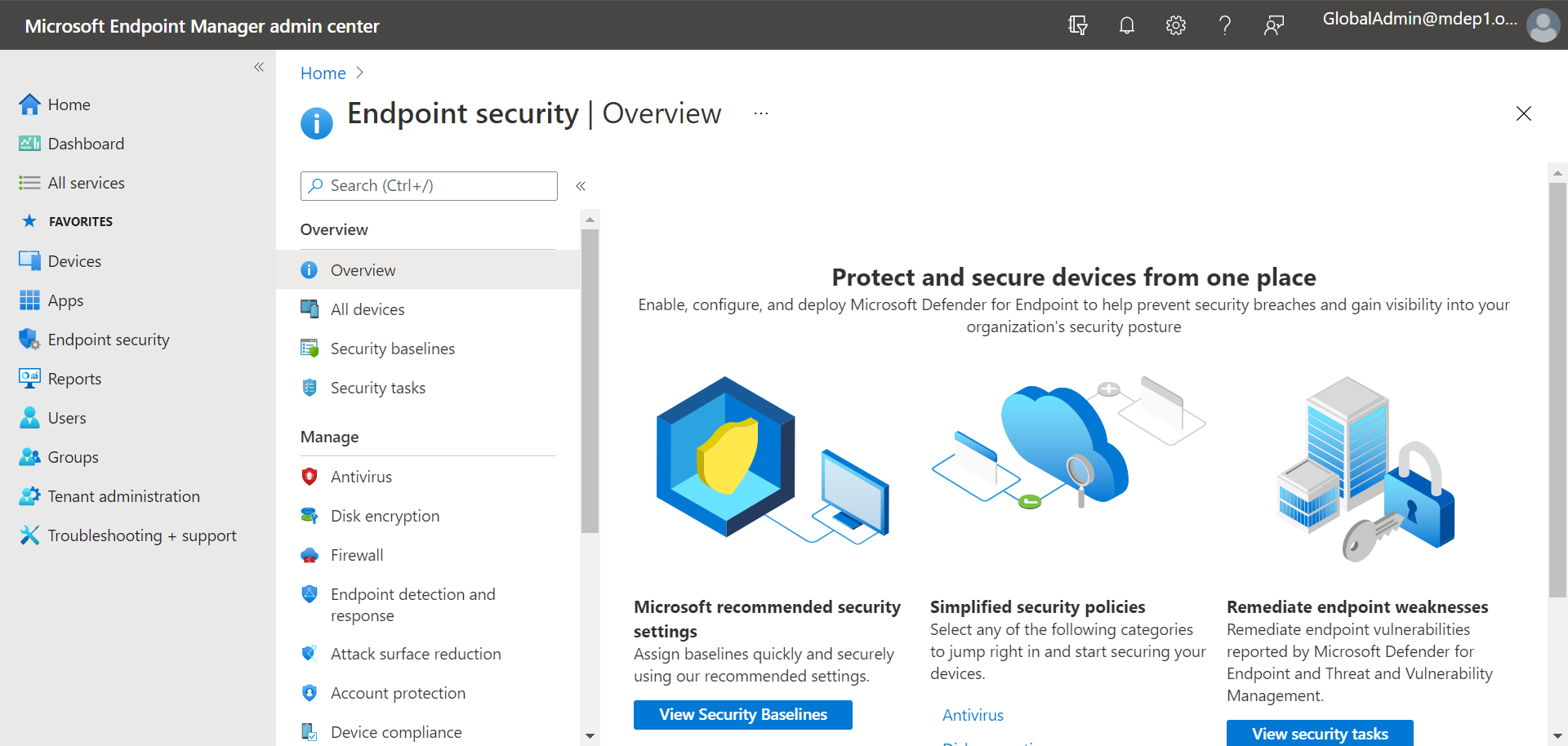
Defender for Endpoint specializes in the protection of laptops, PCs, servers and mobile devices, that is, the most sensitive and vulnerable points of access to corporate data. His task is therefore to monitor them in a proactive, intelligent and coordinated way with the activities of all the services that accompany him on the platform.
Defender for Endpoint can help an organization respond to potential threats, such as malware or ransomware, using tools built into Windows 10, 11 and Azure services. These tools provide automated investigation, detection, and response to preventive and post-breach threats.
Microsoft Defender for Endpoint aims to: preventive protection, post-violation detection and the proactive and unified response across endpoints.
His intervention therefore translates into a significant reduction in exposure to threats, as well as the impact that incidents can have on the corporate security system. But it's important to stress how these results are achieved.
In fact, Defender for Endpoint follows a precise course of action, based on:
Starting from the first point, Defender for Endpoint makes use of AI to identify tools, techniques, and procedures in business endpoints. He then compares them with the behavioral patterns he has learned over time to recognize abnormal activities and trace them back to malicious users.
It then analyzes the threats and sends the reports with the relevant information in a sandbox. Here, the Threat Investigation is carried out to trace the attack chain and view forensic data on the attacks identified.
Finally, the system isolates the compromised endpoint to eradicate the current threat and restore its security state. It is a complete and effective intervention, which simultaneously and constantly involves the different endpoints of a company.
The main requirements for using Microsoft Defender for Endpoint can be divided into two sections: licensing requirements and software on Windows Server:
Licensing requirements must include one of the following:
The software on Windows Server must include one of the following:
In addition, Microsoft Defender for Endpoint is compatible with most Windows operating systems and servers, including virtual desktops, as well as Android, iOS, Linux, and macOS. Browser requirements include Microsoft Edge, Google Chrome, and other modern Chromium-based browsers.
To successfully implement business processes within the Microsoft 365 ecosystem, the following skills are needed:
Dev4Side Software has the vertical technical skills to provide you with a single, transversal point of contact for all the elements of your subscription.
Together with the other products on the Microsoft Defender XDR platform, Defender for Endpoint guarantees the complete, intelligent and proactive protection of corporate data and identities.
At the core of MDE is a suite of complementary capabilities that work together to provide end-to-end protection for macOS, iOS, Windows, Android, Linux, and IoT devices. This holistic approach allows security and IT teams to collaborate seamlessly, unify endpoint management, and implement detailed security policies, while using powerful threat detection, investigation, and remediation capabilities.
So what are these functionalities that allow it to contribute to this holistic protection system, starting with the endpoints? Let's see the main ones in the list below:

As with any service or method dedicated to this specific area of cybersecurity, the main advantage of using Microsoft Defender for Endpoint is that your endpoints, and by extension your network, are protected from cyberattacks.
This tool takes a proactive approach to security, minimizing all areas that could represent an access point for cybercriminals. From preventing access to untrusted applications and websites to reviewing all device settings and providing recommendations, protecting devices starts with putting them in the best possible security position.
Unlike other endpoint protection solutions, the Microsoft Defender for Endpoint dashboard provides users and teams with complete visibility and allows them to observe the overall security score of their endpoints, the evidence analyzed and related verdicts, the actions taken and much more. You'll never have to wonder if endpoint protection is actually working, as you can monitor everything that happened in the last 180 days.
The capabilities described above allow Microsoft Defender for Endpoint to have distinctive advantages designed to make optimal cybersecurity a continuous reality.
Users can save time and resources, since they don't have to deploy additional agents or infrastructure. Extended visibility, signals, and human intelligence are integrated into the product to address the latest and most advanced cyber threats.
Being based on cloud technologies, MDE has the ability to scale in a single tenant for more than 1 million endpoints, allowing customers to divide that tenant among hundreds of sub-tenants. In addition, it can use cloud-based and client-based machine learning and behavioral algorithms to identify and counter threats.
Security teams can search for anomalies in historical data for up to 180 days and create customized queries and detections for threat hunting. To stay updated on emerging threats, organizations can obtain threat analysis reports that help them assess how exposed or affected they are and what to do to mitigate those risks.
To provide threat management, MDE monitors both Microsoft and third-party software vulnerabilities and security configuration issues, then examines 180 days of historical data to identify anomalies and build customized detections and queries for threat hunting. To stay updated on emerging threats, organizations can obtain analysis reports that can help them assess how exposed or affected they are, taking steps to reduce the risk and exposure deriving from these issues.
An additional added value is that Microsoft Defender for Endpoint can now integrate with the generative artificial intelligence capabilities of Microsoft Security Copilot to detect and defend against ransomware and other cyberthreats on multiple platforms. In particular, Copilot for Security is integrated into the Defender for Endpoint portal to allow security teams to easily summarize incidents and device information, analyze scripts, codes, and files, apply guided responses to resolve incidents, create incident reports, and generate KQL queries.
We have reached the final part of our overview of Microsoft Defender for Endpoint and let's try to close with some points of attention and best practices useful for those who have never used this or other Microsoft Defender XDR services.
The best choice, however, remains to rely on people who are experts in the sector or specialized consultants.
In today's rapidly evolving threat landscape, where hybrid work models, personal device usage (BYOD) policies, and cloud-oriented environments have become the norm, endpoint security has become a crucial concern for organizations of all sizes. The widespread adoption of remote and distributed workforces has expanded the attack surface, making endpoints the weakest point in the cybersecurity chain. This is where Microsoft Defender for Endpoint excels.
Defender for Endpoint is a robust and holistic form of endpoint protection, perfect for organizations of all sizes. From proactive actions to strengthen security to remediation if malware is detected, Defender for Endpoint will continuously take action to keep you safe. Paired with Microsoft Defender Antivirus (included with Windows), you'll have better protection, more meaningful information, and a unique, stronger platform.
Although there are some licensing and operating system requirements, Defender for Endpoint can be used on most operating systems and purchased as a stand-alone license if not already included in your licenses. Overall, the key features and benefits of this endpoint protection make it an excellent choice for any organization.
1. What is Microsoft Defender for Endpoint?
Microsoft Defender for Endpoint is an Endpoint Protection and Endpoint Detection & Response (EDR) solution that protects corporate devices such as PCs, laptops, servers, and mobile devices from malware, ransomware, and advanced attacks. It is part of the Microsoft Defender XDR platform and is designed to prevent, detect, and respond to threats in a centralized manner.
2. Which devices are protected by Microsoft Defender for Endpoint?
Microsoft Defender for Endpoint protects Windows, macOS, Linux, iOS, Android, and server environments, including virtual desktops and cloud-based scenarios. It therefore covers most endpoints used in modern and hybrid work environments.
3. What is the difference between Microsoft Defender Antivirus and Defender for Endpoint?
Microsoft Defender Antivirus is the basic antimalware protection included with Windows. Microsoft Defender for Endpoint goes beyond traditional antivirus by offering advanced behavioral detection, post-breach investigation, automated incident response, and centralized endpoint visibility. Used together, they provide significantly more comprehensive protection.
4. What are the main features of Microsoft Defender for Endpoint?
The main features of Microsoft Defender for Endpoint include Microsoft Defender Vulnerability Management, Attack Surface Reduction, Next-generation protection, Endpoint Detection and Response (EDR), Automated Investigation and Remediation, and Defender Experts for XDR. These capabilities work together to cover threat prevention, detection, and response.
5. Is Microsoft Defender for Endpoint effective against ransomware and advanced attacks?
Yes. Thanks to behavioral monitoring, automated response, and integration with Microsoft Security Copilot, Microsoft Defender for Endpoint is particularly effective against ransomware, fileless attacks, advanced exploits, and lateral movement within the network. It can automatically isolate compromised endpoints and stop threat propagation.
The Infra & Security team focuses on the management and evolution of our customers' Microsoft Azure tenants. Besides configuring and managing these tenants, the team is responsible for creating application deployments through DevOps pipelines. It also monitors and manages all security aspects of the tenants and supports Security Operations Centers (SOC).


