
There's much more to a SharePoint migration than a simple move: you need to cover every aspect — from planning to optimization, from governance to everything else. Creating a detailed migration plan will help to avoid potential errors, reduce downtime, and ensure that the SharePoint migration project goes smoothly. But where to start structuring one? Who to trust if you don't have the slightest idea where to start? In this article we will explain a little more in detail what a SharePoint migration consists of, what to do and what to avoid and who can help us if we are in difficulty.
.png)
Data migration is the process of transferring information from one computer system or application to another. The term is commonly used when talking about migrating to the cloud or moving from local to online storage, but in reality any massive movement of files constitutes a data migration. This process can be complex and time-consuming, but improving efficiency and security in storing and retrieving data is often necessary.
Data migration to SharePoint is a process aimed at modernizing an organization's IT infrastructure, to fully exploit the platform's potential in creating sites, such as the corporate intranet, with which to digitize internal processes.
It's not just about moving files, it's also about transferring structures, configurations, permissions, and workflows, while ensuring security, regulatory compliance, and an optimal user experience.
Therefore, it is an extremely delicate process that, if incorrectly managed, can cause serious damage in terms of data security and user experience on the SharePoint sites that form the basis of the corporate digital workplace.
For this reason, it should not be taken lightly and in the next sections we will try to better outline the steps and mistakes.
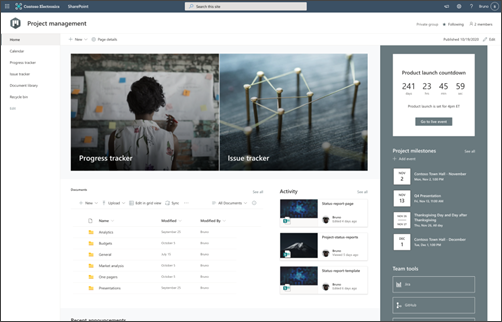
But let's start first by giving a more detailed definition.
Data migration to SharePoint is the process of transferring data, configurations, and functionality from an existing SharePoint environment (such as a legacy or on-premise version) to a new environment, such as SharePoint Online or another updated version of the Microsoft 365 platform.
In this process, various elements are involved that constitute collaboration or communication sites, such as the extranet or the corporate intranet. Among these elements we find site structures, document lists and libraries, files and documents, workflows and automations, security permissions and configurations.
Before delving into the migration phases, it's important to understand what a SharePoint migration actually involves. It's not just about moving files from one place to another, but it represents an opportunity to transform the way an organization manages, organizes and accesses its data.
Choosing the most appropriate approach depends on the organization's objectives and current configuration. Here are the main types of SharePoint migration:
The right tools and services can simplify the migration process and ensure that it is adapted to the specific needs of your organization. Understanding the options available is critical to building an effective and tailored SharePoint migration strategy.
Choosing the right tools and support, your team can switch to SharePoint (or upgrade their SharePoint environment) without interruption, creating an efficient and productive workspace that fosters future growth.
Here is an overview of the main solutions used to date:
Having defined what a migration is, it's time to understand what is meant by 'strategy'.
A cloud migration strategy is a high-level plan that an organization adopts to guide the transfer of some or all of its application workloads, along with associated data, from local servers to one or more cloud environments. To learn more, check out this article on what a cloud-first strategy is.
A successful cloud migration strategy on SharePoint should include defining the priorities for migrating existing workloads, choosing the appropriate migration approach for each specific workload, planning a pilot project to test and refine the strategy if needed, and establishing a rollback procedure to be applied in case something goes wrong.
When defining a cloud migration strategy, it will be necessary to compare the architecture of the existing on-premise infrastructure with that of Microsoft 365 and SharePoint, in order to assess the commitment and costs required for the migration to a cloud infrastructure.
Also, it will be useful to consider using specially designed tools, such as ShareGate, which can greatly simplify the process and save time and complications.
Migrating to SharePoint Online represents a strategic choice for organizations that aim for digital transformation and better availability and accessibility of data. However, it is essential to approach the process carefully, making sure that all phases are well communicated, precisely defined and carried out correctly.
But what are these phases? Let's see them better below.
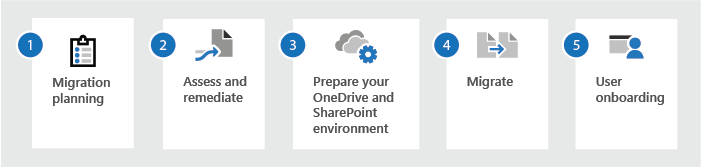
Before starting the migration, it is essential to establish a plan, starting with your objectives. Careful planning reduces the risk of problems during and after the migration. What do you hope to achieve by moving to SharePoint Online? Among the most common objectives are:
Once the objectives have been defined, you can move on to the next phase of planning the migration to SharePoint by creating an inventory of the data in the source system. This will help assess the size and complexity of the migration.
Among the items to include in the inventory are site collections, sites, IDs, lists, document collections and workflows.
The size and complexity of the migration will depend on many elements, such as the amount of data to be migrated, the number of business users involved, and the complexity of the current environment.
To these is also added the risk profile relating to the different systems used in the various departments. If multiple departments use different systems, you will need to carefully evaluate the risks associated with migrating each system to SharePoint Online.
For example, if a department uses a highly customized version of SharePoint, its migration may pose a greater risk than one of a department that uses a more standard version of the platform.
In some cases, it may make more sense to initially migrate data to an archive as an intermediate step in a complex migration. This gradual approach allows data to be divided into autonomous blocks to be migrated one at a time, minimizing interruptions in the company's daily activities. In complex settings, this strategy allows documents to be transferred in a progressive and controlled manner.
Before migrating data, it is important to clean the source environment. This means removing all unused or outdated content. Their identification should be simple, based on usage statistics or document management policies. Data cleaning ensures that unnecessary information is not transferred to the new environment.
It is also recommended that you optimize the performance of the source environment. This way, you ensure that there are sufficient resources to carry out the migration without delay.
Once the source environment has been cleaned, you will need to prepare the new SharePoint Online environment. This process includes creating the necessary site collections and sites, configuring permissions and security settings, and installing and configuring any required customizations.
Permissions are especially critical to configure properly in SharePoint Online. It's all too easy to unintentionally assign excessive administrative rights to a user. If permissions are not set correctly, you risk to expose the organization to potential cyberattacks.
Engaging employees is essential to ensure that they are informed about the migration and prepared for the changes it may entail.
We'll need to create a communication plan to inform users about the migration, collect their feedback, and answer any questions. Remember that this data migration will change daily workflows: many people may feel anxious about no longer being able to find the information they need to do their jobs.
This communication plan must also include training and change management activities. Users may need extensive training to feel comfortable with the new system.
Change management will be crucial to ensure that everyone is integrated and uses the new environment properly. If you're migrating content from SharePoint on-premise to SharePoint Online, this step will be easier, since users are already familiar with the tool.
Finally, it is important to include any new governance rules in the communication plan as well. This includes the rules for creating a new SharePoint Online site, a new document library, or for performing other tasks. Knowing these rules in advance will be essential.
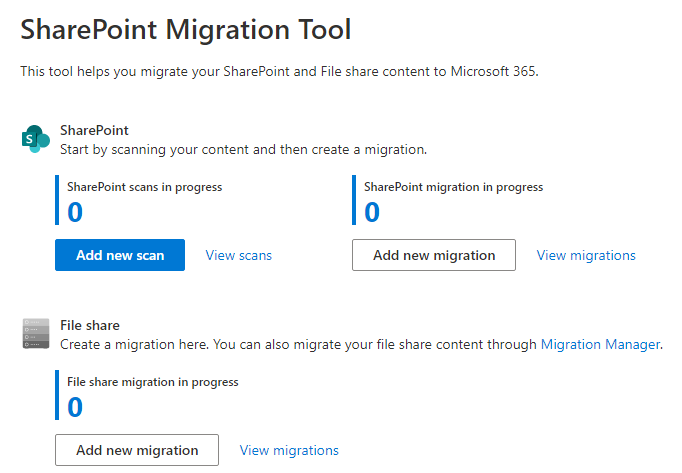
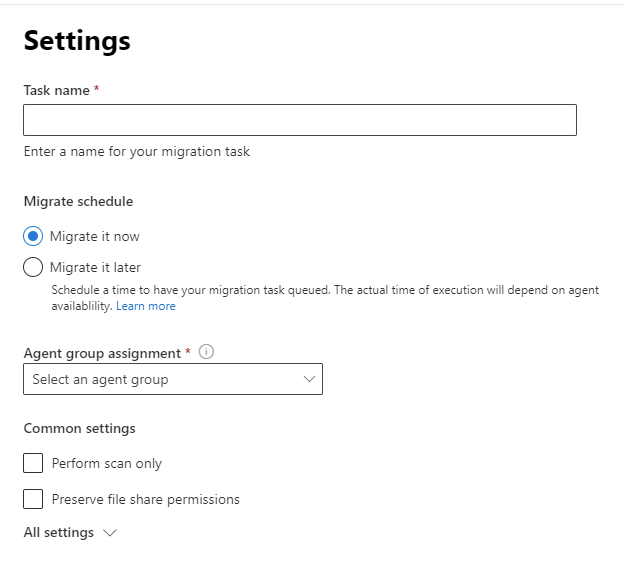
Now that we have defined the objectives of the migration, chosen the approach and built a plan, we can finally start the migration process, which will take place following these steps that we report briefly in the list below:
We created intranet.ai, which now has over 200 installations worldwide. It is the complete and customizable solution for digitizing the processes and communication of any company.
Our experts will help you:
Get in touch if you're considering an intranet project using SharePoint Online.
What if by chance something doesn't go right?
Sometimes things may not go as smoothly as planned. So why do errors occur during the migration process?
Often this is due to insufficient preparation or an underestimation of technical complexities. Below we analyze in detail what are the most common problems that companies encounter when migrating to SharePoint and, above all, what they are caused by.
A common mistake is to start the migration without careful planning. It may seem like a trivial concept, but it is very important: an “improvised” approach often leads to confusion, delays and suboptimal results, while a clear strategy involves defining what to migrate, why to do it and how to do it, considering possible critical issues and related solutions.
Take the case of a company that decides to move its data to SharePoint Online without carrying out a preliminary analysis. During the migration, responsible teams may find that some critical functionality, such as custom workflows, is not compatible with the new platform. This would force them to review the project later, causing not only an increase in costs, but, more importantly, inconvenience in daily operations.
A common mistake concerns precisely the neglect of the existing information architecture. Many SharePoint environments were designed years ago, and although they were functional then, they may be obsolete today. Migrating without restructuring the architecture means bringing old problems into a new system, compromising the effectiveness of content management and security, which are instead strengths of platforms such as SharePoint Online.
Transferring obsolete or duplicate data can slow down migration and complicate content management in the new environment. For this reason, it's crucial to clean your data first before you start.
To better understand, let's take the case of a company that discovers that its libraries contain hundreds of obsolete versions of the same document. If the archives were not cleaned before the migration, all of these versions would be transferred, making it very difficult for end users to find the information they need in the new work environment.
Migration is not just a technical issue: it requires the involvement of different business figures to make decisions on data, permissions and content mapping.
Access permissions are essential to protect sensitive information and ensure that each user can access only the content within their competence. Errors in the transfer of permissions could cause serious security breaches, resulting in interruptions in workflows.
Let's take the example of a company that makes this mistake, meaning it doesn't check its permission settings. After the migration, confidential documents containing sensitive data could become accessible to all users, even through the generation of content through Copilot, thus violating data privacy regulations.
Not all versions of SharePoint are compatible with each other, and so are third-party integrations or custom solutions.
As a result, you need to consider the degree of compatibility between the source and target systems if you don't want to run into malfunctions or corrupt data. A known case concerns the Fabulous 40 templates, available in SharePoint 2007, which presented significant difficulties when upgrading to later versions, such as SharePoint 2010 or 2013.
How to evaluate compatibility? The first step is to carry out a preliminary analysis of the source system, identifying critical components such as customizations, workflows, custom web parts and third-party integrations. This allows you to fully understand the current structure and functionality, preparing the ground for comparison with the target system.
Next, compare the characteristics of the current version of SharePoint with those of the target version to identify any deprecated or modified functionality. This type of analysis helps to predict possible obstacles and plan the necessary interventions. For example, customizations based on outdated technologies, such as farm-based solutions, may not be supported and require rewriting to work in the new version.
At this point, it is advisable to perform a migration in a test environment with the objective of identifying and resolving any critical issues in advance, ensuring that data and functionality are transferred correctly during the actual migration.
SharePoint's file and library structure requires a precise organization to work at its best: misconfigurations can lead to duplicate documents, broken paths, and difficulty finding content. All this translates into a poorly performing digital work environment, difficult for users to use and adopt.
An ineffective organization of the structure not only complicates the search and management of documents, but it can also lead to confusion about the correct versions of the files to be used. This negatively impacts productivity and collaboration, as users risk working on outdated or duplicate data.
For this reason, when migrating or restructuring SharePoint, it is essential to carefully plan the library hierarchy and the assignment of permissions, ensuring clear and consistent navigation.
Many companies underestimate the time needed to successfully migrate to SharePoint, often causing delays that, while justified, were not foreseen in the project plan. On the contrary, it is essential to always take into account possible unforeseen events, especially when large volumes of data must be transferred or there are interruptions in connectivity, factors that can significantly extend completion times.
In addition to these elements, it is also important to consider the technical complexity associated with the source and target environments, as well as the need for extensive testing and user training. Migration is not a linear process and may require multiple iterations to resolve unexpected issues or optimize configurations.
Therefore, realistic planning must include additional time margins to manage these variables, thus ensuring a smoother transition and minimizing the impact on the company's daily activities.
It doesn't seem like a simple 'move' now, does it?
As we have already pointed out, this is an extremely delicate process and, as far as possible to carry it out on a small scale, more massive migrations may require the help of someone more experienced to ensure that everything goes as it should. An experienced and professional SharePoint partner who can guarantee us the peace of mind and security we are looking for.
And if you're looking for it right now, then why not choose Dev4Side?
With its curriculum, Dev4Side may be the partner you were looking for to migrate your digital environments to the Microsoft collaboration platform. Our company has more than 15 years of experience in the development of business software and is an expert in creating intranet solutions for companies of all sectors and sizes using the potential offered by SharePoint.
Our professionals will be at your disposal to facilitate the transition of your intranet to SharePoint, with the aim of optimizing infrastructure and management costs, as well as maximizing the use of the advanced collaborative features offered by the Cloud platform.
We deal not only with the intranet, but also with the transition of file shares and complete tenants, including Teams and Mailbox, ensuring a fluid and efficient management of all corporate digital assets.
And if you are already a SharePoint user, but you want to exploit the potential of its most recent versions, Dev4Side can allow you to safely and calmly update your intranets and collaboration environments with a focused and meticulous planning of the process, calibrated to your needs and desires.
But if you're still not convinced, why not take a look at the page of our services or to the page dedicated to case studies on our projects more successful to see first-hand the results we have achieved with our customers?
Every operation that takes place on your digital infrastructure should be planned, prepared and set in motion with a clear and defined strategy, including data migration.
As we have been able to observe, this is much more than a simple movement and requires the utmost attention and care to detail, to avoid regrettable incidents that can lead to annoying waste of time and resources at best and to real blocks of operations at worst.
If you realize that the complexity of the project is rapidly climbing upwards, the best choice would therefore be to rely on an expert consultancy service (such as the one offered by Dev4Side) and have a partner at your side who can help us outline the best possible strategy for your organization, aware that the investment will generously pay off.
1. What is a SharePoint migration?
It is the transfer of content, structures, permissions, configurations, and workflows from an existing environment, whether on-premises or legacy, to SharePoint Online or to a newer version of the Microsoft 365 platform.
2. Why is it essential to have a SharePoint migration strategy?
A clear strategy reduces the risk of downtime, data loss, security issues, and user resistance, and allows the migration to be leveraged as an opportunity to modernize information architecture and business processes.
3. What are the main steps of an effective SharePoint Migration Strategy?
An effective strategy includes analyzing the source environment, defining objectives, inventorying content, choosing the migration approach such as lift and shift, hybrid, or cloud, performing data cleanup, preparing the new environment, running a pilot migration, executing the final cutover, and carrying out post-migration testing and optimization.
4. What are the most common mistakes in SharePoint migrations?
The most common mistakes include the lack of a defined strategy, insufficient data cleanup, underestimating project complexity, incorrectly configured permissions, compatibility issues with customizations and third-party solutions, and overly optimistic time estimates.
5. How long can a SharePoint migration project last?
The duration depends on several factors, including data volume, number of sites and users, level of customization, and security requirements. A project can take from a few weeks for simple scenarios to several months for complex enterprise environments
The Modern Work team specializes in developing and integrating custom solutions across the entire Microsoft 365 ecosystem. We design native applications for Microsoft and Azure platforms, and we implement business processes that maximize the return on investment in Microsoft 365.


