
Microsoft Defender for IoT: what is it and how it works
Defender for IoT protects industrial networks and OT environments with agentless monitoring, vulnerability assessment, and real-time threat detection built in.
.png)
Microsoft Defender for IoT: A Brief Introduction
Operational technology (OT) is a set of devices that organizations rely on to monitor and manage industrial equipment, processes, and events. The Internet of Things (IoT) primarily includes consumer-level devices connected to the internet. There are currently around 21.1 billion connected IoT devices worldwide in 2025.
Modern OT devices are connected to the Internet through a variety of networks (wired connection, Wi-Fi, cellular network, Bluetooth, etc.). In addition, most of them are designed to manage mission-critical business processes, ranging from optimized office space management to automated chemical sampling.
As a result, targeted attacks on OT and IoT devices can pose significant risks to organizations. Making the issue even more critical is the fact that such attacks can take place on two levels: hardware and software, both of which can be exploited to breach the security perimeter.
Microsoft Defender for IoT is a unified security solution designed to collect security telemetry from a wide range of IoT, OT and industrial control systems (ICS) devices for subsequent analysis.
Deployable on-premises, in the cloud, or in hybrid mode, Microsoft Defender for IoT can scale effectively to provide full visibility across the enterprise IoT/OT environment, detect security threats, and support vulnerability management. Let’s explore how in the following sections.
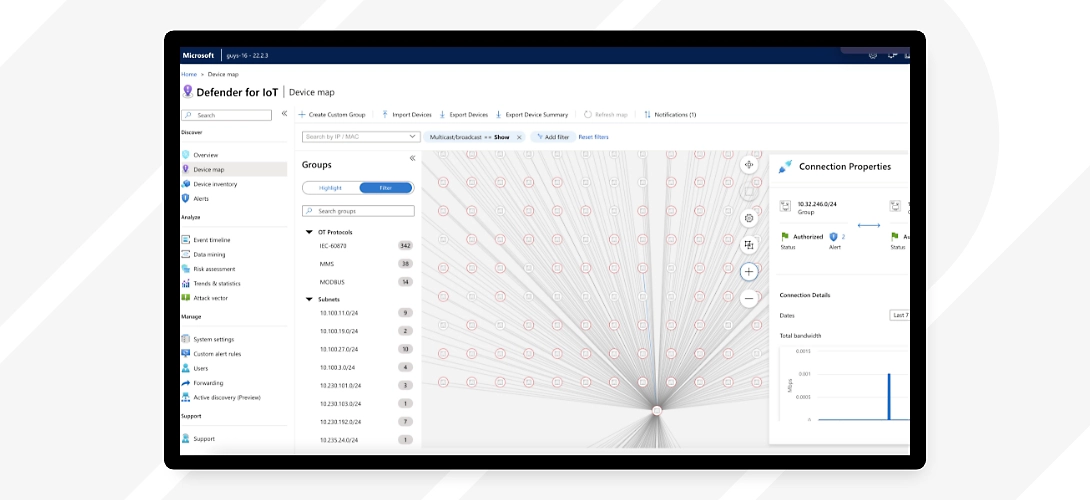 Microsoft Defender IoT: Homepage
The challenge of security in Industry 4.0
The convergence of IT, operational technology (OT) and Internet of Things (IoT) creates a complex and fragmented digital ecosystem that is difficult for industrial and critical infrastructure providers to integrate and secure.
Before analyzing security solutions, it’s essential to understand the difference between OT and IoT and the unique challenges they present:
- Operational Technology (OT): It refers to hardware and software that detect or determine changes in industrial processes. Think of factory systems that control machinery or a power plant systems that manage the flow of electricity. These environments prioritize business continuity and uptime, often running legacy systems that were not designed with cybersecurity in mind.
- Internet of Things (IoT): The IoT connects smart devices, from sensors to smart homes, allowing them to communicate and share data over networks. In the industrial sector, IoT devices enable automation, predictive maintenance, and real-time data monitoring. Unlike IT systems, OT environments can’t afford downtime. A security incident in OT could disrupt critical infrastructure such as power grids, transportation, or healthcare systems, making them an attractive target for cybercriminals.
In the past, attacks on IoT and OT devices seemed like a hypothetical threat to many organizations, but in recent years they have learned otherwise. Attackers have several methods available to compromise and exploit corporate IoT devices, using them as entry points, for lateral movement within the network, or to bypass security controls, just to name a few examples.
The challenges in protecting IoT and OT networks stem from their growing scale. From smart videoconferencing systems and connected printers to smart meters and production control systems, the use of IoT/OT devices in companies is rapidly increasing. In Europe, 48% of large companies were using IoT devices in 2021.
With a growing number of endpoints, security features, configuration requirements for each device, and user identity, organizations are increasingly struggling to maintain complete visibility (and therefore control) over their OT ecosystem.
Unfortunately, the “cost” of greater connectivity appears to be a broader attack surface. A breach of OT components could have a critical impact on the organization, making it an attractive target for hackers. The compromise of a single device could provide immediate access to an entire system, a risk amplified by the fact that some OT devices are connected to the Internet and/or interconnected with other business systems.
The reasons why “IoT hacking” continues to appear in the headlines include low awareness of security risks, weak security practices within organizations,and low asset visibility.
These factors are often the root for the most common IoT device vulnerabilities, such as those listed in the table below:
| Vulnerability | Example |
|---|---|
| Insecure network services | IoT devices that do not use encryption or secure protocols to communicate may be vulnerable to attacks such as data interception (e.g., HTTP instead of HTTPS). |
| Unauthorized changes to device configuration | An attacker could access a device and modify its security settings, disabling protection or opening insecure ports. |
| Insecure interfaces | Interfaces between devices and systems (for example, APIs) without authentication or encryption can allow attacks by unauthorized users. |
| Missing secure update mechanisms | Devices that do not support secure firmware updates may be vulnerable to known exploits that could otherwise be fixed with patches. |
| Use of outdated components | Using devices or software that are no longer supported or updated (e.g., obsolete wireless modules or firmware versions) exposes systems to unpatched vulnerabilities. |
| Insufficient privacy protection | Devices that do not encrypt sensitive data (such as personal or geolocation information) may compromise user privacy in the event of an attack. |
| Insecure data transfer and storage | Sensitive data sent without encryption or stored on unprotected devices can be easily intercepted or stolen. |
| Lack of centralized device management | The absence of a centralized platform to monitor and manage devices can make it difficult to identify vulnerabilities and apply updates in real time. |
| Use of manufacturer default settings | Using default usernames and passwords, or leaving security configurations unchanged, makes unauthorized access to devices easier. |
Microsoft Defender for IoT: features and operation
Microsoft Defender for IoT has been specifically designed to identify threats and vulnerabilities in IoT and OT environments. Its architecture, based on the Purdue Model, is designed to protect industrial control systems (ICS) that support critical infrastructures.
Since many IoT and OT devices do not have built-in security agents capable of sending telemetry data to connected security tools, they may remain invisible to cybersecurity teams and therefore not updated and/or misconfigured.
Microsoft Defender for IoT plays a key role in continuously monitoring network traffic between OT and IT devices and can be configured to monitor the following types of sensors:
- OT/IoT network sensors, connected to a SPAN port or network TAP.
- OT/IoT network sensors, that use analytics engines and Layer-6 Deep Packet Inspection (DPI). In both cases, data collection, analysis and reporting take place directly on the sensor, reducing both bandwidth usage and latency. On-premises or Azure-based dashboards receive only security telemetry and relevant insights for security management.
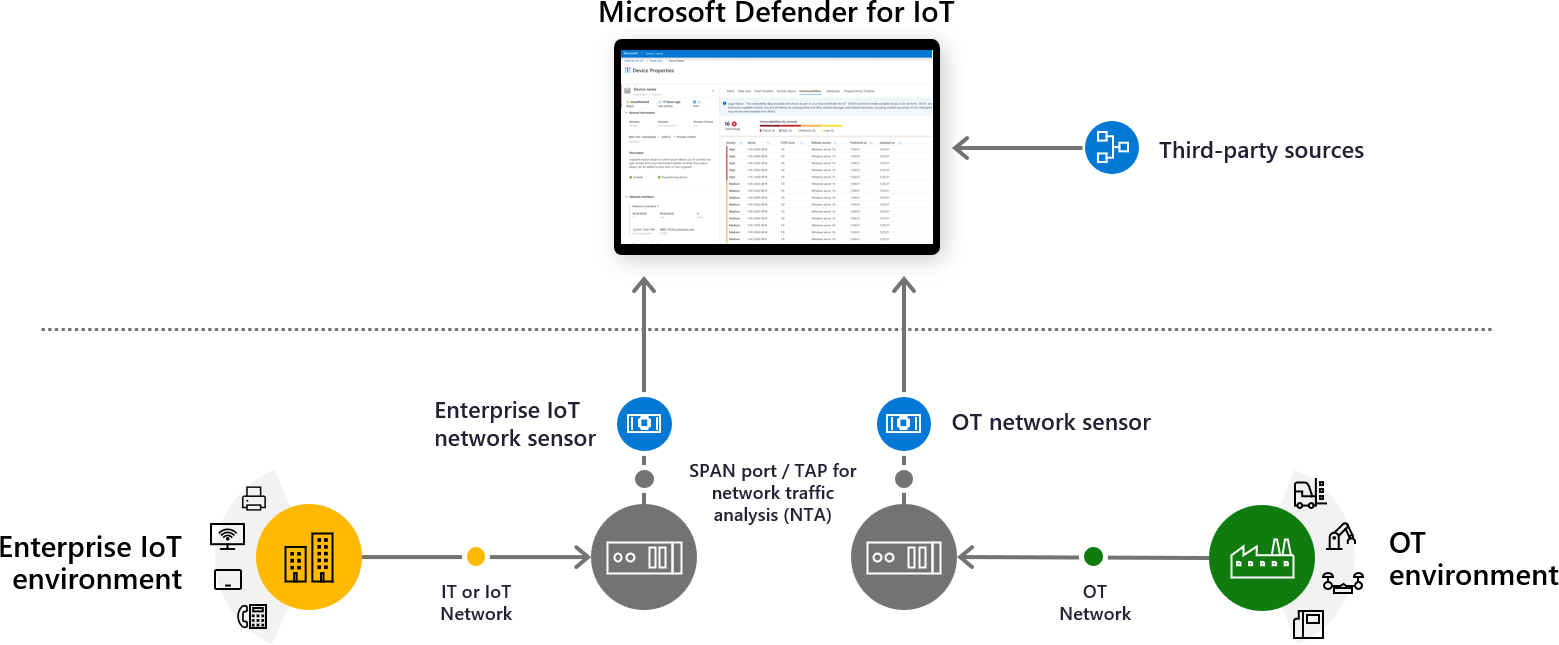 Microsoft Defender for IoT: ArchitectureWith Microsoft Defender for IoT, businesses can**:**
- Detect instantly new IoT/OT devices in their networks, collecting device details and additional data from network sensors and other relevant sources.
- Receive real-time alerts on common risks (e.g. missing patches, open ports, unauthorized changes to device configurations, control logic, or firmware).
- Obtain vulnerability management recommendations, based on behavioral analysis and machine learning algorithms.
- Simulate advanced threat scenarios, such as zero-day exploits or attacks that exploit resources already present in systems (living-off-the-land tactics).
- Scale deploymentacross cloud, on-premises, and hybrid IoT/OT environments to achieve full visibility.
- Extend monitoring to devices with custom or non-standard protocols, using the Open Development Environment (ODE) and the Horizon SDK.
Microsoft Defender for IoT allows continuous monitoring of all OT/IoT devices through data centralization and provides Security Operation Centers (SOC) with advanced tools to ensure maximum protection of business operations.
The default components of Microsoft Defender for IoT include**:**
- An Azure-based portal for cloud management and integration with other Microsoft security services.
- An IoT/OT sensor consolefor device discovery and subsequent Defenderdeployment directly on the device or on a virtual machine. Organizations can choose between cloud-connected sensors or fully on-premises sensors managed locally. Finally, another major strength of Microsoft Defender for IoT is its smooth integration with Microsoft Sentinel, Microsoft’s cloud-native SIEM (Security Information and Event Management) solution.
This integration enhances OT/IoT security by providing centralized threat visibility (with customizable dashboards),proactive threat hunting through Sentinel’s AI-powered analytics tools, and automated incident response using Sentinel Playbooks, which reduce manual intervention and accelerate response times.
Microsoft Defender for IoT Architecture: The ‘Purdue Model’ and How It Overcomes It
We previously mentioned that the architecture of Defender for IoT is built on the foundations of the Purdue Model, but what exactly is it? And how does Defender for IoT go beyond its limitations?
The Purdue Model, also known as Purdue Enterprise Reference Architecture (PERA), is a hierarchical model used to represent the architecture of industrial networks and industrial control systems (ICS).
The model shows how the typical components of an ICS architecture are interconnected, dividing them into six zones that contain information technology (IT) and Operational Technology (OT) systems. When implemented correctly, it helps to establish an “air gap” between ICS/OT and IT systems, isolating them so that organization can apply effective access controls without hindering business activities.
There are six levels (from 0 to 5, plus level 3.5 DMZ), grouped into different zones. OT systems occupy the lower levels of the model, while IT systems occupy the upper levels, with a ‘demilitarized zone’ acting as the convergence between them.
Let’s look at this in more detail in the table below:
| Level | Name | Description | Examples of Technologies |
|---|---|---|---|
| 5 | Corporate Network | Contains general enterprise systems that support operations across the entire organization. Resources, corporate strategy, finance, and other high-level functions are managed here. | ERP (SAP, Oracle), email, cloud services, enterprise databases, HR software |
| 4 | Business Planning & Logistics | Handles business planning and supply chain management. It coordinates production operations with logistics, sales, and administration. | MES (Manufacturing Execution Systems), order management systems, cloud-based SCADA, production planning software |
| 3.5 | DMZ (Demilitarized Zone) | The DMZ (level 3.5) is an intermediate zone, not a formal level in the original Purdue Model. It acts as a buffer between IT and OT networks, protecting the industrial network from cyberattacks. Security devices such as firewalls and proxies are typically located here. | Firewalls, proxy servers, IDS/IPS (Intrusion Detection/Prevention Systems), jump servers, industrial VPNs |
| 3 | Manufacturing Operations Systems | Oversees production and manages operational data. Coordination between different production processes takes place here to ensure efficiency and quality. | MES, Quality Management Systems (QMS), production recipe management, production databases |
| 2 | Supervisory Control | Real-time control and monitoring of production. SCADA and HMI systems allow operators to visualize and interact with production processes. | SCADA (Supervisory Control and Data Acquisition), HMI (Human-Machine Interface), historian systems for data collection |
| 1 | Basic Control | Performs direct control of machines and industrial processes. Automation devices such as PLCs and DCS are located at this level. | PLC (Programmable Logic Controllers), RTU (Remote Terminal Units), DCS (Distributed Control Systems) |
| 0 | Physical Process | Includes the physical devices responsible for the actual execution of production. Mechanical and physical operations take place at this level. | Temperature/pressure sensors, actuators, motors, industrial robots, valves, transducers |
Today, with the Industrial Internet-of-Things (IIoT) blurring the line between IT and OT, experts often wonder if the Purdue model is still valid for modern ICS networks. Its segmentation framework is often sidelined, as data from Level 0 is sent directly to the cloud. However, many suggest that it is not yet time to discard the model.
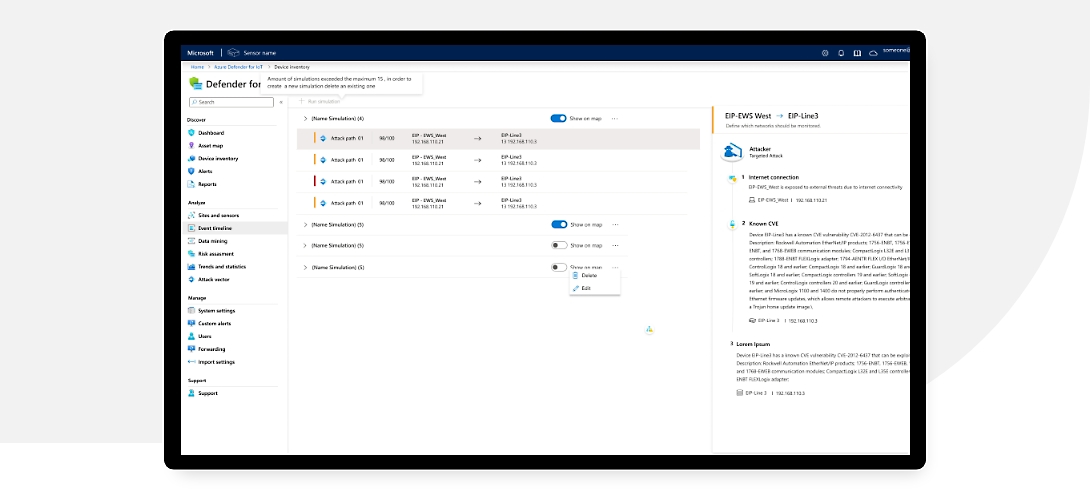 Microsoft Defender for IoT: Perdue ModelDefender for IoT still uses the Purdue Model structure as a foundation for network segmentation and the application of security controls. However, it builds on this foundation by implementing the most advanced solutions related to the protection of ICS networks such as:
- Cloud-Edge Protection: The integration between cloud and on-premises infrastructure is essential to secure increasingly interconnected industrial environments. Traditional OT systems were isolated, but with Industry 4.0 and the Industrial IoT (IIoT), more and more data is being processed in Cloud for advanced analysis and remote management. For this reason, Defender for IoT emphasizes tight integration between on-premises and cloud security to detect threats in real time.
- Zero Trust for OT: The Zero Trust model applied to OT environments follows the principle “Never Trust, Always Verify”. This approach is essential to prevent internal and external attacks, especially since many OT networks were historically designed with limeted perimeter protection. Defender for IoT allows the network to be divided into isolated segments to limit the spread of malware or attacks, and OT devices are constantly monitored to detect abnormal access or tampering attempts.
- AI & Machine Learning Analysis: The use of artificial intelligence (AI) and machine learning (ML) in OT security systems allows to anticipate and block threats before they cause damage. This includes features such as threat hunting and proactive threat detection based on behavioral models, automated incident response and the identification of complex attack patterns.
Microsoft Defender for IoT: best practices for using it
Defender for IoT is an excellent solution for protecting your devices. However, like any tool, it’s not enough to understand how it works, but you also need to know how to use it effectively to unlock its full potential.
In this section, we are going to look at some of the best practices that can be implemented while using Defender IoT and we will try to understand how they can help strengthen your security posture with a few simple steps.
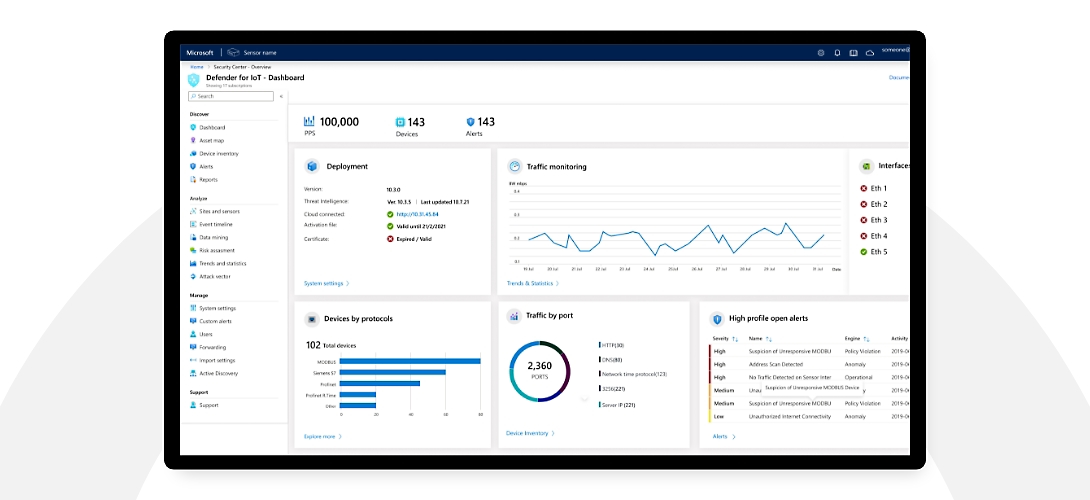 Microsoft Defender for IoT: Best Practices
Define the SOC Use Case Set
A Security Operations Center (SOC) use case is a threat detection and response model that an organization develops to identify, report, and mitigate a specific security threat.
Essentially, it’s about creating a record of priority threats, compliance requirements, and industry-specific needs that should be translated into SOC alerts, an event that requires an investigation and a response orchestrated by the security team.
Since Microsoft Defender for IoT can collect and process enormous amounts of data, it is necessary to define specific parameters for alert generation (in other words, determine which behavioral deviations of a device should be considered anomalies and therefore investigated).
For example, generating alerts for configuration changes made to a SCADA device by an administrator or privileged user may be unnecessary. However, setting an alert for a change made by an unknown or unauthorized user is critical. Based on the type of incident, the SOC team can develop a dedicated playbook for its investigation and remedation. In the case mentioned above, this might include automatically sending a shutdown command to the PLC.
Design SIEM Rules
Security Information and Event Management (SIEM) involves the centralized collection and management of security information and events to enable a faster response to vulnerabilities and threats. The goal of SIEM is to detect and address incidents at an early stage, before they can compromise business operations.
Based on the SOC use cases identified for OT/IoT environments, the security team should design analytical rules capable of generating descriptive alerts for each specific type of incident. It is then necessary to define detailed workflows to analyze incoming alerts and implement the appropriate mitigation actions.
Leverage Integration with Microsoft Sentinel
Microsoft Sentinel is Microsoft’s SIEM/SOAR tool, which not only manages security information and events but also provides advanced orchestration, automation and threat response (SOAR) capabilities.
Integrating Microsoft Defender for IoT with Microsoft Sentinel, SOC teams can take advantage of:
- Built-inSentinel rules for detecting IoT/OT events.
- Pre-configured playbooks to automate incident investigation and response.
- Smart filters to classify incidents based on specific IoT issues.
- Detailed reports on the business impacts of incidents, to be shared with stakeholders. The Sentinel playbooks significantly help the SOC teams to improve alert management, notify device owners or operators, eliminate false positives, and quickly launch a thorough investigation.
Conclusions
The major technological shift that has propelled the workplace into Industry 4.0 has also brought with it a whole series of new problems that cannot be ignored if organizations want to maintain strong security posture.
No company can afford to have its operational technology and associated devices malfunction or be compromised by misuse or malicious agents. It is therefore essential to adopt solutions that help prevent such scenarios.
Defender for IoT is a solid answer to these problems and, with its wide range of options and features, it provides the right tools to help protect industrial environments, backed by the certified quality of Microsoft’s cybersecurity solutions. It’s never too early to think about the security of your digital infrastructure, so why wait?
FAQs about Microsoft Defender for IoT
1. What is Microsoft Defender for IoT?
Microsoft Defender for IoT is a security solution designed to protect IoT devices, OT environments, and Industrial Control Systems (ICS). It provides full visibility into network-connected assets, detects threats in real time, and helps manage vulnerabilities and misconfigurations.
2. What is Microsoft Defender for IoT used for?
It is used to monitor and protect industrial networks and critical infrastructure. It enables organizations to identify unknown devices, detect anomalous behavior, uncover vulnerabilities, and support SOC teams in responding to security incidents.
3. What is the difference between IT security and OT security?
IT security protects traditional information systems such as servers, PCs, and business applications. OT security, on the other hand, focuses on industrial systems that control physical processes, such as PLCs, SCADA, and DCS. In OT environments, operational continuity is a top priority and downtime is unacceptable, making protection more delicate and complex.
4. Does Microsoft Defender for IoT work only in the cloud?
No. Microsoft Defender for IoT can be deployed on-premises, in the cloud through Azure, or in a hybrid model. This flexibility allows it to adapt to both traditional industrial environments and modern cloud-integrated infrastructures.
5. How does it detect threats in OT and IoT devices?
Defender for IoT uses network sensors connected to SPAN or TAP ports to analyze traffic through Deep Packet Inspection (DPI). It does not require agents to be installed on industrial devices, which often do not support traditional security software.

Written by
Emanuele Rossi
Infra & Security · Dev4Side
Dev4Side Software · Microsoft Gold Partner
Need help implementing this in your company?
Our specialist teams have delivered 200+ Microsoft implementations across Italy. Contact us for a free, no-obligation evaluation of your project.
Related articles
Microsoft Entra ID is the new Azure AD: How does it work?
Microsoft Entra ID is the evolution of Azure Active Directory, the solution for identity and access management. Here are differences, features, and costs.
Microsoft Purview Compliance Manager: Simple Compliance
Microsoft Purview Compliance Manager: assess risks, track improvement actions, and meet regulatory requirements — all managed from one central dashboard.
Microsoft Security Awareness Training: all the official resources
Discover the official Microsoft resources for Security Awareness Training and how to strengthen the company's security posture starting with employees.