
Microsoft Security Awareness Training: all the official resources
Discover the official Microsoft resources for Security Awareness Training and how to strengthen the company's security posture starting with employees.
.png)
What is security awareness training
Microsoft Security Awareness Training is delivered through Microsoft Defender for Office 365’s Attack Simulation Training feature, which sends simulated phishing, voice phishing, and malware campaigns to employees to measure click rates and train them to recognise attacks. Failed simulation recipients are automatically enrolled in targeted micro-learning modules, and administrators track behaviour change via campaign analytics in the Microsoft Defender portal.
.webp)
The benefits of security awareness training
Effective cybersecurity awareness training allows employees to practice proper cybersecurity hygiene, recognize security risks related to their actions, and identify potential cyberattacks that may occur through email and web platforms.
The benefits of increased awareness of an organization’s security posture include:
- Prevention of financial losses: Cyber attacks can bring businesses to their knees financially and damage their reputation. The “Cost of a Data Breach Report 2024” by IBM Security and the Ponemon Institute estimated that the global average cost of a data breach is 4.88 million dollars per incident — a 10% increase compared to the previous year. Security training teaches employees how to protect the organizational resourced, data, and financial assets. By reducing the likelihood of incidents and breaches, organizations can minimize economic losses and maintain a safer and more resilient environment.
- **Reduction of incident risk:**The volume of attacks against organizations continues to grow. Verizon’s “Data Breach Investigations Report 2024” analyzed 30,458 security incidents globally. The report confirmed that 10,626 of these were data breaches, and that 68% of them — excluding malicious insiders and including people who fell victim to social engineering attacks or made mistakes — involved the non-malicious human element. The FBI’s “Internet Crime Report 2022” indicated that phishing attacks ranked first with 300,497 complaints (with a total loss of 52 million dollars), followed by personal data breaches. Proper training can prevent and reduce these incidents by empowering employees to recognize and proactively address potential threats.
- **Reduction of human error:**Cybersecurity experts agree that human behavior is often the primary cause of most security incidents. Security training provide employees with the knowledge, skills, and mindset necessary to reduce human error, making organizations more resilient against threats.
- **Cultivating a protection-oriented mindset:**Despite the many existing risks, organizations can prevent incidents or reduce their effects by educating their employees on how to identify cyber risks, avoid potential attacks, and respond correctly to a cyber event.
- Prevention against data loss and corruption: Effective training enables employees to understand the importance of protecting sensitive data; preventing the disclosure of personal information, intellectual property, and financial resources; and safeguarding the company’s brand reputation.
What characterizes effective training
An effective cybersecurity awareness training program should reach employees with different levels of technical expertise and cybersecurity knowledge, as well as different learning styles.
The training program should be multifaceted, consisting of a collection of lessons and learning opportunities that can involve all members of the organization. In addition, a comprehensive program includes role-based content, providing personalized learning material based on the employee’s specific responsibilities, as well as for external stakeholders, such as business partners and contractors, ensuring they do not expose the organization to risk.
Effective programs include the following key elements:
- Educational content. This should range from written materials to interactive online learning modules to gamification sessions, allowing employees to access information in formats that best suit their learning style, whether audio, visual or others. The contents should include lessons and modules with different levels of complexity, so that each employee can access the information most relevant to their role.
- Ongoing communication and follow-up messaging. These serve to remind employees of corporate cybersecurity policies. They provide brief reminders on how to identify and avoid security risks and breaches, how to manage any problems, and updates on emerging threats.
- Attack simulations. By using phishing attempts, social engineering tactics, surveys, quizzes and other assessments, organizations can evaluate how well employees adhere to cybersecurity policies and identify individuals who are not following best practices.
- Monitoring and measuring worker engagement. This helps assess the effectiveness of the awareness training program, helping to identify any weaknesses and areas to be strengthened.
- Specific compliance requirements. These ensure that employees are well informed about regulatory requirements and the importance of compliance. For example, standards such as the Health Insurance Portability and Accountability Act (HIPAA) Or the Payment Card Industry Data Security Standard (PCI DSS) contain specific elements that end users must understand during training.
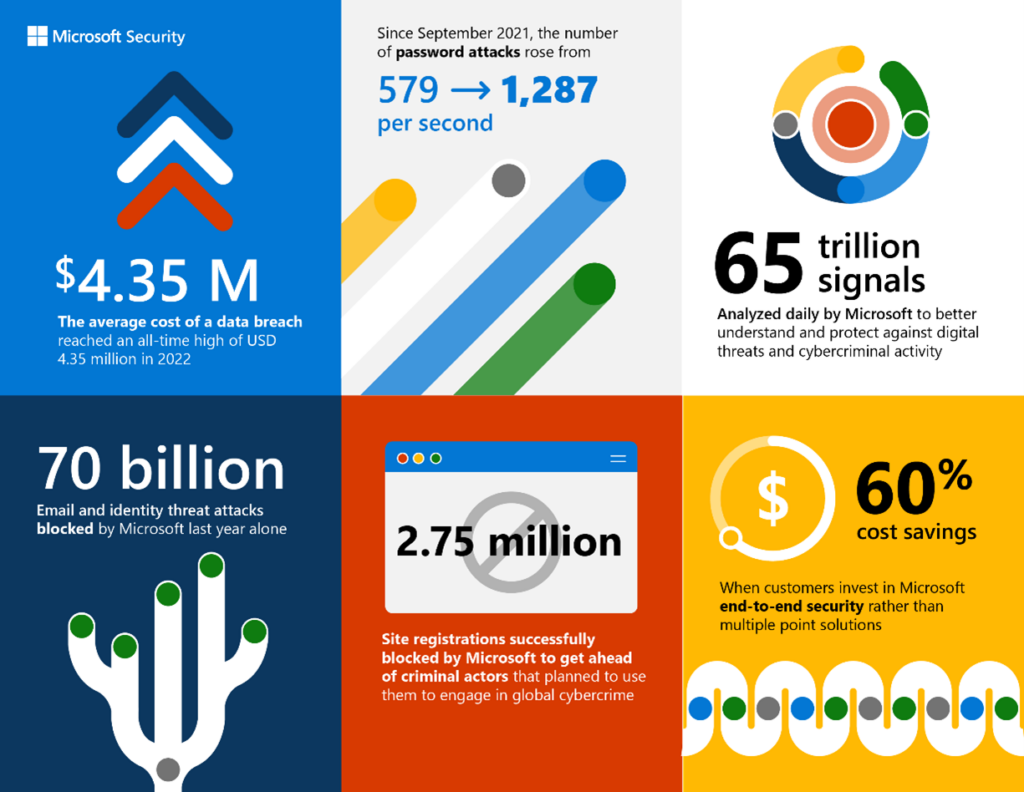 Microsoft Security NumbersA good training program also typically includes a combination of the following elements:
- Formal education, such as structured lessons and mandatory training.
- Informational learning opportunities, such as weekly emails containing tips, policy updates, and cybersecurity news.
- Experiential sessions and gamification, where employees face phishing simulations and realistic scenarios to test their understanding and reinforce training, preparing them to better handle real-world cybersecurity challenges.
Microsoft can provide the right tools to create training programs that strike the proper balance among these elements. In the next section, we will look at one of the most important of these tools.
What is Attack Simulation Training
Attack Simulation Training is a behavioral solution designed to mitigate phishing risk within organizations. It uses realistic simulations and targeted training to educate employees, measure behavioral changes, and automate the creation and implementation of an integrated security awareness program.
In organizations with Microsoft Defender for Office 365Plan 2 (through add-on licenses or subscriptions such as Microsoft 365 E5),Attack Simulation Training can be used in the Microsoft Defender portal to run realistic attack scenarios within the organization and help identify vulnerable users before a real attack impacts business results.
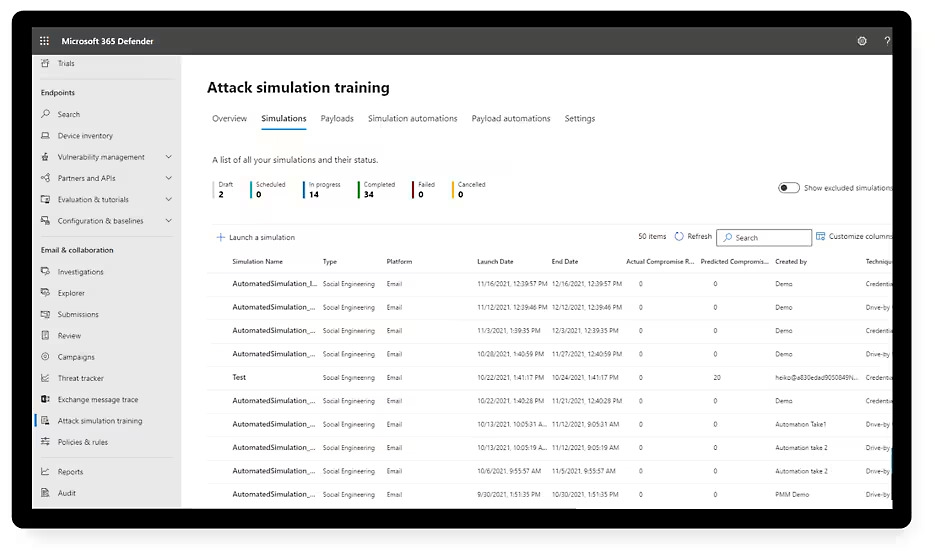 Attack Simulation Training: HomepageIn Attack simulation training, simulations are benign cyberattacks carried out within the organization. These simulations are used to test security policies and practices, as well as to train employees to increase their awareness and reduce their susceptibility to attacks.
In simple terms, a simulation is nothing more than an full campaign in which realistic but harmless phishing messages are sent to users.
The basic elements of a simulation are:
- Who receives the simulated phishing message and according to what schedule.
- The training that users receive based on their action or inaction (whether correct or incorrect) regarding the simulated phishing message.
- The payload used in the simulated phishing message (a link or attachment) and the composition of the phishing message (for example, package delivered, problem with your account, or you won a prize).
- The social engineering technique used. The payload and the social engineering technique are closely related.
The techniques that can be simulated are listed in the following table:
| Technique | Description |
|---|---|
| Credential Harvest | An attacker sends the recipient a message containing a link. When the recipient clicks the link, they are redirected to a website that typically displays a dialog box requesting a username and password. The landing page is often themed to resemble a well-known site in order to build user trust. |
| Malware Attachment | An attacker sends the recipient a message containing an attachment. When the recipient opens the attachment, arbitrary code (for example, a macro) is executed on the user’s device, allowing the attacker to install additional code or strengthen their foothold. |
| Link in Attachment | A hybrid credential harvest technique. The attacker sends a message with a link embedded in an attachment. When the recipient opens the attachment and clicks the link, they are redirected to a page requesting a username and password, often themed to resemble a well-known site. |
| Link to Malware | The attacker sends a message containing a link to an attachment hosted on a well-known file-sharing site (e.g., SharePoint Online or Dropbox). When the user clicks the link, the attachment opens and executes arbitrary code (e.g., a macro) on the user’s device. |
| Drive-by URL | The attacker sends a message containing a link. When the user clicks the link, they are taken to a site that attempts to execute code in the background to collect information or install code. The site is often compromised or a replica of a well-known site. This technique is also known as a watering hole attack. |
| OAuth Consent Grant | The attacker creates a malicious Azure application that attempts to gain access to data. The app sends an email containing a link that, if clicked, initiates a consent request to access the user’s data (e.g., their inbox). |
| How-to Guide | An instructional guide providing users with directions (e.g., how to report phishing messages). |
Even if Attack Simulation Training includes numerous predefined payloads for available social engineering techniques, it is possible to create customized payloads to better meet organization’s needs, including copying and modifying an existing payload. Payloads can be created at any time, either before creating the simulation or during its configuration.
In simulations that use the Credential Harvest or Link in Attachment social engineering techniques, login pages are part of the selected payload. The login page is the web page where users enter their credentials.
Each applicable payload uses a default login page, but it can be changed. It can be chosen between predefined login pages, customized pages already created, or can be created a new one during the configuration of the the simulation or payload.
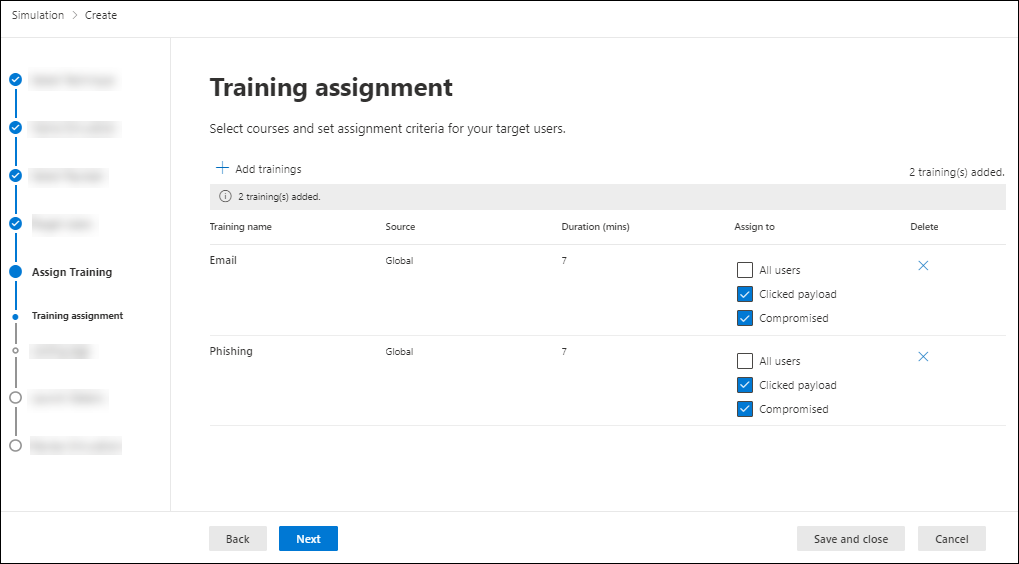 Attack Simulation Training: Setting Assignment Criteria
The benefits of Attack Simulation Training for users and companies
These types of simulations can be incredibly valuable for companies and their employees, who can proactively learn to defend themselves against the most common threats affecting today’s digital landscape.
Users learn by doing, and IT teams can identify the most vulnerable individuals within the organization through the simulation process, but it is also possible to cultivate a whole series of other significant benefits to improve corporate security posture.
Let’s take a look at some of the main benefits in the table below:
| Benefits | Description |
|---|---|
| Risk Assessment | Measures employees’ awareness of phishing attacks through simulations based on real emails used by attackers; Automates the creation of simulations, payload attachment, target user selection, and scheduling, using Microsoft Entra ID groups to automatically import users; Customizes simulations based on employee context, such as region, industry, and role, with detailed granularity |
| User Behavior Improvement | Reduces risk through targeted training designed to change behaviors; Provides a comprehensive training content library that enables personalized and performance-based training tailored to simulation results; Includes nano-learning, microlearning, and interactive content to address different learning styles and reinforce phishing risk awareness; Allows customization of the training landing page with editable tags, including links to courses and the company logo |
| Progress Evaluation | Assesses phishing risk mitigation across various social engineering vectors; Provides visibility into the status of training and simulations within the organization through completion and coverage metrics; Tracks the organization’s progress against a baseline predicted compromise rate; Uses the user susceptibility score to automatically trigger simulations for repeat offenders and add context to simulation results |
Other useful Microsoft resources for Security Awareness
However, Microsoft does not offer just this tool to help employees develop greater awareness of the responsibilities and risks related to digital security. It also provides a whole series of additional resources to keep users (business and not) informed about digital threats and the best practices to avoid them.
In the table below we outline some of the Redmond company’s most important platforms and communication channels dedicated to the topic, which can be leveraged to support the development of comprehensive and up-to-date training programs:
| Resource | Description |
|---|---|
| Microsoft Security Blog | The official blog for staying up to date on the latest cybersecurity news, analysis of emerging threats, updates on Microsoft security products, and best practices for protecting users and organizations. Ideal for security professionals, decision-makers, and IT managers. |
| Microsoft Tech Community | An interactive platform where you can connect with Microsoft product experts, participate in technical discussions, ask questions, and share experiences with other cybersecurity professionals. It includes forums, articles, events, and webinars. |
| Microsoft Security Response Center (MSRC) | The center dedicated to managing security vulnerabilities in Microsoft products. It provides security advisories, timely updates, threat mitigation guidance, and information on how to report vulnerabilities. An essential reference for security teams. |
| Microsoft Services in Cybersecurity | Offers professional consulting services to help organizations assess, strengthen, and improve their security posture. Includes risk assessments, support for implementing Microsoft Security solutions, and incident response services. |
| Cybersecurity Skills for the Cyber Workforce | A collection of educational resources designed to build foundational and advanced cybersecurity skills. Includes courses, certifications, learning paths, and guides for students, career changers, and corporate teams. |
| Microsoft Cybersecurity Scholarships | Initiatives and scholarship programs promoted by Microsoft to support students pursuing a career in cybersecurity. They help cover the costs of training, certifications, and academic programs in the field. |
Conclusions
Microsoft’s role in creating cybersecurity solutions has always been unquestionable, and its portfolio of digital security offerings set up by the software house is both extensive and layered.
However, the Redmond company has always stood out also for its constant commitment to educating users (business and not) in order to increase their awareness of the risks and responsibilities associated with digital security.
The resources, made available by the American technology giant, represent a highly valuable set of tools that organizations can implement into employee training programs to strengthen their security posture, starting from the smallest (and potentially weak) element of the entire structure: the individual.
FAQs about Microsoft Security Awareness Training
1. What is Microsoft Security Awareness Training?
Microsoft Security Awareness Training is the set of resources, tools, and programs made available by Microsoft to help organizations and users improve their cybersecurity awareness. The goal is to reduce risk related to the human factor by training employees to recognize threats such as phishing, malware, and social engineering attacks.
2. Why is security awareness training important for organizations?
Because most security incidents involve the human element. Effective training helps prevent financial losses, reduce the risk of data breaches, and limit the impact of cyberattacks. Improving awareness means strengthening the organization’s security posture starting with its people.
3. What makes a security awareness program effective?
An effective program is continuous, personalized, and measurable. It should include diverse content (lessons, online modules, gamification), realistic simulations, follow-up communications, and results monitoring. It is also essential to tailor training to employees’ roles and regulatory requirements.
4. What is Microsoft’s Attack Simulation Training?
Attack Simulation Training is a feature integrated into Microsoft Defender that enables organizations to simulate realistic phishing attacks internally. It is designed to test user resilience, measure susceptibility, and provide targeted training to reduce risk.
5. How does a phishing simulation work in Microsoft Defender?
Simulated (but harmless) phishing messages are sent to users. Based on their actions (clicking links, entering credentials, reporting the message), the system delivers personalized training and collects metrics to assess risk levels and improvement over time.

Written by
Emanuele Rossi
Infra & Security · Dev4Side
Dev4Side Software · Microsoft Gold Partner
Need help implementing this in your company?
Our specialist teams have delivered 200+ Microsoft implementations across Italy. Contact us for a free, no-obligation evaluation of your project.
Related articles
Microsoft Entra ID is the new Azure AD: How does it work?
Microsoft Entra ID is the evolution of Azure Active Directory, the solution for identity and access management. Here are differences, features, and costs.
Microsoft Purview Compliance Manager: Simple Compliance
Microsoft Purview Compliance Manager: assess risks, track improvement actions, and meet regulatory requirements — all managed from one central dashboard.
Microsoft Defender for IoT: what is it and how it works
Defender for IoT protects industrial networks and OT environments with agentless monitoring, vulnerability assessment, and real-time threat detection built in.