
Microsoft Purview Compliance Manager: Simple Compliance
Microsoft Purview Compliance Manager: assess risks, track improvement actions, and meet regulatory requirements — all managed from one central dashboard.
.png)
Microsoft Purview Compliance Manager: A Brief Introduction
Compliancerefers to the set of regulations and laws that a company must follow in order to remain in business. These rules include areas such as taxation, data protection, safety regulations And labor regulations. It’s important to keep up with these requirements, as non-compliance can result in high fines or in legal consequences.
To maintain compliance, companies must first be aware of the relevant laws and regulations they must follow. This is especially important for companies that operate in highly regulated industries, such as finance, banks And healthcare.
We are in the middle of a digital revolution where the information is a strategic asset, hybrid work is the norm, and protecting your information assets is crucial to maintaining trust and meeting compliance requirements. As a result, organizations are looking for external certifications such as ISO 27001or NIST SP 800-53 to manage compliance risks and ensure overall information security and compliance readiness.
Companies must also ensure that their processes, policies, and procedures align with applicable regulations. This means that they must review regularly their processes to ensure they remain up to date.
Therefore, compliance is no longer just a bureaucratic obligation and it has become an interesting challenge over the years. Now it’s about acting as the guardians of sensitive information and staying aligned with the regulations.
So, what are the risks of failing to manage regulatory compliance?
- Organizations are subject to various data protectionand privacy regulations. Non-compliance can lead to fines,legal action, andreputational damage.
- Loss of trust from customers and partnersif certifications such asISO 27001 are not achieved.
However, responsibility goes beyond simply following rules and regulations; it requires a continuous vigilance and proactive measures. Therefore, although the risks of poor compliance management may be significant, there are stepsthat can be taken to mitigatethese risks and ensure that your organization meets its compliance obligations.
Microsoft Purview Compliance Manager can help your company with just that. From evaluating data protection risks to managing controls, keeping up with evolving regulations and certifications, and reporting to auditors.
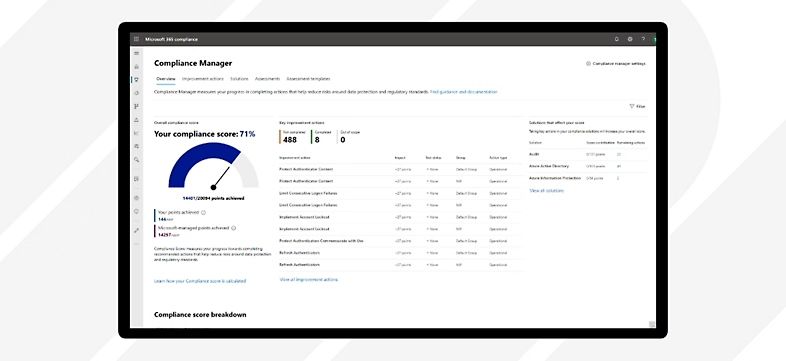 Microsoft Purview Compliance Manager: Homepage
Compliance Manager can help your organization track progress in reducing risks related to data protection and regulatory compliance. This is especially important if you’re using Microsoft Teams to handle sensitive and regulated information.
By using Compliance Manager, you can make your work environment more secure and comply with the necessary rules and regulations, reducing the chances of losing important data when using Microsoft 365 applications.
Curious? Let’s find out more in the next sections.
What is Microsoft Purview Compliance Manager
Using mapping software to plan long journeys to unknown destinations is now a common practice. You enter your starting position and destination, as well as when you want to leave. Next, the mapping software recommends the optimal routes based on different transportation options and times of the day.
Why should a compliance journey be any different? This also has a beginning and a destination, and requires a ‘digital map’ to guide the way. In this scenario, our ‘digital map’ is Compliance Manager.
Microsoft Purview Compliance Manager is a cloud-based tool designed to simplify compliance. The platform analyzes a company’s system and processes, identifies potential gaps and recommends corrective actions.
Compliance Manager helps simplify compliance and reduce risks by providing:
- Pre-built assessments for common industry and regional standards and regulations, or customizable assessments to meet specific compliance needs (available assessments depend on the license agreement).
- Workflow capabilities that enable efficient risk assessment management through a single tool.
- Detailed instructions on suggested improvement actions that can be performed by both your organization and Microsoft to help meet relevant standards and regulations. For actions managed by Microsoft, the implementation details and control results are provided.
- A risk-based compliance score, which helps you understand your compliance profile by measuring the progress of improvement actions.
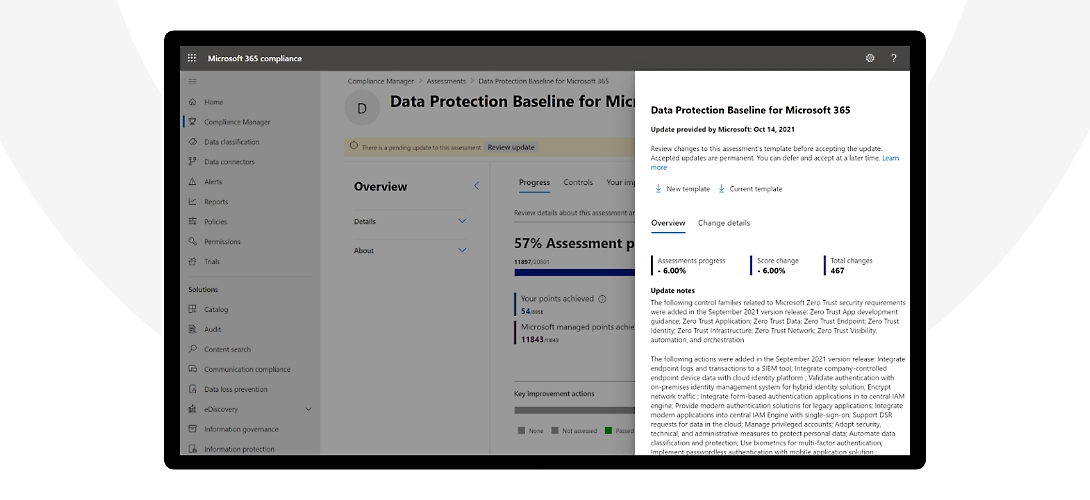 Microsoft Purview Compliance Manager: Data Protection Baseline
Compliance Manager supports multicloud integration with Microsoft Azure, Google Cloud Platform (GCP) and Amazon Web Services (AWS) through Microsoft Defender for Cloud. This ensures that compliance assessments are comprehensive and reflect the status of all services in use, providing a holistic view of your compliance posture.
Compliance Manager supports the entire compliance lifecycle, from initial assessment to ongoing management. Let’s see in the table below how it can help in each step:
| Phase | Capabilities |
|---|---|
| Design | Preconfigured or custom assessment templates; Definition of information security risks using the compliance score; Mapping of common controls across regulations and multiple assessments |
| Implementation | Guidance on recommended improvement actions for implementing controls; Clear assignment of responsibility for improvement actions (managed by Microsoft and by the organization); Risk-based scoring to help prioritize activities; Reports and dashboards to measure progress in completing improvement actions; Assignment of improvement tasks to other users; Export and import of improvement actions to enable offline work |
| Management and Maintenance | Regular updates on changes to regulations and certifications; Reporting for auditors; Ongoing review, monitoring, and maintenance of the compliance posture; Automated testing and continuous monitoring for many improvement actions |
Compliance Manager provides a comprehensive view of data across the enterprise by scanning data sources such as databases, files, and applications, and identifying data points subject to compliance requirements. Then, it delivers detailed insights into the data, including who owns it, who has access to it, and how it’s used.
In addition to offering a complete data overview, Microsoft Purview Compliance Manager also helps organizations identify and mitigate risks associated with data usage. It delivers actionable insights and recommendations on how to address risks related to sensitive information.
Compliance Manager assigns points for completing improvement actions to comply with regulations, standards or policies, and combines these points into an overall compliance score. Each action has a different impact on the score, depending on the potential risks involved. This helps prioritize the actions that will most effectively strengthen the organization’s overall compliance posture.
When first used, Compliance Manager provides an initial score based on the Microsoft data protection baseline, which is a set of controls covering key data protection regulations and general data governance standards.
This baseline includes major protection and governance frameworks and standards, such as NIST CSF, ISO 27001, FedRAMP, and GDPR.
The key elements of Microsoft Purview Compliance Manager
Compliance Manager uses various elements and data to manage compliance activities. When using it to assign, test and monitor compliance tasks, it is useful to have a basic understanding of what the key elements are, which are respectively: controls, evaluations, regulations and improvement actions.
In this section, we will take a closer look at each of these elements to better understand what they are and how they operate within Compliance Manager.
Controls
A control is a requirement derived from a rule, standard, or policy. It defines how to assess and manage the system configuration, the organizational process, and the people responsible for meeting a specific requirement of a regulation, standard, or policy.
Compliance Manager tracks the following types of controls:
- Microsoft managed controls: controls related to Microsoft cloud services, where Microsoft is responsible for implementation
- Your managed controls: sometimes referred to as customer managed controls, these are controls implemented and managed by the organization
- Shared controls: these are controls for which implementation responsibility is shared between the organization and Microsoft.
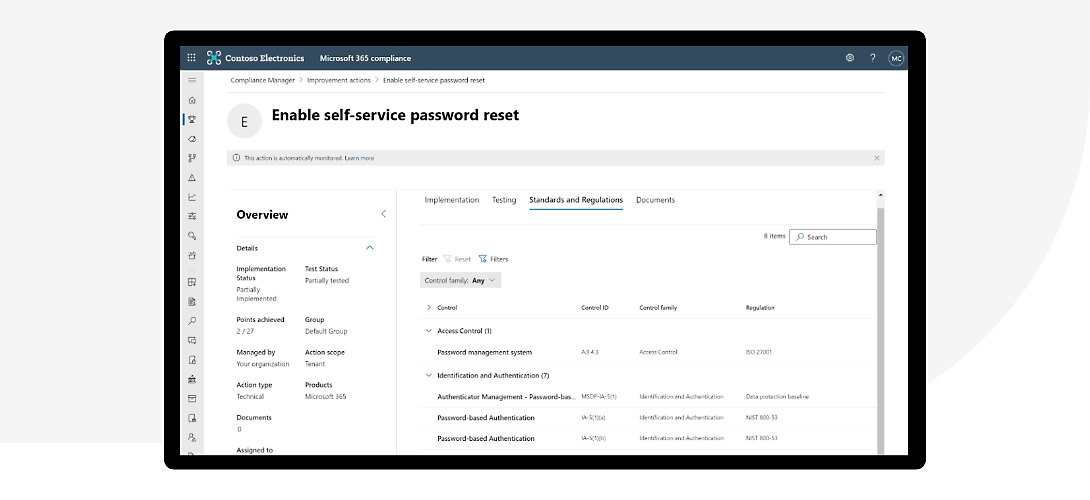 Microsoft Purview Compliance Manager: Control Mapping
Assessments
An assessment consists of grouping controls from a specific regulation, standard, or policy. Completing the actions that are part of an assessment helps meet the requirements of a standard, rule, or law.
For example, it is possible to have an assessment that, once all included actions are completed, allows you to align the Microsoft 365 settings with the ISO 27001 requirements.
Assessments have several components:
- Services in scope: the specific set of Microsoft services applicable to the assessment
- Microsoft managed controls: controls for Microsoft cloud services, implemented by Microsoft on behalf of the user
- Your controls: sometimes referred to as customer-managed controls, these are controls implemented and managed by the organization
- Shared controls: these are controls for which implementation responsibility is shared between the organization and Microsoft.
- Assessment score: shows the progress toward achieving the total possible points from actions within the assessment managed by both the organization and Microsoft
Regulations
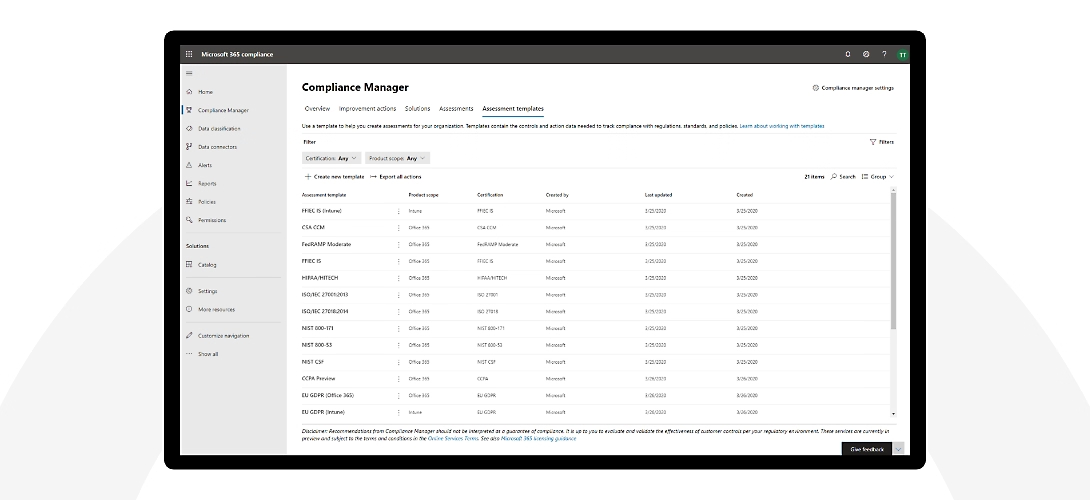
Compliance Manager provides templates for over 360 regulations that allow you to quickly create assessments.
In the summary table below, we will look at some of the most important templates supported by Compliance Manager.:
| Regulation | Description |
|---|---|
| ISO 27001 | International standard that defines the requirements for an Information Security Management System (ISMS). It helps organizations manage information security in a systematic and ongoing way, protecting the confidentiality, integrity, and availability of information. |
| GDPR | The EU General Data Protection Regulation (GDPR) sets out rules for the protection of personal data, including individuals’ rights, organizational obligations, and responsibilities in the event of data breaches. It applies to all organizations that process the personal data of EU citizens. |
| NIST CSF | The National Institute of Standards and Technology Cybersecurity Framework (NIST CSF) provides guidelines for managing and reducing cybersecurity risks. It consists of five core functions: Identify, Protect, Detect, Respond, and Recover. It is primarily used for cybersecurity risk management within organizations. |
| FedRAMP | The Federal Risk and Authorization Management Program (FedRAMP) is a certification program that establishes a standardized process for the authorization and continuous security monitoring of cloud services handling sensitive information for the U.S. federal government. It ensures that cloud services meet strict security standards. |
| ISO 27018 | ISO 27018 is a standard that provides guidelines for protecting personal data in the cloud. It focuses on the processing of personal data within cloud computing services, helping organizations ensure privacy and the protection of users’ personal information. |
| HIPAA | The Health Insurance Portability and Accountability Act (HIPAA) is a U.S. law that establishes standards for protecting personal health information. It safeguards the privacy of health data and ensures that medical information is handled securely. |
| PCI DSS | The Payment Card Industry Data Security Standard (PCI DSS) is a set of security requirements designed to ensure that all organizations handling payment cards protect cardholder data. It includes measures to prevent fraud and data breaches. |
| NIS2 | The European Union’s NIS2 Directive strengthens the security of network and information systems by establishing obligations to protect critical infrastructure. It focuses on essential sectors such as energy, transport, healthcare, and ICT, and aims to enhance cyber resilience across Europe. |
Improvement actions
Improvement actions help centralize compliance activities. Each improvement action provides recommended guidance to support alignment with regulations and data protection standards.
Actions can be assigned to users in the organization to carry out implementation and testing tasks. It is also possible to store evidence, notes, and record status updates within each improvement action.
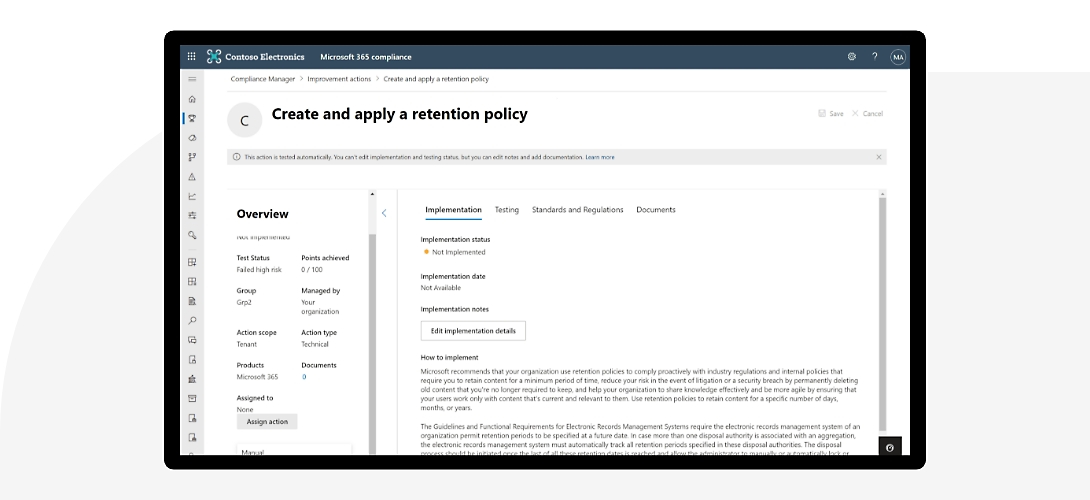 Microsoft Purview Compliance Manager: Control Assessment
A look at the Microsoft Purview Compliance Manager dashboards
We know what it is for and what are the fundamental elements behind its operation. Now we just have to explore its main page and become familiar with the interface.
Getting started with Compliance Manager is straightforward. Simply sign in to the Microsoft Purview portal and locate Compliance Manager in the compliance solutions menu.
After that, if you have never used it, just follow the instructions to configure Compliance Manager and start creating assessments. The process is simple and intuitive.
Compliance Manager has several dashboards where we can view the progress of our assessments. The Overview tab**** shows a summary of all assessments, including:
- Overall compliance score
- Points achieved compared to the total possible
- Microsoft-managed points compared to the total possible
- Key improvement actions
- Solutions impacting the score
- Compliance score breakdown
The overview helps you track your progress over time. The more improvement actions we implement, the higher our score will be.
The overview is useful if you are working on a single assessment, but if you manage multiple evaluations and want to see the progress of a specific one, you can select it from the Assessments tab to access its detailed progress page.
A useful activity is reviewing improvement actions to identify any that fall outside your area of responsibility. If you mark them as ‘out of scope’, they will be removed from the report, reducing the overall score.
You can track progress over time and prioritize improvement actions with Highest Risk Score.
 Microsoft Purview Compliance Manager: Regulatory Assessment
Monitoring regulatory updates
Microsoft continuously monitors regulations and standards to identify any changes that affect improvement actions. Changes are reported as ‘Update pending. ’, allowing you to review and apply them accordingly. In addition, the assessments are updated when Microsoft software features change.
Pending updates are visible both in the Assessments tab and in Improvement actions tab.
- In the Assessments tab, you can see which assessments have pending updates. By selecting one, you can review the total number of changes and accept the update. You can also export the current and new templates to maintain records.
- In the Improvement actions tab, you can review the details of the changes and accept them.
Monitoring compliance progress
Tracking progressis essential for any compliance certification. You must stay informed about progress and potential issues allows for timely action.
It is possible to set Alert Criteria to receive e-mail notifications in case of:
- Score changes
- Assignment changes
- Implementation status updates
- Test status changes
- Compliance Evidence Changes
Compliance Manager also includes a default alert policy that sends notifications whenever there are changes to the improvement action score.
Conclusions
Keeping track of your alignment with regulations is not optional. It requires attention, care and the ability to act promptly when issues arise that demand immediate intervention. The number of regulations that a business must comply with (especially in highly regulated industries) can be difficult to manage.
Described like this, the scenario may seem a complex task, but managing corporate compliance doesn’t have to be overwhelming. Tools like Microsoft Purview Compliance Manager can make the work of business compliance enforcement far more manageable and structured.
Having everything under control through a single centralized interface, which automatically evaluates required actions and identifies opportunities to strengthen regulatory alignment provides valuable support. It helps simplify and automate complex processes. So why not give it a chance?
FAQs about Microsoft Purview Compliance Manager
1. What is Microsoft Purview Compliance Manager?
Microsoft Purview Compliance Manager is a cloud-based solution that helps organizations manage regulatory compliance and data protection. It provides prebuilt assessments based on international standards and enables organizations to monitor, measure, and improve their compliance posture through a risk-based score.
2. What is Microsoft Purview Compliance Manager used for?
It is used to assess compliance levels against regulations and standards such as ISO 27001, GDPR, NIST, and HIPAA, identify control gaps, assign improvement actions, and monitor progress over time through dedicated dashboards and reports.
3. How does the compliance score work?
The compliance score is a risk-based metric that measures progress on improvement actions. Each completed action contributes to the overall score with a different weight depending on the associated risk, helping organizations prioritize the most critical activities.
4. Which regulations does Compliance Manager support?
Compliance Manager offers templates for over 360 regulations and standards, including ISO 27001, GDPR, NIST CSF, FedRAMP, ISO 27018, HIPAA, PCI DSS, and NIS2. Available assessments depend on the type of active Microsoft license.
5. What is the difference between Microsoft-managed, customer-managed, and shared controls?
Microsoft-managed controls are implemented directly by Microsoft within its cloud services. Customer-managed controls are implemented and managed by the organization. Shared controls involve joint responsibility between Microsoft and the organization.

Written by
Emanuele Rossi
Infra & Security · Dev4Side
Dev4Side Software · Microsoft Gold Partner
Need help implementing this in your company?
Our specialist teams have delivered 200+ Microsoft implementations across Italy. Contact us for a free, no-obligation evaluation of your project.
Related articles
Microsoft Defender XDR: the suite to defend your digital assets
Microsoft Defender XDR (formerly Microsoft 365 Defender) unifies endpoint, identity, email, and cloud security into one platform to detect and stop advanced threats across your environment.
Microsoft Purview: comprehensive guide
Microsoft Purview unifies mapping, cataloging, and data insights, integrating the capabilities of Azure Purview and Microsoft 365. Here are all details.
Microsoft Entra ID is the new Azure AD: How does it work?
Microsoft Entra ID is the evolution of Azure Active Directory, the solution for identity and access management. Here are differences, features, and costs.