
Microsoft Entra ID is the new Azure AD: How does it work?
Microsoft Entra ID is the evolution of Azure Active Directory, the solution for identity and access management. Here are differences, features, and costs.
In brief
- Microsoft Entra ID is the new name for Azure Active Directory: rebranded in 2023, same features, no migration required
- Manages cloud identity and access for Microsoft 365, Azure, and SaaS apps: SSO, MFA, Conditional Access, and PIM
- Three plans: Free (basic), P1 at €5.60/user/month (MFA + Conditional Access), P2 at €8.40/user/month (advanced identity protection)
- According to Forrester, organizations adopting Entra ID achieve 123% ROI with a 6-month payback period
- The foundation of Zero Trust: every access request is verified dynamically, regardless of location or device
Microsoft Entra ID: What is it?
Microsoft Entra ID (formerly Azure Active Directory) is Microsoft’s cloud-based identity and access management service, providing authentication, single sign-on (SSO), multi-factor authentication, and conditional access for Microsoft 365, Azure, and third-party SaaS applications. It replaced the Azure AD brand in 2023 and serves as the identity backbone for all Microsoft cloud services.
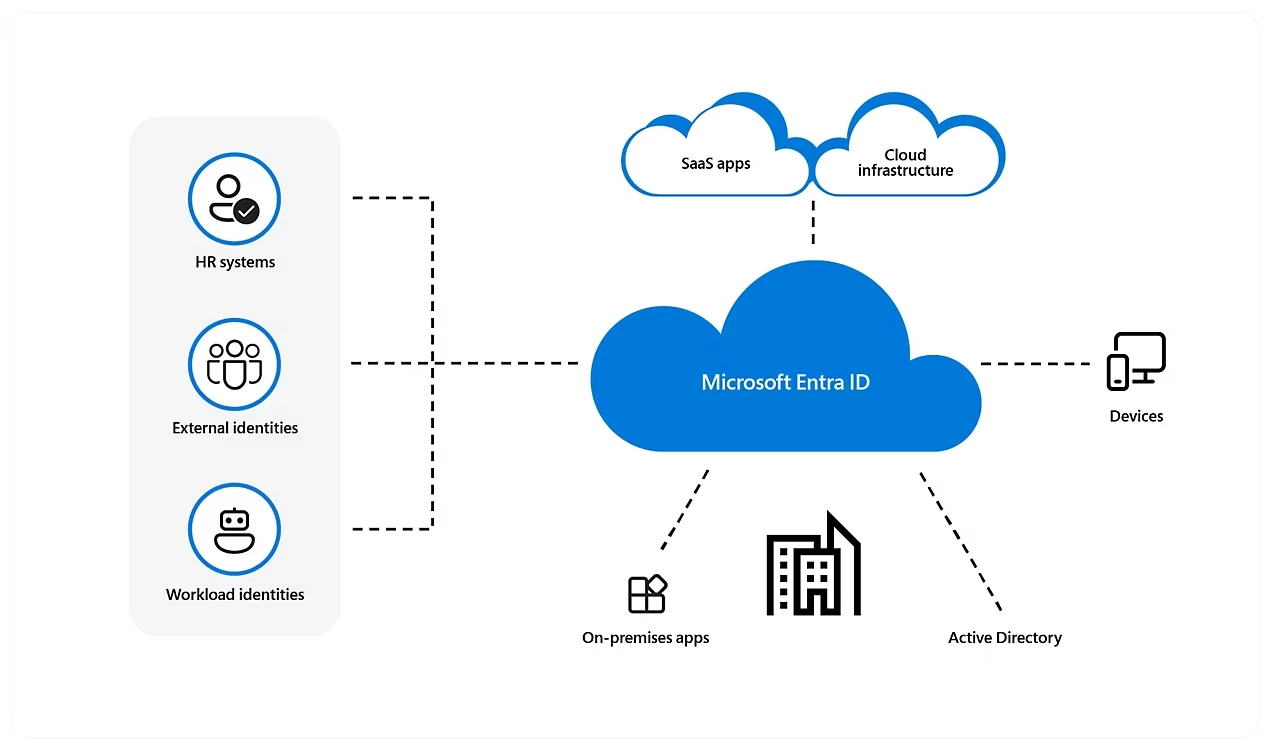 Overview of Microsoft Entra ID
Microsoft Entra ID vs Azure Active Directory: What’s the change?
The rebranding of Microsoft products has often generated some confusion between users and customers. Similar names, similar (if not identical) functionalities and services that, despite being distinct on paper, are difficult to distinguish, if not downright obscure, for those who are not in the sector.
This confusion can be extremely frustrating for those users who are simply looking for the most advanced solution suited to their security needs. They often have to scroll through endless pages of documentation or articles, only to find themselves even more uncertain about what they are reading. So let’s take a moment to finally clarify the matter and avoid wasting more time navigating the dark.
According to Microsoft, the only real difference between Microsoft Entra ID and Azure Active Directory is the name. What used to be known as Azure Active Directory is now called Microsoft Entra ID. Nothing more and nothing less.
Microsoft has renamed Azure Active Directory to Entra ID to remain consistent with its Entra product line, released in 2022. The Redmond company has in fact decided to group all its identity and access management features, including Azure AD, under the Entra brand and has therefore changed its name to minimize confusion and emphasize the centralization of all these functionalities within a single dedicated line of software products.
Microsoft Entra ID: How does it work?
After clarifying the possible confusion with Azure Active Directory, let’s proceed without further ado with our overview of Entra ID. Let’s start with a more detailed description of its main characteristics and their general operation.
Identity and access management
At the heart of Microsoft Entra ID is, as we have already seen before, the management of user identities. This includes creating and managing user profiles, authenticating users, and controlling access to resources. Identities can be managed not only for users within the organization but also for external users, such as partners or customers, through B2B (Business-to-Business) and B2C (Business-to-Client) identification functions.
Access management features are enriched by the ability to define role-based access policies (RBAC), which allow organizations to authorize and manage user access to resources based on their roles within the organization and by conditional access policies (which we will see in detail later) that allow dynamic security policies to be applied based on the context of the access, such as the user’s location or the device used.
Secure authentication
Microsoft Entra ID supports a variety of authentication methods, including multifactor authentication (MFA), a security measure that requires more than one form of identity verification to grant access to a system, application, or data and that adds an additional layer of protection, in addition to the traditional password, before granting access to sensitive resources.
As the adoption of cloud services increases, multi-factor authentication (MFA) provides additional protection against unauthorized access to these environments, often accessible from anywhere. MFA significantly reduces the risk of unauthorized access by requiring more than one verification method. Therefore, even if an attacker were able to obtain a user’s password through phishing attacks or other techniques, they would not have access to the additional factors required by the MFA.
Integration with Microsoft Authenticator and other MFA services provides tenants with a wide range of verification options, which may include apps, sending SMS to the user’s personal or business number, or voice calls to verify their identity.
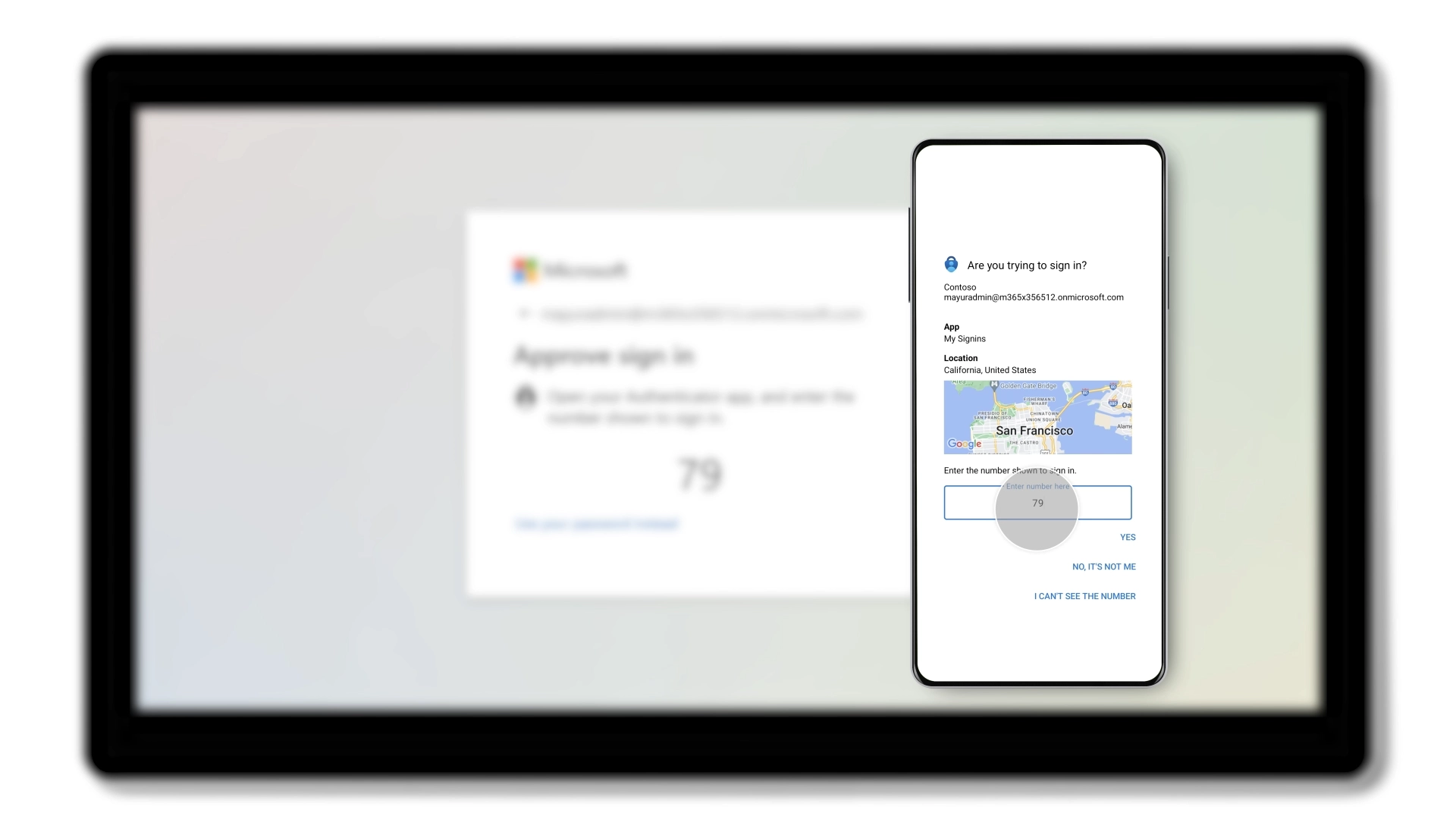 Passwordless, multi-factor authentication with Microsoft Entra ID
Conditional access
Conditional access is a cybersecurity strategy that imposes specific conditions for granting access to an organization’s resources. This approach is based on the principle of Zero Trust, which requires strict verification of every request for access before granting it.
Entra ID offers functionality dedicated to the implementation of conditional access strategies, allowing organizations to automatically activate security policies based on certain conditions. For example, a policy might require MFA authentication only when a login is attempted from an unknown geographic location or a non-compliant device.
The integration of artificial intelligence into conditional access functions makes it possible to analyze user behavior patterns and assess risk in real time, dynamically adapting access policies. If a user attempts to log in from an unusual location or with atypical behavior, Entra ID may request additional verification or temporarily block access.
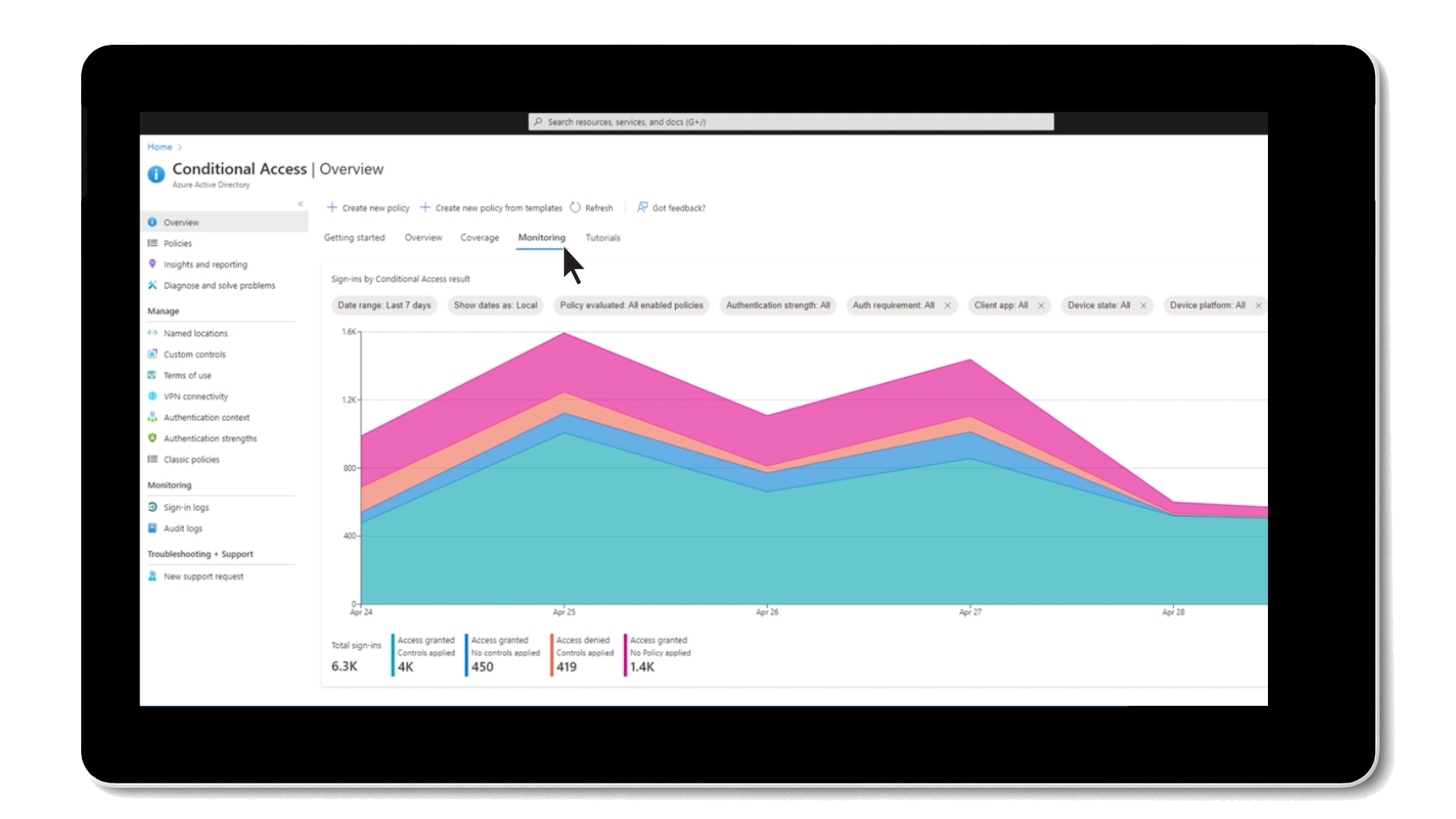 Sign-ins monitoring through conditional access in Microsoft Entra ID
Single Sign-On (SSO)
Entra ID’s Single Sign-On (SSO) feature is designed to simplify and improve access to applications and resources within an organization. It allows users to authenticate once to access different business applications and resources. After initial authentication, the user no longer has to enter credentials for each individual application, greatly improving the user experience and productivity.
Entra ID supports a wide range of applications, both cloud-based and on-premise, integrating them into the SSO authentication system. This includes Microsoft applications such as Office 365 and Azure, as well as many other SaaS (Software as a Service) and legacy applications. The platform uses open standards such as SAML (Security Assertion Markup Language), OAuth (Open Authorization) and OpenID Connect for identity federation and SSO authentication, allowing easy integration even with third-party applications that support these standards.
Privileged Identity Management (PIM)
PIM, an acronym for Privileged Identity Management, is one of the advanced cybersecurity features offered by Microsoft Entra ID. PIM allows organizations to manage in detail accounts with elevated privileges, such as system administrators, critical service accounts, and other roles with privileged access to sensitive resources.
Users with privileged roles do not have continuous access to those privileges, but should request it only when necessary. This access is granted for a limited period of time and only after formal authorization. Before granting privileges, Entra ID requires additional identity verification, such as multi-factor authentication (MFA), to ensure that only authorized individuals can use accounts with elevated privileges.
In addition, all the activities of the accounts with elevated privileges are recorded and monitored, allowing you to see who gained access, when and for how long, as well as the actions taken during the login.
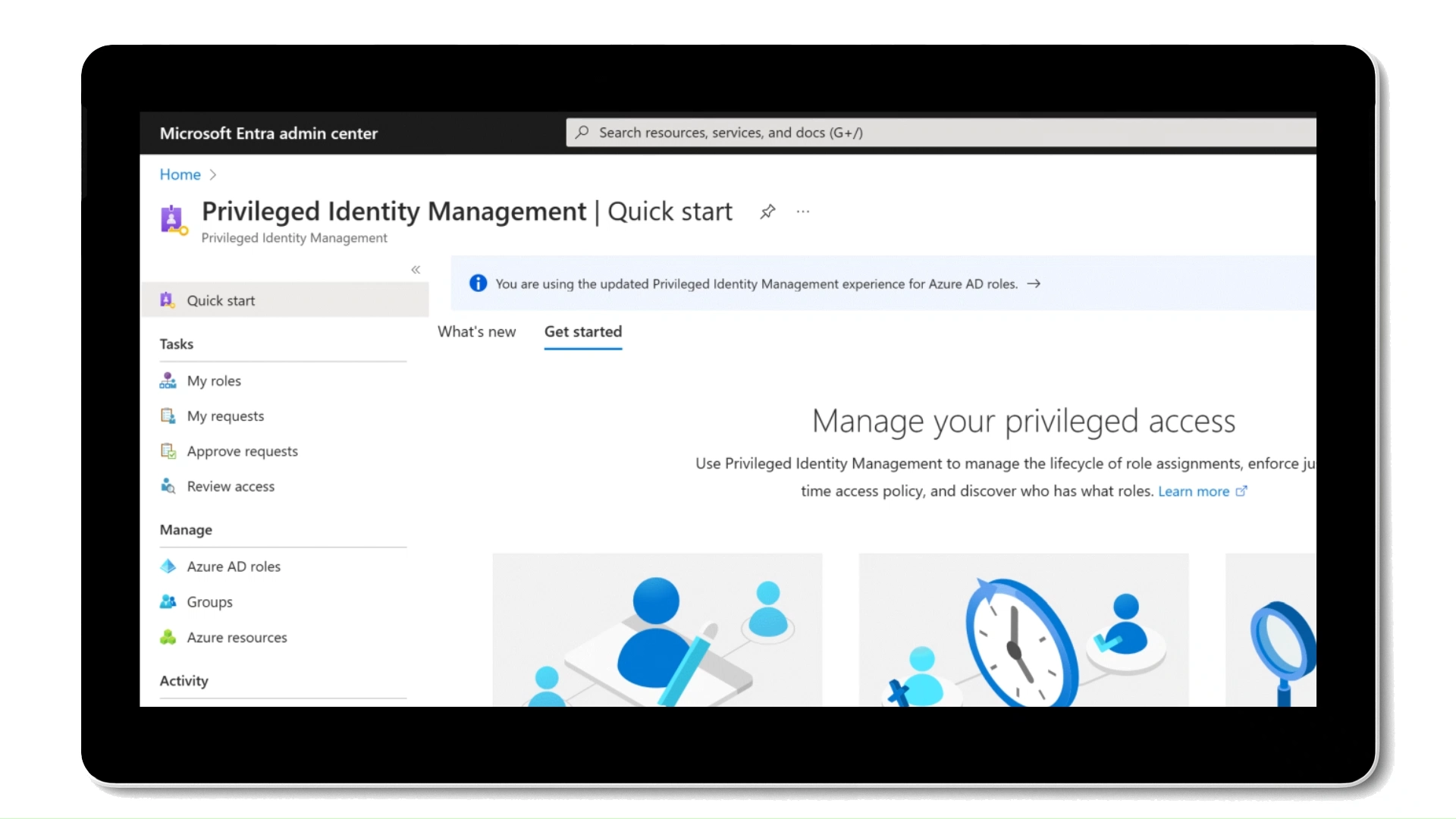 Privileged Identity Management in Microsoft Entra ID
Supported standards and integrations
To perform its identity and access management functions, Microsoft Entra ID supports several standard protocols, making it possible to integrate a company’s custom applications with the identities and authorization methods that the system manages:
- OAuth 2.0 — An open-standard identity management protocol, providing secure access for websites, mobile apps, IoT and other devices.
- OpenID Connect — OIDC was designed to work with native and mobile apps using REST/JSON protocols.
- JSON Web Token — An open standard which defines a compact and autonomous way to transmit information between parties as a JSON object.
- SAML (Security Assertion Markup Language) — An open standard which uses XML to transmit data.
- Web Services Federation (WS-Fed) — The standard developed by Microsoft that defines how security tokens can be transported between different entities to exchange identity and authorization information.
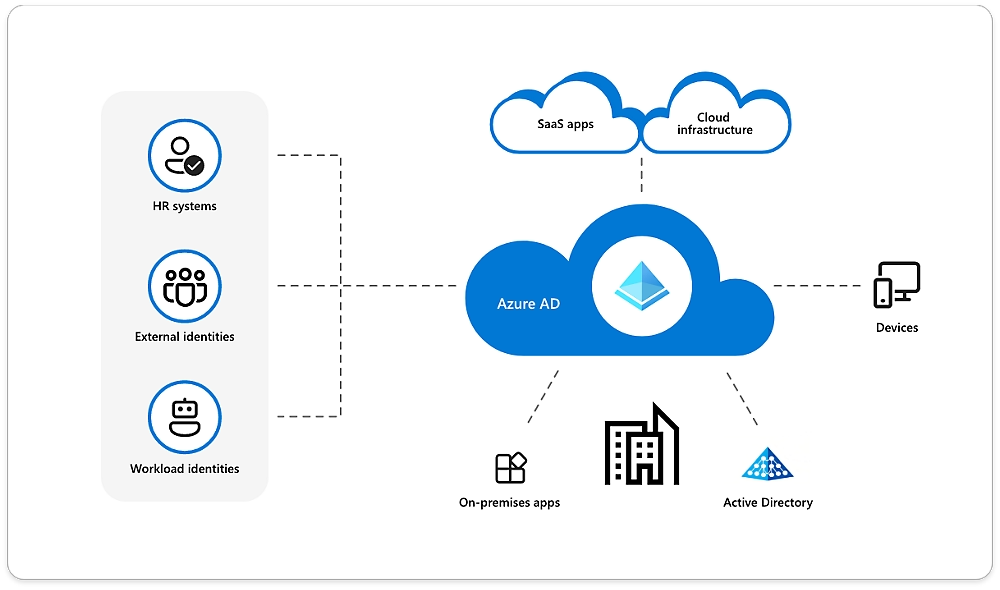 Microsoft Entra ID ecosystem
Microsoft 365 integrations
Entra ID natively integrates with Microsoft Azure and the full Microsoft 365 suite to allow unified identity management. Users of the corporate digital workplace based on Microsoft 365 can use the same credentials to access their work apps, while IT admins can control their use from a single interface.
Entra ID can also automate user account provisioning and groups. This means that when a new user is created in the system, an account in Microsoft 365 is automatically created that already has the permissions granted by the organization.
B2B and B2C identity management
Entra ID supports two additional identity models for organizations that need to manage external users:
Azure Active Directory B2C is aimed at companies that provide public access services, such as e-commerce sites, mobile apps or customer portals. It simplifies the management of customer identities, allowing them to register, access and manage the information contained in their personal account. It also allows you to personalize the user experience, from registration to access of the resources made available, adapting each phase to the brand and the needs of the organization.
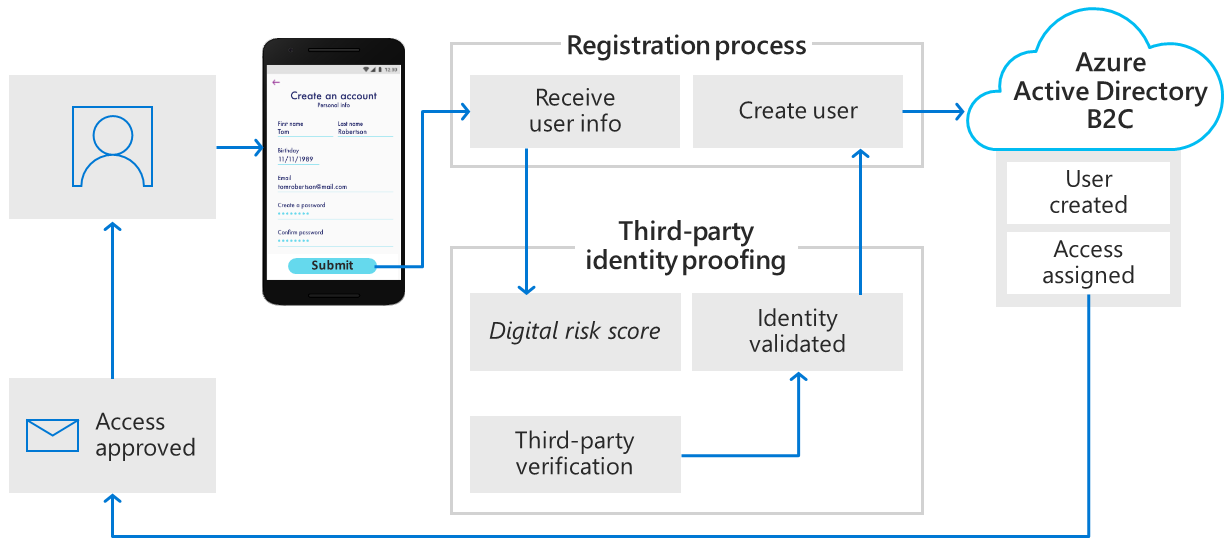 Overview of Azure Active Directory B2C
Azure Active Directory B2B is used to connect users from different organizations. It allows the host company to invite external users and manage their identities in its Azure environment. Unlike the B2C offer, it is not possible in this case to personalize the user experience, as the objective of the B2B model is to simplify collaboration between professionals.
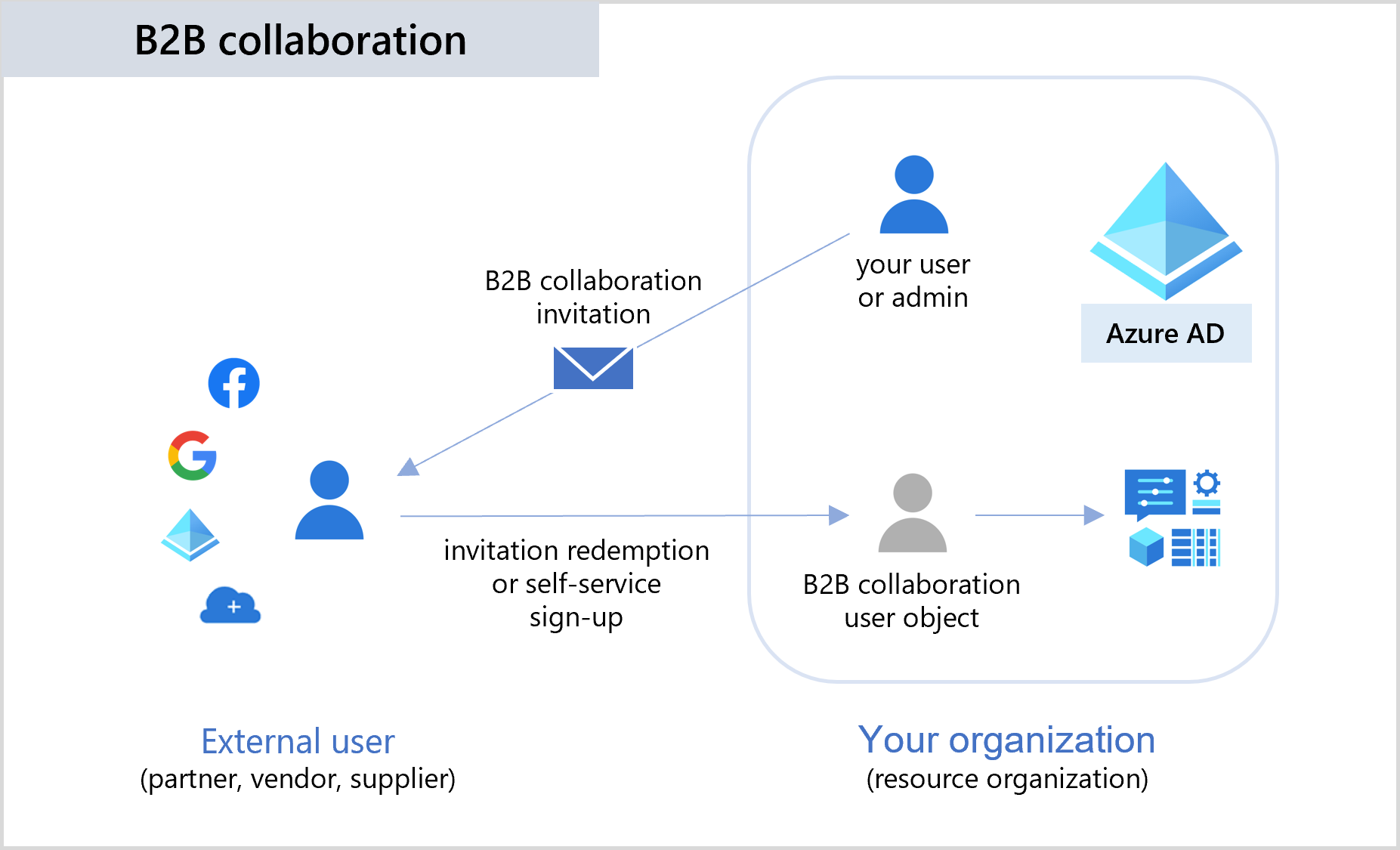 Overview of Azure Active Directory B2B
Microsoft Entra ID: implementation benefits
Now that we have a little clearer in mind its main characteristics, it’s time to see a little closer what are the main advantages of implementing Entra ID within your corporate digital infrastructures.
Dynamic tool for IT administrators and developers
Microsoft Entra ID provides IT administrators with powerful identity protection tools. Advanced machine learning algorithms proactively detect identity-based threats, allowing for rapid responses to mitigate risks. Access governance requirements are also easily met, ensuring consistent application of policies and adherence to security protocols.
The Identity Protection Score provides administrators with an overall assessment of the security status of identities within the organization, allowing them to identify areas for improvement and implement more effective security measures. Administrators can take advantage of the Access Reviews feature, which allows you to set specific review criteria to reduce the risk of unauthorized or excessive access. This tool is particularly useful in dynamic environments, where user roles and access needs change frequently.
The platform offers detailed control over access to applications and resources, simplifying user provisioning thanks to integration with Windows Server Active Directory (AD) and cloud applications, such as those of the Microsoft 365 digital workplace. It’s important to note that Active Directory (AD) is different from Azure Active Directory (Azure AD), although both can be used in combination to manage identity and access in hybrid environments.
For application developers, Entra ID offers smooth integration, acting as a standards-based authentication provider. This makes it easy to add single sign-on (SSO) functionality to applications. The effectiveness of this solution lies in its compatibility with existing user credentials, thus reducing friction during the authentication process.
In addition, developers can harness the power of Microsoft Entra ID APIs to provide access to corporate organizational data, allowing them to customize applications and align them with the specific needs of business users.
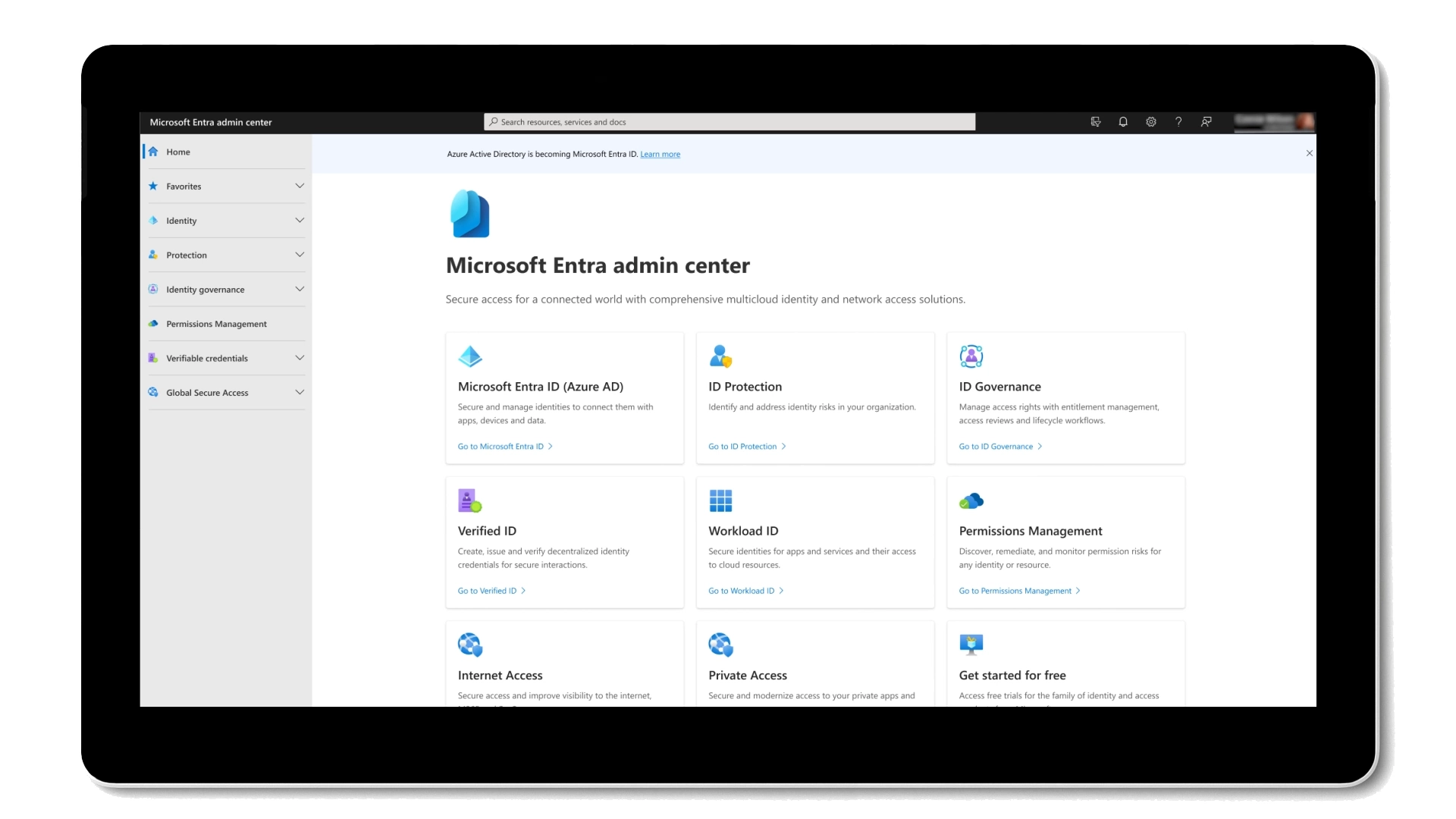 Unified administration interface with Microsoft Entra ID
Accelerating the adoption of Zero Trust models
Before the name change, Azure Active Directory had already accelerated the path of many companies to the Zero Trust model, offering high added value to the digital security infrastructures of thousands of companies at lower costs than in the past.
The Zero Trust model is a cybersecurity paradigm that starts from the assumption that you should never automatically trust anything, both inside and outside the company perimeter, and that every access attempt must be strictly verified and authenticated before granting access to resources.
This model contrasts with traditional approaches to security, which often assumed that everything within the corporate network was reliable, requiring exhausting efforts from IT departments to keep everything under control.
Microsoft Entra ID plays a crucial role in accelerating organizations’ adoption of the Zero Trust security model. As highlighted by a 2020 Forrester study, organizations that used Microsoft Entra ID (then still Azure AD) to protect their applications achieved an ROI of 123 percent, with a payback period of only six months.
Remote work support
The shift to remote work has highlighted the importance of secure access to a company’s applications and digital assets. Microsoft Entra ID’s single sign-on (SSO) capabilities simplify login procedures, allowing employees to sign in to multiple applications with a single authentication, without sacrificing security.
This consolidation of identity and access management (IAM) not only saves time, but also translates into significant increases in productivity. According to Forrester, a 50% reduction in overall management effort can be achieved for an IAM team, which will no longer have to worry about managing multiple accounts for individual users. The continuous loss of credentials by users and their change, with good management, will only be a distant memory.
In this regard, Entra ID also supports a variety of emerging identity standards, such as FIDO 2 and WebAuthn, which offer passwordless authentication methods. These standards greatly improve security and user experience, allowing authentication through biometrics or secure hardware devices, reducing dependence on passwords and improving resistance to phishing attacks.
Reducing data breach risks
Data breaches pose significant financial and reputational risks to organizations. Entra ID addresses this concern comprehensively, protecting all applications and making it significantly more difficult for attackers to compromise credentials.
Measures such as banning common passwords, blocking legacy authentication, and protecting privileged identities (PIM, which we talked about in previous sections) greatly reduce the risk of data breaches.
According to a Forrester study, organizations that take advantage of these capabilities have achieved a 45% reduction in the likelihood of a data breach, saving approximately 2.2 million dollars over a three-year period.
Microsoft Entra ID: How much does it cost?
To conclude our overview, we will now review the plans available to users who want access to the Entra ID features and the associated costs. The platform offers a free level, two paid options with a monthly cost per user and an additional add-on, also paid with a monthly cost.
Microsoft Entra ID Free
The free Microsoft Entra ID tier is a basic solution, provided at no additional cost. It integrates with Microsoft cloud services, such as Azure and Microsoft 365, and offers standard functionality for identity and access management.
This free tier includes features such as authentication, which allows the verification of user identities, and single sign-on, which allows users to log in to multiple applications with a single set of credentials. However, Entra lacks the most advanced security and management features, making this plan not ideal for companies that need the highest standards of security and digital identity management.
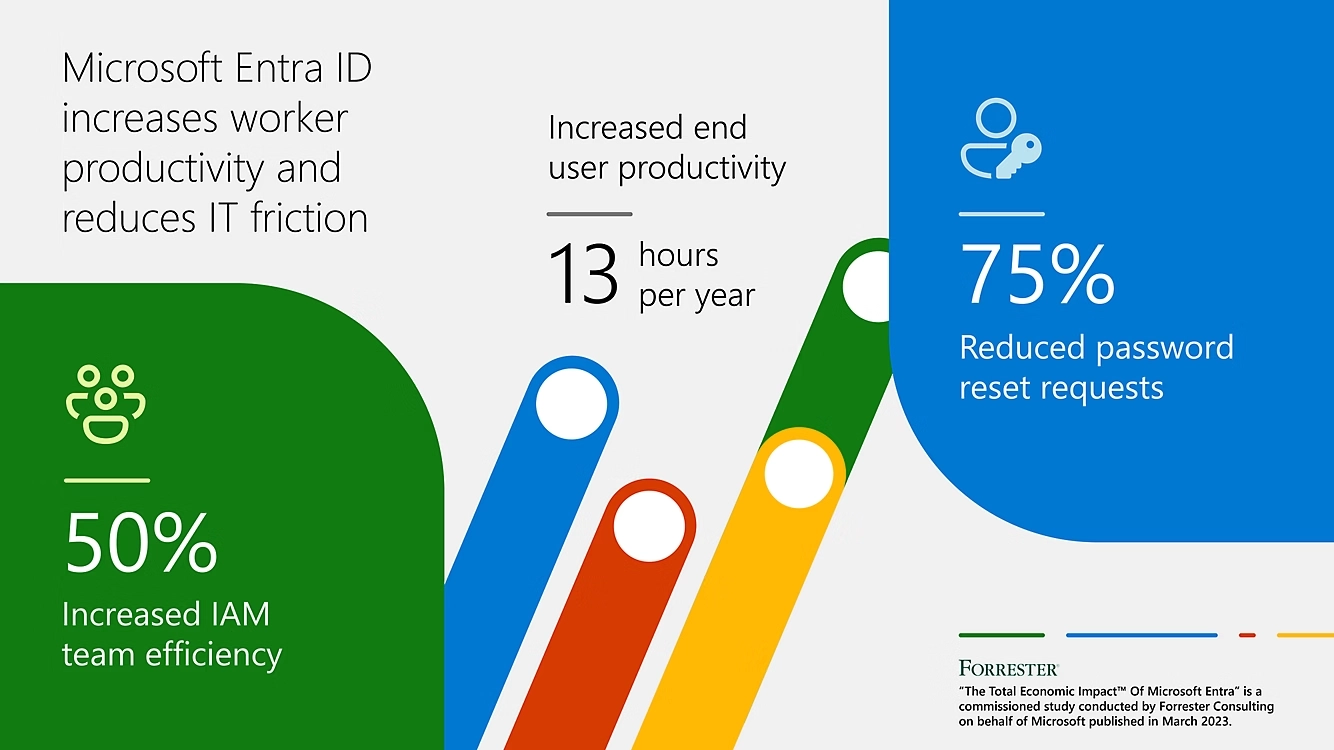 Impact of Microsoft Entra ID on organizations
Microsoft Entra ID P1
The Microsoft Entra ID P1 tier, priced at €5.60 per user per month, is available as a standalone solution or bundled with the Microsoft 365 E3 and Business Premium packages.
Level P1 includes all the functionality of the Free tier, plus advanced administration capabilities to manage identities both in on-premises environments and in the cloud, known as hybrid identity. Self-service for end users allows them to manage certain account management tasks, reducing the workload of IT departments.
Level P1 also offers multi-factor authentication and conditional access, useful for strengthening security. These features require users to provide additional verification factors before accessing resources and allow companies to implement policies that define under what conditions access to resources is allowed.
Level P1 is a great entry point for small and medium-sized businesses that want to implement robust and rigorous security measures for their digital infrastructures at a reasonable price, although they lack some of the more advanced functionality offered by the P2 plan.
Microsoft Entra ID P2
The P2 level, at a price of €8.40 per user per month, is the most complete package offered by Microsoft Entra ID and is aimed at enterprise customers who need a complete suite of tools for identity and access management. Like level P1, it is available as a standalone solution or bundled with the Microsoft 365 E3 and Business Premium packages.
In addition to the capabilities of level P1, level P2 adds identity protection to safeguard user identities with automatic threat detection and resolution, event logging, and reporting. These additional functions are crucial for detailed security monitoring and allow organizations to meticulously track accesses and identify any anomalies.
This level is suitable for large companies or organizations with strict security requirements that need advanced auditing and threat protection capabilities, such as legal, banking and financial institutions.
Microsoft Entra ID Governance
At a price of €6.60 per user per month, this add-on is available to customers already subscribed to levels P1 or P2 and allows organizations to define and enforce policies regarding the management and use of identities.
This add-on can help businesses minimize security risks associated with identity management and ensure compliance with internal and external regulations. Its capabilities are especially useful in work environments where staff, roles, and user access needs change quickly and frequently.
Among its functions is the possibility of specifying who can access resources, under what conditions and with what level of privileges. The Governance level is useful for organizations that need sophisticated control over the identity lifecycle, the enforcement of policies, and the assurance that access rights comply with internal and external regulatory requirements and corporate policies.
Conclusions
Finally, it is important to reiterate that Microsoft Entra ID is not only a rebranding of Azure Active Directory, but a significant step towards the integration and simplification of identity and access management solutions in the Microsoft ecosystem.
In recent years, the topic of cybersecurity has become more crucial than ever, and any breach in an organization’s digital infrastructure can result in significant waste of time and money. With Entra ID, Microsoft aims to protect companies from these threats with cutting-edge tools, providing users and organizations with effective means to manage digital identities and ensure secure access to corporate resources, both on-premises and in the cloud.
Please consult the table provided by Microsoft to choose the plan that best suits your needs and secure your employees’ corporate login data and digital identities as soon as possible.
Frequently asked questions about Microsoft Entra ID
What is Microsoft Entra ID? Microsoft Entra ID is the new name for Azure Active Directory (Azure AD), offering cloud-based identity and access management to help manage users and secure access to resources.
How does Microsoft Entra ID work? Microsoft Entra ID manages identities and access through features like single sign-on (SSO), multi-factor authentication (MFA), and conditional access policies, ensuring secure and seamless user experiences.
What are the benefits of implementing Microsoft Entra ID? It enhances security, supports Zero Trust models, integrates easily with applications, and helps reduce data breach risks.
How much does Microsoft Entra ID cost? It offers a free tier and two paid plans: P1 (€5.60 per user/month) and P2 (€8.40 per user/month), with an optional Governance add-on (€6.60 per user/month).
Frequently asked questions
What is Microsoft Entra ID?
What is the difference between Microsoft Entra ID and Azure Active Directory?
How does Single Sign-On work with Entra ID?
How much does Microsoft Entra ID cost?
What are conditional access and Privileged Identity Management in Entra ID?

Written by
Emanuele Rossi
Infra & Security · Dev4Side
Dev4Side Software · Microsoft Gold Partner
Need help implementing this in your company?
Our specialist teams have delivered 200+ Microsoft implementations across Italy. Contact us for a free, no-obligation evaluation of your project.
Related articles
Microsoft Azure: what it is, core services and pricing
Microsoft Azure: what it is, its core services, pay-as-you-go pricing and business benefits. A clear guide by Dev4Side, Microsoft Gold Partner.
Microsoft Purview Compliance Manager: Simple Compliance
Microsoft Purview Compliance Manager: assess risks, track improvement actions, and meet regulatory requirements — all managed from one central dashboard.
Microsoft Security Awareness Training: all the official resources
Discover the official Microsoft resources for Security Awareness Training and how to strengthen the company's security posture starting with employees.