
The 4 reasons to choose Microsoft for corporate network security
Corporate network security with Microsoft: 4 key reasons to choose Microsoft tools to protect infrastructure, users, and data from evolving cyber threats.
.png)
Microsoft for Network Security: A Brief Introduction
Microsoft network security covers the tools Microsoft provides for protecting corporate networks: Azure Firewall (stateful L3–L7 inspection), Azure DDoS Protection, Azure Front Door with WAF, Network Security Groups, Azure Private Link, and Microsoft Defender for IoT for OT/ICS environments. Together with Entra ID conditional access and Zero Trust architecture, they form Microsoft’s layered approach to enterprise network defence.
What is Network Security
A network is comprised of interconnected devices, such as computers, servers, and wireless networks, and many of these devices are susceptible to potential attacks. Let’s add to the growing complexity of any company’s digital infrastructures and see how security becomes an increasingly complex element, whose application methods must evolve as malicious actors (threat actors) develop new methods of attack on these increasingly complex networks.
Today’s network security encompasses all the measures taken to protect the integrity of a computer network and the data within it, and its role is to protect sensitive data from cyberattacks, ensuring that the network is usable and reliable. Successful network security strategies use multiple security solutions to protect users and organizations from malware and cyberattacks, such as distributed denial of service (DDoS) attacks.
A network security strategy is applied using a combination of hardware and software tools and its main objective is to prevent unauthorized access within or between parts of a network. A security manager or team establishes strategies and policies to keep an organization’s network secure and help it to comply with security standards and regulations.
Every network user must comply with these security policies because any point on the network where an authorized user can access data is also a point where data can be compromised, either by a malicious actor or due to negligence or errors on the part of the user.
Regardless of the specific method or business security strategy, security is generally seen as a responsibility shared by everyone, since every user of the network represents a possible vulnerability in it.
The most common tools and software used in network security
The choice of security policies and tools varies from network to network and changes over time. Robust security often involves the use of multiple approaches, known as defense in depth (or layered defense), to provide organizations with as many security controls as possible.
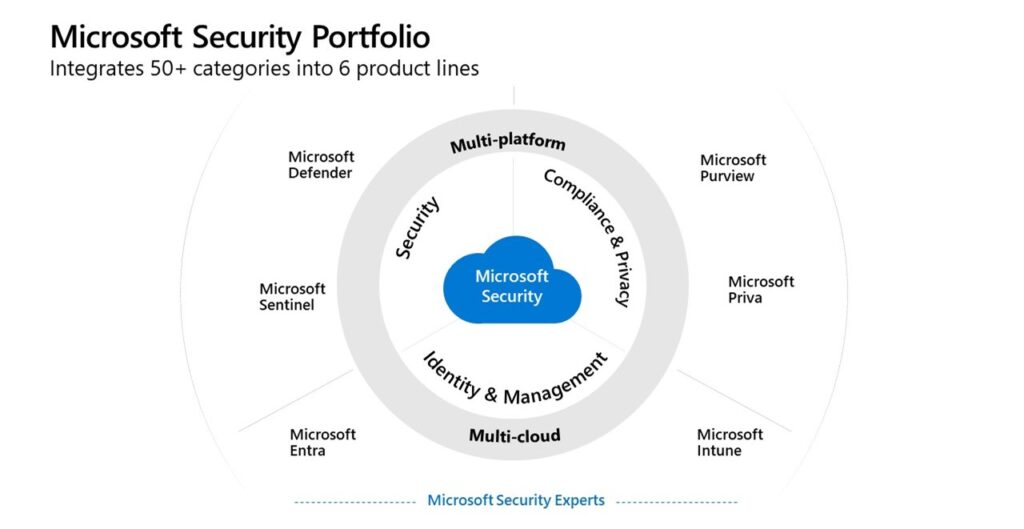
The following are some of the commonly used types of network security tools and software:
| Security Measure | Description |
|---|---|
| Access control | Limits access to network applications and systems to a specific group of users and devices. Denies access to anyone who is not authorized. |
| Antivirus and anti-malware | Software designed to detect, remove, or prevent viruses and malware (such as trojans, ransomware, and spyware) on computers and networks. |
| Application security | Protects business applications, whether developed in-house or purchased. Modern malware often targets open-source code and containers. |
| Cloud security | Cloud providers offer additional security tools. For example, AWS uses “security groups” to manage inbound and outbound traffic. |
| Data Loss Prevention (DLP) | Tools that monitor data in use, in transit, and at rest to prevent breaches. They often classify sensitive data and train employees. |
| Email security | Email is a weak point: it is often a vector for phishing and malware attacks. It is also an insecure method for sending sensitive files. |
| Firewall | Software or firmware that inspects network traffic to block unauthorized access. Next-generation firewalls provide advanced protection and deep packet inspection. |
| Mobile device security | It is essential to monitor and control mobile devices’ access to the corporate network and their activity once connected. |
| Multi-factor authentication (MFA) | Requires two or more factors to verify the user’s identity. Example: Google Authenticator generates unique codes in addition to the password. |
| Network segmentation | Divides large networks into smaller, more manageable segments for better control and traffic visibility. Critical for securing industrial control systems (ICS). |
| SIEM (Security information and event management) | Logs data from network applications and hardware to detect suspicious behavior and send automated alerts. |
| Software-defined perimeter (SDP) | Creates a virtual perimeter to hide the network from unauthorized users, relying on identity to grant access. |
| VPN (Virtual private network) | Secures the connection between an endpoint and the corporate network through tunneling protocols that encrypt data. Remote-access VPNs enable remote work. |
| Web security | Controls employees’ web usage and protects the integrity of corporate websites by blocking threats and unwanted sites. |
| Zero Trust network access (Zero Trust) | Grants only the permissions strictly necessary for the user to do their job, blocking everything else. |
 Software used for network security
General considerations when looking for a network security solution
Cybersecurity service providers offer many robust solutions to businesses for network and data protection. Although each software is efficient in its scope, companies face difficulties in determining the compatibility and scalability of a solution.
These crucial factors need to be addressed thoroughly when deciding on a network security solution.
Understand your needs
Before comparing network security software, it’s essential to know why you need it. Many companies take the wrong approach in choosing a robust solution, comparing only the characteristics of the software, without taking into account factors that could be important such as compatibility with their digital ecosystem or the ability to scale and adapt to the security measures that are required.
The first step to take is to analyze the nature of your company’s operations and security challenges. We look for weaknesses and assess what the risks are. When these elements are clear, we’ll be able to understand better how data protection software can (or can’t) help your business.
Consider the costs
The cost factor is the most important variable in the cybersecurity equation. Because software development companies take months to develop and finalize software, their products could be expensive. Generally, the cost depends on the efficiency and variety of the software.
Companies often spend a lot of time evaluating their options because of the risk of overspending. A good strategy for dealing with these problems is to find the right balance between cost and functionality, perhaps by adopting solutions that offer less advanced functionality but more suited to your needs or seeing if the provider we are interested in has cheaper plans for its service.
Compatibility with your systems
Software products can be complicated and many companies are in the bad situation of having to face continuous compatibility errors when using network and data security programs due to ill-informed choices.
When choosing online security solutions, it is always important to keep your technical teams informed and let them analyze the technical parts to verify compatibility with their internal systems.
Most credible software solution companies offer in-depth assistance in implementing new systems internally, as many factors come into play in determining compatibility.
Scalability
Purchasing a robust cybersecurity solution is just the beginning. Companies evolve over time, facing new internal and external challenges, and an important part that some companies overlook is the scalability factor. Software products are effective only when they can support new devices, systems, and applications.
Your investment may be useless if the security solution we have chosen prevents us from adopting new technologies. Therefore, when we are about to buy our new ‘shield’, we must carefully check if the program can handle future technologies and the availability of backup and recovery services.
Training and support
It takes time to understand and benefit from cybersecurity solutions because of the technicalities. Some companies delegate this responsibility to internal IT teams and expect quick results. While it can sometimes be effective, it’s best to buy a solution from companies that are willing to offer training and support.
A product developer is the ideal source of training for companies, who can organize internal training sessions with our internal teams to educate them on the effective use of the security software that we have decided to implement.
Some software companies offer ongoing support for the use and maintenance of the software. While it may cost more, it can potentially save your business from many thorny situations and lighten the workload of your IT teams.
4 Reasons to Choose Microsoft for Enterprise Network Security
Now that we have a clearer idea of what network security involves and what are the most important considerations to make in the search for a solution to adopt, the time has come to respect the statement made in our introduction and finally do some justice to one of the most underestimated and least considered sides of the Microsoft offer: the one linked to the security of digital infrastructures and networks.
The range of Microsoft products dedicated to this area is in fact impressive and the spectrum of solutions offered by the Redmond company covers virtually any security need, for companies of all types and sizes. It is only for reasons of readability that we will not list them here and we invite you to learn more about the variety of the offer by consulting the dedicated articles on our blog.
Here we will limit ourselves to analyzing the 4 main reasons to consider choosing Microsoft for the defense of its corporate networks, to understand if the Redmond house is really the partner we want to trust when it comes to protecting its operations.
 4 reasons to choose Microsoft for network security
A great commitment to cybersecurity
Microsoft announced in 2021 an investment commitment of 20 billion dollars over 5 years in cybersecurity and has invested significantly to integrate security into its core technologies such as Windows, Office and Azure, in addition to making strategic acquisitions of security technologies that enhance the investments that customers have already made in Microsoft.
The software house manages the Microsoft Cyber Defense Operations Center (CDOC), a cybersecurity and defense structure active 24 hours a day, 7 days a week, with world-class security experts and data scientists who protect, detect and respond to threats targeting Microsoft’s cloud infrastructure, products and devices, and internal resources.
Microsoft uses its hosted cloud and security solutions and manages its business on the same multi-tenant cloud services as its customers, including those from highly regulated industries and governments.
Their engineers, researchers, forensic experts, threat hunters, and data scientists work together to improve Microsoft products and services for their customers. The global incident response team works tirelessly to help software house customers to respond and recover from breaches, and their team of Executive Security Advisors, including several former CISOs, uses extensive practical experience to collaborate with customers in planning and implementing robust security programs.
A Holistic Approach to Security
Microsoft adopts a layered security approach to enable the digital transformation of its customers’ businesses.
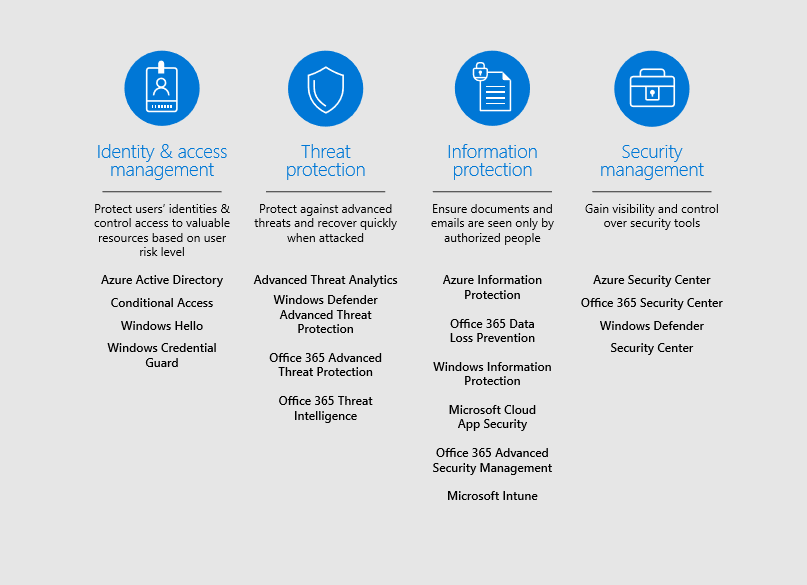
- A complete platform — The Microsoft platform looks holistically at all the critical endpoints of today’s cloud and mobile based world. By integrating security into Microsoft products and services from the start, the company can offer a comprehensive and agile platform to better protect its organization, detect threats more quickly, and respond to security breaches even in larger organizations. The platform serves as a framework to protect business organizations in four ways:
- Identity and access management: protect user identities and control access to valuable resources based on the user’s level of risk
- Threat protection: protect against advanced threats and help recover quickly in the event of an attack
- Information protection: ensure that documents and emails are visible only by authorized people
- Security Management: gain visibility and control over security resources, workflows and policies, as well as recommendations for improving security posture
- Vast intelligence — Microsoft’s information network is built on a massive amount of security-related signals from consumer and commercial services that operates on a global scale and powers Microsoft solutions to help to protect, detect and respond more effectively to threats. Every day the software house’s large intelligence network:
- Scan 5 billion emails for phishing and malware
- It processes more than 100 trillion security signals
- Blocks 4.5 million new malware attempts
- Analyze 38 million identity risk detections
Using the enormous reach and depth of signals and intelligence deriving from various globally distributed on-premises and cloud solutions, Microsoft investigates threats and vulnerabilities and publishes the Microsoft Digital Defense Report (MDDR) annually to educate business organizations on the current state of threats and on best practices and recommended solutions.
Microsoft is committed to being a leader in this sector, but security is not an issue it can address alone, and its commitment is to ensure that our products work with the technology you already use, promoting a vibrant ecosystem of partners that help the software house raise standards across the industry.
The giant also collaborates extensively with customers and industry standards bodies to help them meet specific customer needs and industry regulations.
A mission aligned with your needs
Microsoft’s mission is to give every person and every organization on the planet a chance to achieve more. As the CEO, Satya Nadella, stated, *“Companies and users will embrace technology only if they can trust it.”*And that’s why Microsoft wants to make sure that its customers can trust the digital technology they use, backed by the guarantees they need. The Redmond company has made massive investments in privacy and control, compliance and transparency and in particular in the features that are most important to its customers and to protect them in the dangerous landscape of the modern network.
For example, for cloud services provided through the Azure platform, the software house has focused its commitments on helping users and companies to have control over their data, to allow them to comply with the current laws of each state, with key international regulations and standards, and to be transparent with their customers regarding the collection and use of data.
Last but not least, Microsoft is constantly working to protect our data from hackers and unauthorized access using cutting-edge technologies, processes and certifications that create a security network around us, consisting of software and human solutions capable of responding to any threat.
Leadership in sharing security best practices
Microsoft collaborates extensively with governments and organizations around the world in sharing industry standards, providing guidance on cybersecurity best practices, and committing to protecting critical infrastructure sectors.
An emblematic example is Microsoft’s deep involvement with the Cyber Security Framework (CSF) of the National Institute of Standards and Technology (NIST). Microsoft actively contributed to the development of the framework and was among the first companies to adopt it for its enterprise risk management program, informing and influencing the company’s risk management practices.
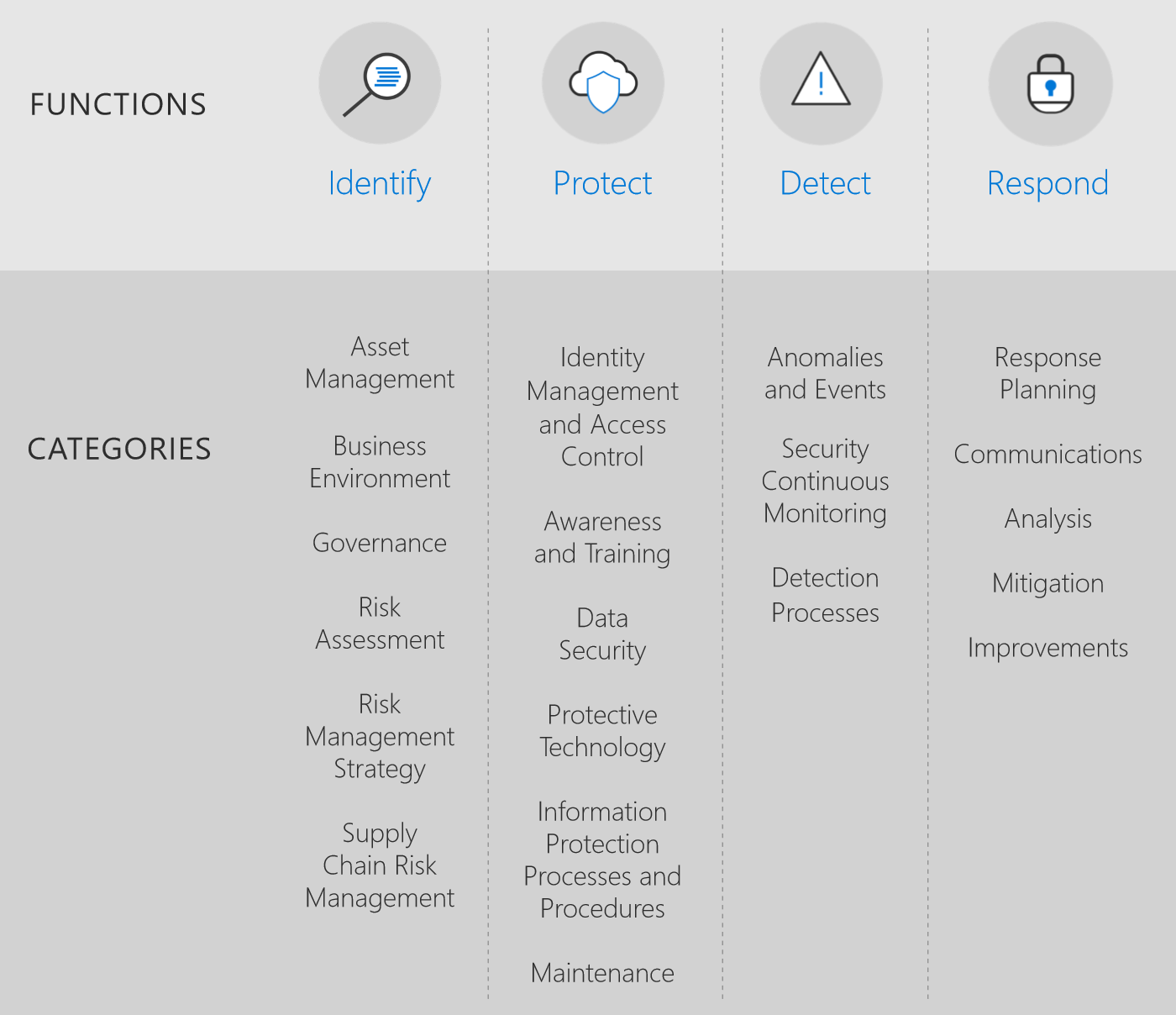 CFS and NIST functions and categoriesThe latter has also become a key component in the way in which Microsoft monitors the state of its security posture and the growth of its cybersecurity solutions.
In addition, the Microsoft Security Development Lifecycle (SDL), established as a mandatory policy in 2004, was designed as an integral part of the software development process at Microsoft. Combining a holistic and practical approach, the SDL introduces security and privacy at an early stage and along every step of the development process.
The industry has accepted practices aligned with the SDL, and Microsoft continues to adapt it to new technologies and changes in the threat landscape. The software house has also developed guidance documents, tools, training and resources to help organizations understand and adopt the SDL quickly and efficiently, outlining each step in a simple and clear way.
Conclusions
Microsoft has always been committed to the cybersecurity landscape and is the main security partner of some of the largest companies in the world not only for the reasons listed above, but also many other reasons that we have not had the opportunity to list here without risking turning this short article into a real book.
The Redmond company is not only the software house that has put on the market some of the most important software for business productivity and office work ever, such as the evergreen Office tools, but it is also one of the leading companies in the digital security sector and its offer in this regard should not be underestimated.
To learn more about the more technical aspects of its offer dedicated to network security, we invite you to consult the articles on our blog dedicated to services related to network security (the most important here and here) and to visit the official Microsoft documentation (available hither) to understand if it is also the right solution for your needs.
FAQs about Enterprise Network Security
1. What does network security mean?
Network security is the set of measures, technologies, and policies that protect networks and data from unauthorized access, malware, attacks (e.g., DDoS), and outages, keeping the network reliable and available.
2. Why has network security become more critical with cloud and remote work?
Because the traditional “on-premises” perimeter no longer exists: users, devices, and applications operate across cloud and hybrid networks. As a result, the attack surface and complexity increase, as does the need for visibility into traffic flows (north-south and east-west).
3. What are the most common threats to corporate networks?
Among the most frequent are: email phishing, malware/ransomware, credential theft, DDoS attacks, lateral movement within the network (east-west), and vulnerabilities in applications and open-source/container components.
4. Which tools are typically part of a ‘modern’ network security strategy?
Typically, multiple layers are combined (defense in depth): access control, MFA, firewalls, endpoint protection, email security, DLP, segmentation, SIEM/SOAR, VPN or zero-trust access, web security, and cloud security posture management.
5. What does defense in depth (layered security) mean?
It is an approach that layers multiple controls (technical and organizational) to reduce the likelihood that a single weakness compromises the entire infrastructure, improving prevention, detection, and response.

Written by
Emanuele Rossi
Infra & Security · Dev4Side
Dev4Side Software · Microsoft Gold Partner
Need help implementing this in your company?
Our specialist teams have delivered 200+ Microsoft implementations across Italy. Contact us for a free, no-obligation evaluation of your project.
Related articles
GitHub Advanced Security: Features, Benefits and Limitations
GitHub Advanced Security protects code and secrets with CodeQL, Copilot Autofix and secret scanning. Features of GitHub Code Security and Secret Protection, pricing and real-world limitations.
Microsoft Entra ID is the new Azure AD: How does it work?
Microsoft Entra ID is the evolution of Azure Active Directory, the solution for identity and access management. Here are differences, features, and costs.
Microsoft Purview Compliance Manager: Simple Compliance
Microsoft Purview Compliance Manager: assess risks, track improvement actions, and meet regulatory requirements — all managed from one central dashboard.