
Terraform Azure: What it is, features, and examples
Let's see what Terraform is, what features it offers to companies, and how to use it for provisioning infrastructure and resources on Microsoft Azure.

Terraform Azure: an introduction
Terraform on Azure is the use of HashiCorp’s open-source Infrastructure as Code (IaC) tool to provision and manage Microsoft Azure resources — virtual machines, virtual networks, storage accounts, AKS clusters, Azure SQL databases — through declarative HCL configuration files stored in version control. The AzureRM provider maps Terraform resources directly to Azure Resource Manager APIs, enabling repeatable, reviewable infrastructure deployments as part of CI/CD pipelines.
What is Infrastructure-as-Code?
Before going to discuss Terraform and its integration into Azure, let’s first take a minute for a brief review, for the benefit of those who may have missed a few steps. What is Infrastructure as Code?
Infrastructure as Code (IaC) is an approach to managing and configuring IT infrastructures through the definition and automation through code, rather than through manual intervention on servers or network devices.
With IaC, the infrastructure (servers, databases, networks, etc.) is described in readable and repeatable configuration files, usually in formats such as JSON, YAML or specific languages such as HCL (HashiCorp Configuration Language).
These files can be versioned, revised, and managed like any other source code, making the provisioning and management process more efficient and less prone to errors.
The IaC offers numerous advantages, including greater consistency, repeatability, and scalability of infrastructure deployments, as well as faster and more reliable provisioning. It also allows the use of version control and documentation of infrastructure configurations, making it easier to track changes and rollbacks.
It aligns perfectly with the core principles of DevOps, such as automation, collaboration, and continuous integration and delivery (CI/CD).

Terraform Azure: what it is, features and terminology
HashiCorp Terraform is an Infrastructure as Code tool that helps to more reliably deploy and manage infrastructure deployments on one or more clouds, or even on-premise.
Like all IaC tools, Terraform allows you to write code that is used to create, modify and version the distributions of your digital infrastructure in a reliable and efficient way.
There are two types of Infrastructure as Code: declarative and imperative.
Terraform belongs to the declarative type of IaC, in which you write a template file or, in the case of Terraform, one or more files with a .tf extension in the Terraform Configuration Language.
These files state what the final result of deploying the infrastructure should be; therefore, when you deploy with the Terraform tool, it will make the necessary changes or updates to the infrastructure to meet the desired definition that has been declared.
In comparison, an imperative approach to the IaC would use traditional command-line scripts (CLI) that perform all the necessary steps in the order in which they are written.
The declarative IaC is more efficient and reliable, since it is not necessary to know the current state of the infrastructure when writing the IaC code, and the tool will determine what changes or updates to make at the time of deployment.
The code written in Terraform can be used to declare (or define) all the infrastructure components necessary for a given workload. This workload could be a single application or even a large scale system comprised of multiple microservices, databases, virtual machines, and other resources.
The infrastructure components of the workload may include low-level infrastructure resources such as network, storage, and computing resources, and also high-level infrastructure such as Platform as a Service (PaaS) computing and database services or other components.
While tools such as Azure Bicep and ARM Templates are developed by Microsoft to natively support the management of Microsoft Azure resources, these tools allow you to manage only Azure resources.
Using HashiCorp Terraform, on the other hand, you can use the same tools and languages to manage Microsoft Azure resources, in addition to any other resource within your environments from a single Terraform project.
In addition, with Terraform, SREs or DevOps engineers will use the same skills and understanding of the HCL language to manage all resources, while also ensuring efficiency benefits.
 There are several advantages to using Terraform to manage your resources:
- Platform agnostic: Terraform is a platform-independent IaC tool, which allows you to manage Microsoft Azure resources together with other types of resources (such as K8s, Helm, AWS, Google, etc.) from a single project.
- Change Plan Validation: Terraform allows you to execute a Plan before applying changes to the infrastructure, so you can inspect it and make sure that only the changes you intend to make are actually applied to your environments.
- Simple deployment: A declarative language and tool such as Terraform make it easier to deploy and manage Azure resources than using a scripting language through automation. You can run the Terraform Plan and Apply multiple times in your environment without it breaking, as could happen with an imperative scripting language, all without making changes to the code.
Terraform terminology
When you start using Terraform, there are some important terms to know to better navigate your way through files, documentation, and other resources while working on your Terraform projects.
Here are some useful terms that are important for all DevOps engineers or site reliability engineers (SRE) to understand:
- Terraform File: a Terraform (.tf) file that contains configuration language code.
- Terraform Project: a directory/folder that contains one or more Terraform files, all of which are part of the same infrastructure distribution.
- Resource: the main construct in Terraform. These are the items that will be provided, such as Storage Accounts, Virtual Machines, Virtual Networks, etc.
- Provider: the ‘plugins’ that allow Terraform to know and work with resources within Microsoft Azure or another cloud provider.
- Variable: a name assigned to a value so that it can be referred to in one or more places within a Terraform file. Similar to a variable in any other programming language.
- Input Variable: values that are passed to your Terraform during the execution of a deployment. These can be provided using the Terraform CLI or as environment variables.
- Module: essentially, a Terraform file directory/folder that is reused in multiple Terraform distribution projects is a module. There are other specific terms, however these are the main ones you should know when you start using Terraform automation and form the basis for understanding how it works.
Terraform Azure Providers: what are they and which are specific to Azure
As a platform-independent set of tools, Terraform adopts a “plugin” style model to add providers that manage communication with the various infrastructure APIs.
This allows the Terraform code to integrate the specific providers you need to work with your infrastructure distributions and enhance the tool with the ability to manage different technological resources such as, in our case, Microsoft Azure resources, Microsoft Azure AD resources or even non-Microsoft technological resources.
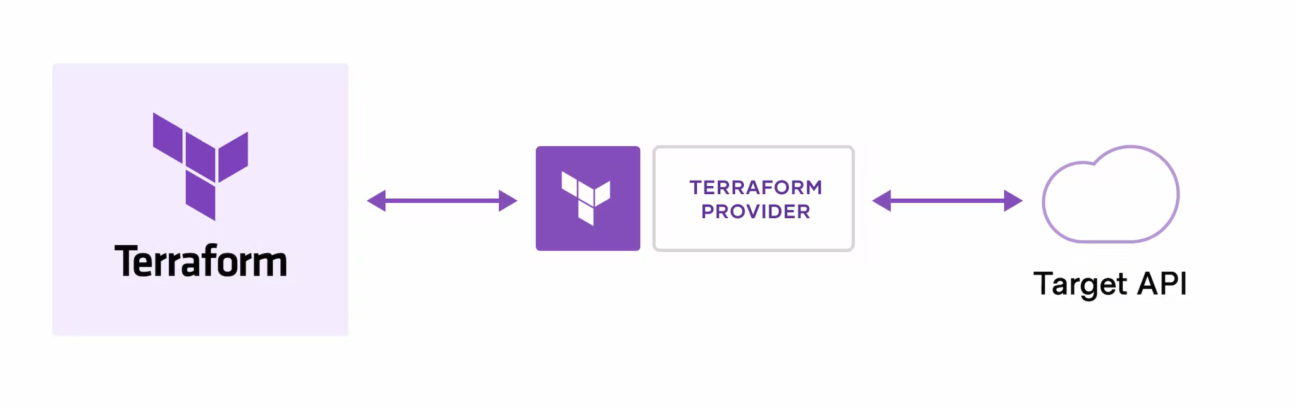 To work with the Microsoft Azure infrastructure through Terraform, you use the azurerm provider to code against the Microsoft Azure Resource Manager (ARM) REST APIs.
The azurerm provider allows the management of Microsoft Azure resources such as virtual machines, storage accounts and network interfaces, but it is not the only one dedicated to Microsoft’s cloud platform.
In fact, there are several Terraform providers specific to the various types of Azure resources:
- azuread: the AzureAD provider allows the management of resources within Microsoft Azure Active Directory such as groups, users, service principals and applications.
- azuredevops: the Azure DevOps provider, developed by Microsoft, allows the management of specific resources within Azure DevOps such as agents, repositories, projects, pipelines and queries.
- azapi: the azAPI provider is built on top of the Azure ARM REST APIs and allows the management of Microsoft Azure resources and properties in preview that are not yet supported or will not be supported by the AzureRM provider.
- azurestack: the Azure Stack provider allows the management of specific resources in the cloud platform service of the same name, such as virtual machines, DNS, virtual networks and storage. As an Infrastructure as Code tool, the infrastructure managed by Terraform is configured in HCL (HashiCorp Configuration Language) code and is usually inserted into version control (such as Git) and integrated with CI/CD distribution pipelines for distribution automation.
Azure Terraform Modules: what are modules and AVMs
Terraform modules are a way to create blocks of Terraform HCL (HashiCorp Configuration Language) code that can be reused within a single Terraform project or even across multiple Terraform projects.
An analogy for programmers, thinking about Terraform modules, is to compare them to a function or a code method.
For those not used to the programming language, let’s imagine instead having a set of instructions for building something, like a house. If you want to build several similar houses, instead of rewriting all the instructions each time, you can create a form with instructions for a part of the house, such as the kitchen, and reuse it whenever you need it.
In the beginning, when you start writing a Terraform project, you create one or more Terraform code files (.tf) inside a single folder. This is similar to writing all the code for a program in a single source code file of more than 1,000 lines.
With modules, you can break that code down into blocks that are used throughout the program. This allows you to create reuse of the code and to adhere to the DRY (Don’t Repeat Yourself) best practice in programming, also making the code easier to read and maintain over time.
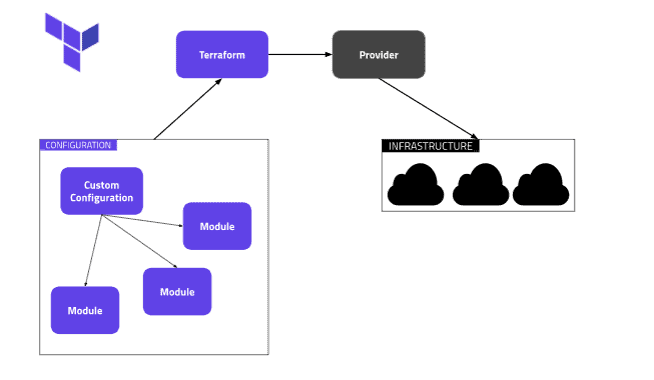 Terraform module diagramTerraform modules offer advantages for different use cases:
- They reduce code duplication in a project.
- They allow code to be reused across multiple projects.
- They can increase the overall readability of the project.
- They can alleviate the burden of code maintenance over time.
- They can improve efficiency in making configuration changes to more resources that are provided in the same way.
- They can help standardize compliance and security requirements across different infrastructures and projects. At a basic level, a Terraform form is a collection of Terraform code (.tf) files in the same folder. This is similar to a regular Terraform project, but with a Terraform module, you can use the form from another module or project to achieve code reuse for infrastructure.
When thinking about reusing code compared to other development technologies, it’s useful to consider a Terraform module as a code library that is referenced and called from another library or code application.
In 2024, Microsoft announced Azure Verified Modules (AVM), an initiative to standardize Infrastructure-as-Code (IaC) modules for Azure. The goal is to provide a unified set of Terraform (and Bicep) modules that adhere to industry best practices and specific standards.
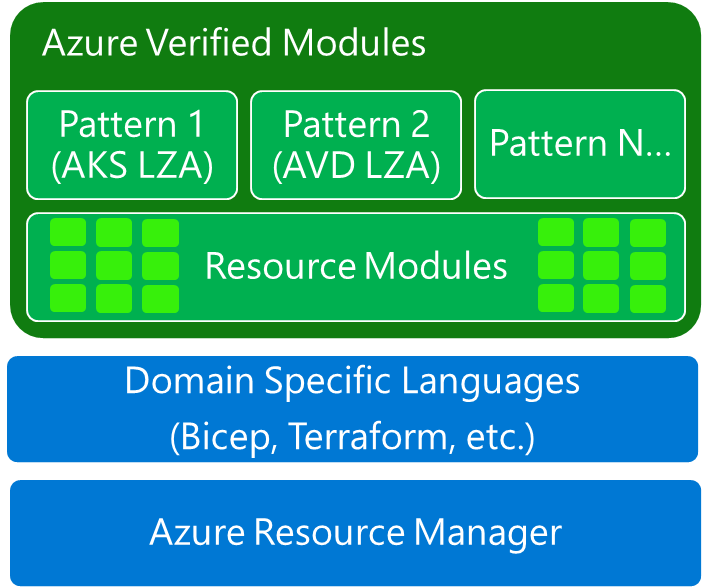 Azure verified modulesKey features of AVM:
- Standardization: AVM provides a set of Terraform modules that align with the recommendations of Microsoft’s Well-Architected Framework, ensuring best practices for security, reliability and efficiency in its infrastructure.
- Efficiency: Using these predefined Terraform modules can significantly reduce the time and effort needed to code and test similar configurations, increasing the productivity of IaC distributions.
- Flexibility: AVM modules are designed to be easily integrated into existing Terraform scripts, offering adaptability in their IaC distributions.
- Support: Being an official Microsoft initiative, AVM modules have strong support from a large community of developers. Problems or feature requests can be reported through GitHub or through Microsoft support channels.
- Continuous and regular updates: AVM modules are regularly updated with the latest Azure features and improvements, ensuring that the infrastructure keeps up with the evolution of the cloud landscape. To start using AVMs for Terraform, you can explore the modules currently available on AVM official page.
Azure Terraform: practical examples with azurerm
Now that we’re a little more clear about what Terraform is and the basics of how it works, let’s take a look at an example of Terraform code using the Azure Resource Manager (azurerm) provider to create an Azure resource group and then an Azure storage account within that resource group.
All infrastructure deployments in Microsoft Azure will use resource groups, and most will also use Azure storage accounts.
The following examples will provide a better understanding of how to use Terraform to manage Microsoft Azure resources. So, let’s move on.

Creating an Azure Resource Group
Here’s a simple Terraform code example that uses the Azure RM azurerm_resource_group resource type to specify the IAC for deploying an Azure resource group.
Create a resource groupresource “azurerm_resource_group” “d4s” {name = “d4s-rg” location = “West Europe”}When you run a Terraform deployment using this code, the Azure resource group will be created.
Note that within the Terraform code for the azurerm_resource_group resource, the Terraform code sets the name of the ‘Terraform resource’ to d4s.
This name can be used to refer to the next Terraform code resource (such as creating the Azure storage account below) to access the properties/values of the resource and configure other resources to be distributed.
For example, in other Terraform code, you can refer to this resource group using the following format:
Format[Terraform Resource Type]. [Terraform Resource Name]
Specify the resource type of the AzureRM Resource Groupazurerm_resource_group. [Terraform Resource Name]
Specify the particular Resource Group named “d4s”azurerm_resource_group.d4sNote that to refer to the resource group named d4s, you must assign this name to the resource type of the resource group (azurerm_resource_group). When declaring Terraform resources, the first value in quotes (“) is the Terraform resource type, and the second value in quotes (“) is the name of the resource.
Here’s an example to clarify:
Formatresource “[Terraform Resource Type]” “[Terraform Resource Name]” {…}
Specify the resource type of the AzureRM Resource Groupresource “azurerm_resource_group” “[Terraform Resource Name]” {…}
Specify the Resource Group resource type to be named “d4s”resource “azurerm_resource_group” “d4s” {…}All resources defined within the Terraform configuration files must have a unique name within the Terraform configuration files (.tf). This uniqueness must be respected in all .tf files in your distribution, whether you use a single .tf file or multiple files. In addition, the name is unique to the type of Terraform resource that is being deployed.
This Terraform Resource Type + Resource Name scheme is used to define each unique resource that the Terraform configuration will manage and deploy. It can also be used to set dependencies between Terraform resources, allowing you to refer to one resource when configuring another; as illustrated below.
Creating an Azure Storage Account
Here’s a Terraform code example for creating an Azure storage account using the azurerm_storage_account resource type.
In this case, the Terraform resource name for the storage account is set to d4sstorage, and the resource_group_name for organizing the resource within Azure refers to the Azure resource group created in the previous example.
Create an Azure Storage Account resource“azurerm_storage_account” “d4sstorage” {name = “d4sstorage”# Place in the same resource groupresource_group_name = azurerm_resource_group.d4s.name# Use the same location as the resource grouplocation = azurerm_resource_group.d4s.location account_tier = “Standard” account_replication_type = “GRS” tags = {environment = “dev”}}When running a Terraform deployment using this code, the Azure storage account will be created with the specified configurations, such as placing it within the previously created Azure resource group in the same distribution.
By setting the azurerm_storage_account.resource_group_name property to the value of azurerm_resource_group.d4s.name, the previously created Azure resource group is referred to, using the .name to indicate to the azurerm provider which resource group to insert the Azure storage account.
Conclusions
Microsoft’s well-established commitment to open source has been bearing great fruit for many years and the integration of a whole series of tools and tools into its proprietary services is leading to a significant increase in the quality of the offer for all those companies that need more efficient digital infrastructures.
The combination of Terraform and Azure is yet another good example of how this openness has paid off tremendously. In the hands of developers, engineers and SREs, it proves to be a powerful and versatile tool for managing cloud infrastructure, with its ability to automate the provisioning and configuration of resources, thus allowing organizations to reduce development times and improve consistency in distributions.
Finally, we cannot fail to mention an extremely active community that contributes modules and providers to continue to improve them and integrate Terraform functionality even more closely with Azure services.
FAQ about Terraform and Microsoft Azure
What is Terraform and how does it work with Azure?Terraform is an open-source tool developed by HashiCorp that allows you to define and manage infrastructure as code, according to a declarative approach. When used in combination with Microsoft Azure, it allows DevOps developers and engineers to automate the provisioning and configuration of Azure resources, while maintaining a high level of consistency, repeatability, and versioned control. Its operation is based on files .tf written in HCL, which declare the desired state of the infrastructure.
What are the benefits of using Terraform with Azure?Using Terraform on Azure means having a tool independent of the cloud provider, capable of orchestrating Azure resources together with resources from other platforms within the same project. The ability to inspect changes before application thanks to the command Plan, the ease of use offered by the declarative language and the absence of breaks even in repeated executions make Terraform particularly suitable for managing complex and dynamic environments.
Which Terraform providers are available for Azure?To work with Azure, Terraform provides several specific providers. The main one is Azurerm, which interacts with the Azure Resource Manager REST APIs and allows you to manage resources such as virtual machines, storage accounts and networks. Other providers include Azuread for managing users and groups in Azure Active Directory, Azuredevops to interact with Azure DevOps, Azapi to access ARM functionality in preview and Azurestack to manage distributed environments through Azure Stack.
What is a form in Terraform and what are AVMs?A Terraform module is a collection of files that encapsulate reusable blocks of code, making it easier to manage and maintain infrastructure. Thanks to the forms, it is possible to avoid duplication, increase the readability of the project and apply changes in a centralized way. Azure Verified Modules, known as AVM, are a series of official modules developed and supported by Microsoft to ensure that distributions follow best practices in terms of security, efficiency and reliability.
What resources can be created with Terraform on Azure?With Terraform, you can create any type of Azure-supported resource, including network, storage, computational, and PaaS. A common example is creating a resource group followed by a storage account, defining the desired properties in the code .tf and letting Terraform generate and maintain the corresponding infrastructure state.
What is the difference between declarative and imperative approach in IaC?The declarative approach, such as that adopted by Terraform, is based on describing the desired state of the infrastructure. It is up to the tool to calculate and apply only the changes necessary to achieve that state. On the contrary, the imperative approach requires that each step be explicitly written and followed in order, making management less flexible and more prone to errors. Terraform, with its declarative model, does not need to know the current state of the infrastructure at the time of writing, improving reliability and scalability.
What terms do you need to know to start using Terraform?It is important to familiarize yourself with concepts such as files .tf, which contain the infrastructure code, and with terms such as resource, provider, variable, module and input variable. Each resource is defined by a type and a name that must be unique within the project. Providers allow Terraform to interact with cloud APIs, while variables make code more dynamic and reusable. Finally, the modules allow you to organize the code in logical and reusable blocks for greater efficiency.

Written by
Emanuele Rossi
Infra & Security · Dev4Side
Dev4Side Software · Microsoft Gold Partner
Need help implementing this in your company?
Our specialist teams have delivered 200+ Microsoft implementations across Italy. Contact us for a free, no-obligation evaluation of your project.
Related articles
Azure DevOps Consulting: What It Is and What It Offers
Azure DevOps Consulting: partner with a certified Microsoft expert for CI/CD and DevOps. Benefits, selection criteria, and what to expect from the engagement.
Azure Security Consulting: security consulting 'in the clouds'
Azure Security Consulting: protect your cloud with a certified Microsoft partner. What's included, why it matters, and how to choose the right consulting team.
Azure Logic Apps: what is it and how it works
Azure Logic Apps automates workflows and integrates systems without writing code. Features, pricing, and common enterprise automation use cases in Azure.