
GitHub Advanced Security: Features, Benefits and Limitations
GitHub Advanced Security protects code and secrets with CodeQL, Copilot Autofix and secret scanning. Features of GitHub Code Security and Secret Protection, pricing and real-world limitations.
GitHub Advanced Security: what it is
GitHub Advanced Security is the name GitHub uses for its set of advanced security features for code hosted on the platform: detection of exposed secrets, static code analysis with CodeQL, dependency review, and Copilot-assisted fixes. As of April 1, 2025, these features are no longer sold as a single bundle but as two distinct, separately purchasable products, GitHub Code Security and GitHub Secret Protection, built for teams that may only need one of the two areas of protection.
In brief
- As of 2025, GitHub Advanced Security is no longer a single bundle: it consists of GitHub Code Security ($30/month per committer) and GitHub Secret Protection ($19/month), also purchasable separately
- GitHub Code Security brings code scanning with CodeQL, Copilot Autofix, AI Scan for languages CodeQL doesn’t cover, and dependency review
- GitHub Secret Protection detects credentials exposed in Git history and blocks pushes that contain them with push protection, including AI-based detection for unstructured secrets
- Many baseline features remain free on public repositories, even without an Advanced Security license
- It doesn’t replace a structured security process: it automates detection, but triage, prioritization and remediation decisions remain the team’s responsibility
How GitHub Advanced Security works: a two-product architecture
The decision to split Advanced Security into two products reflects a very concrete need GitHub heard from many different organizations: not every team has the same risk profile. A company managing production credentials across many private repositories has different priorities from a team building software with few external dependencies but a strong need for static code analysis.
| Area | GitHub Code Security | GitHub Secret Protection |
|---|---|---|
| Main goal | Find vulnerabilities in source code | Find exposed secrets and credentials |
| Analysis engine | CodeQL + AI Scan | Pattern matching + AI detection |
| Key features | Code scanning, Copilot Autofix, dependency review | Secret scanning, push protection |
| Price per active committer | $30/month | $19/month |
| Free on public repos | Yes (code scanning, CodeQL CLI, Copilot Autofix) | Yes (secret scanning, push protection) |
On public repositories, GitHub makes a substantial share of these features available for free, in line with its long-standing commitment to open-source security. On private repositories, you need a GitHub Team or Enterprise plan plus the license for the specific product, billed based on the number of active committers, meaning developers who made at least one push to a repository with Advanced Security enabled in the last 90 days.
GitHub Code Security: features
Code scanning with CodeQL
CodeQL is the static analysis engine GitHub built in-house to automate security checks on code. It works by turning source code into a queryable database, against which it runs queries designed to find known vulnerability patterns, such as SQL injection, cross-site scripting, or insecure deserialization. Results show up as code scanning alerts directly in the repository, linked to the responsible line of code.
Scanning runs through GitHub Actions, which means it consumes Actions minutes like any other workflow, and it integrates naturally into the pull request cycle. Anyone who prefers working offline, or wants to run the analysis in pipelines other than Actions, can also run CodeQL CLI locally and upload results in SARIF format, the open standard for static analysis results that GitHub also supports for third-party tools.
Copilot Autofix
Copilot Autofix automatically generates fix suggestions for code scanning alerts, aiming to shorten the time between spotting a vulnerability and actually resolving it. It doesn’t remove the need for human review, but on recurring, well-documented classes of issues it significantly cuts the manual work of clearing dozens of alerts piled up in an older repository.
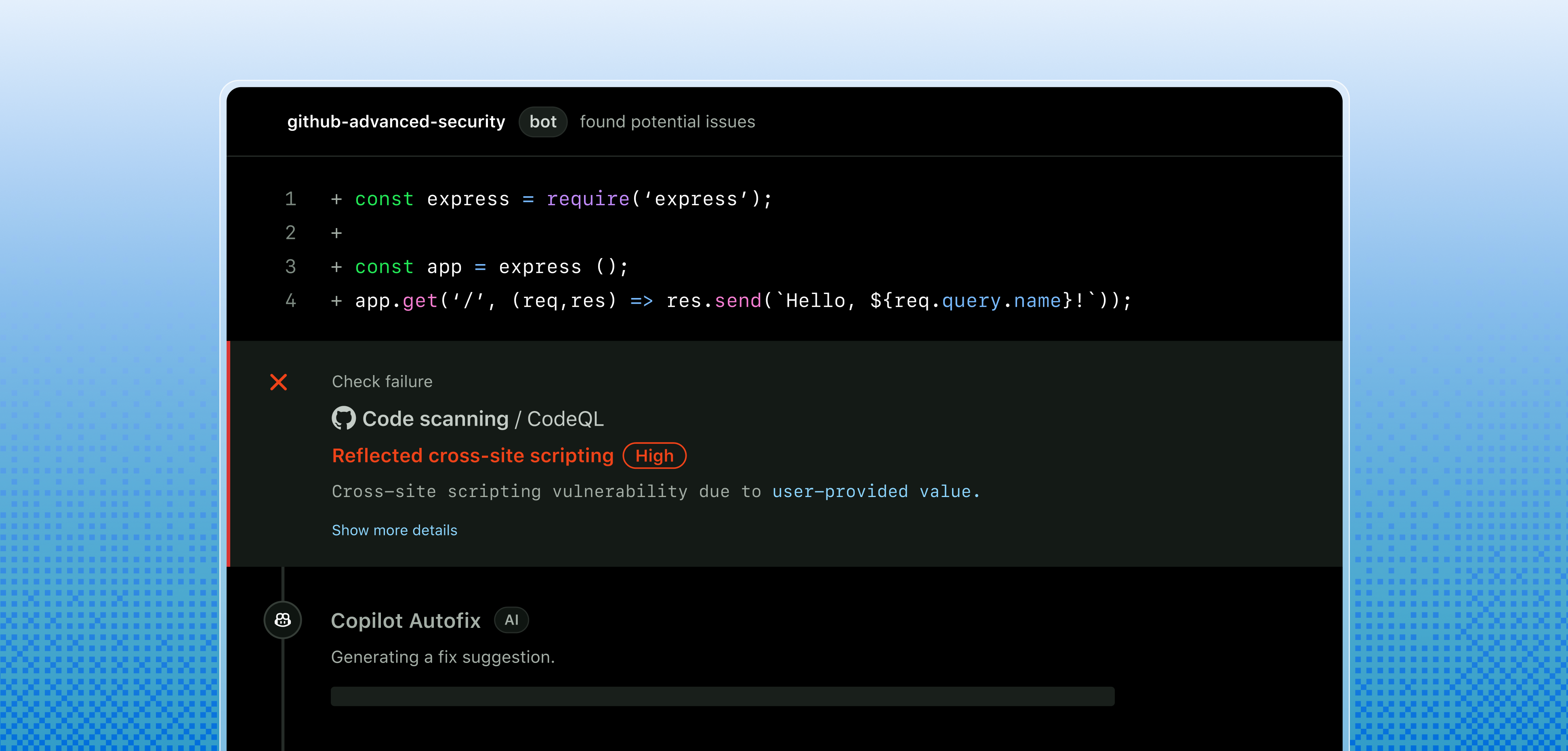 CodeQL and Copilot Autofix in action
AI Scan
A more recent feature, built to cover a long-standing CodeQL limitation: not every language and framework has mature CodeQL queries. AI Scan uses an AI-based engine, triggered during pull request review, to find vulnerabilities in languages or frameworks CodeQL doesn’t yet cover fully. It’s a complement to CodeQL, not a replacement: the two analyses work together on the same pull request.
Security campaigns and auto-triage
When an organization builds up hundreds of open alerts across dozens of repositories, the problem stops being technical and becomes organizational. Security campaigns let you group a set of alerts into a coordinated initiative, with goals and owners assigned, designed to cut down security debt at scale instead of leaving it to individual teams.
Custom auto-triage rules, meanwhile, work on Dependabot alerts: they let you automatically dismiss certain categories of updates, postpone others, or trigger automatic updates, based on criteria defined once at the organization level.
 A remediation campaign in progress
Dependency review
Dependency review shows, directly inside a pull request, the full impact of a change to the project’s dependencies, flagging whether a new version introduces known vulnerabilities before it’s even merged into the main branch. It’s one of the simplest controls to turn on and among the most effective, because it steps in at the point where fixing a problem costs the least: before the merge, not after deployment.
GitHub Secret Protection: features
Secret scanning
Secret scanning analyzes the entire Git history, across all branches of the repository, looking for credentials hardcoded directly into the code: API keys, passwords, access tokens. The scan also covers comments, issue and pull request descriptions, discussions, wikis, and even secret gists, a broader scope than many teams expect the first time they hear about this feature.
When an exposed credential is detected, the alert shows up in the repository’s dedicated security tab, and for partners that support automatic validation (many cloud providers, including Azure), the alert can also include a check on the credential’s current validity, useful for quickly telling an old, already-revoked token apart from one that’s still active and therefore genuinely dangerous.

Push protection
Push protection steps in before the damage is done: it directly blocks the push of a commit containing a recognized secret, preventing the credential from ever entering the repository’s history. It’s the difference between discovering an API key has been exposed and having to rotate it urgently, and never exposing it at all.
AI-based detection
Beyond known patterns (structured keys with a recognizable format, like tokens from many cloud providers), GitHub Secret Protection includes AI-based detection built for unstructured credentials, such as passwords a developer chose freely and pasted into a configuration file by mistake. This kind of secret has historically been much harder to catch with pattern matching alone, because it doesn’t follow a predictable format.
Custom patterns and governance
Organizations can define custom detection patterns, built for internal credentials that don’t fit the standard formats GitHub recognizes. Rounding out the picture are governance features aimed at enterprise scenarios, such as delegated approval for who can bypass a push protection block or dismiss a secret scanning alert, useful for preventing a single developer from silencing a critical alert without anyone noticing.
Benefits of GitHub Advanced Security
The most immediate benefit is pushing security checks further upstream in the development cycle, what the industry calls shift left. Finding a vulnerability in a pull request, before the merge, costs hours. Finding it in production, after an incident, costs days and often reputation too.
There’s also a less-discussed but equally concrete benefit for teams already working in the Microsoft ecosystem: GitHub Advanced Security is also available for Azure DevOps, with the same licensing model, which lets organizations with mixed pipelines (part on GitHub, part on Azure Repos) maintain a consistent level of protection without having to manage two completely different security tools with two separate governance models.
Finally, the free availability of a large share of features on public repositories lowers the barrier to entry for open-source projects and small teams wanting to start introducing security practices without a dedicated budget, worth mentioning when weighing the total cost of adoption against alternatives on the market.
Limitations and what to know before turning it on
Not everything is automatic, and it’s worth being explicit about where GitHub Advanced Security shows its limits, because mismatched expectations are often the main cause of failed adoptions.
- Cost scales with the number of active committers, not the number of repositories. An organization with many developers who touch code only occasionally may end up paying more than expected, because every committer active in the last 90 days counts as a license, even with a single push.
- CodeQL doesn’t cover every language with the same depth. Some newer languages and frameworks have less mature queries than those available for historically more common languages like Java, C#, or JavaScript. AI Scan closes part of that gap, but it’s still an evolving area, not a complete, definitive replacement.
- False positives are never zero. Both code scanning and secret scanning can generate alerts that, after review, turn out to be irrelevant to the project’s specific context. You need a defined triage process, otherwise alert noise ends up discouraging whoever is supposed to handle it.
- Copilot Autofix proposes, it doesn’t decide. Suggested fixes should always be reviewed before merging, especially for vulnerabilities touching business logic or architectural choices, where a syntactically correct fix can still introduce behavior different from what was intended.
- You still need a GitHub Team or Enterprise plan for private repositories: free features remain limited to public repositories, so most organizations protecting proprietary code will still need to factor in license costs.
GitHub Advanced Security for Azure DevOps
For organizations using Azure Repos instead of GitHub to host their code, GitHub Advanced Security for Azure DevOps brings the same type of protection into existing pipelines, with no need to migrate to GitHub. The billing model is identical, $49 per active committer per month for full coverage, billed directly on the Azure subscription linked to the Azure DevOps organization rather than on a GitHub account.
For teams weighing whether to consolidate their DevOps pipeline, this is often a practical factor to weigh alongside the rest of the architecture: anyone who has already invested in managing projects and pipelines with Azure DevOps doesn’t necessarily need to move their code to GitHub just to get the same level of security analysis.
 Code scanning inside Azure DevOps
Pricing: how much GitHub Advanced Security costs
Pricing is based on two separate components, also purchasable individually:
- GitHub Code Security: $30 per month per active committer
- GitHub Secret Protection: $19 per month per active committer
- Both together: $49 per month per active committer
A committer counts as active if they made at least one push to a repository with Advanced Security enabled in the last 90 days, a criterion that counts the person, not the repository they work in. Billing is consumption-based, calculated daily and with no multi-year contract commitment, a shift from the old Advanced Security model, designed to make it easier to scale spend up or down based on the team’s actual size. GitHub also offers, for Team and Enterprise plan customers, a free risk assessment on up to 20 repositories, useful for getting a concrete sense of how many vulnerabilities or exposed secrets would surface before even buying a license.
Getting started: activation and best practices
Activation starts with security configurations, a centralized set of security settings an administrator can apply to multiple repositories in the organization at once, instead of configuring each repository individually. For large organizations this makes a huge difference in time and consistency across projects.
A few practical suggestions drawn from watching real-world adoption:
- Start with a pilot project before turning on Advanced Security across the whole organization, to understand the real volume of alerts that surface and size the triage workload accordingly.
- Turn on push protection first, since it prevents new problems, and only afterward spend time clearing historical alerts already built up in existing repositories.
- Define a triage process with clear owners for code scanning and secret scanning alerts, otherwise the volume of notifications risks being ignored after the first few weeks.
- Use security campaigns to tackle security debt built up in older repositories, instead of leaving it as an informal task for whoever happens to notice.
Conclusion
GitHub Advanced Security, in its current form split into two products, reflects a simple but correct idea: code security and secret protection are two distinct problems, with different priorities depending on context, and not every organization needs to tackle both at the same time with the same intensity. For teams already working in the Microsoft ecosystem, availability on Azure DevOps too removes one more argument in favor of a forced migration to GitHub just to get this level of protection.
It remains true, as with any automated security tool, that technology alone isn’t enough. You need a defined process for handling alerts, deciding priorities and assigning responsibilities, otherwise even the most sophisticated tool ends up generating noise instead of value. If your organization is considering how to introduce GitHub Advanced Security, or how to integrate it with an existing Azure DevOps pipeline, our team can help design an adoption path that starts from your code’s real risks, not a generic checklist.
FAQ about GitHub Advanced Security
Is GitHub Advanced Security still a single product? No, not anymore. As of April 1, 2025, Microsoft and GitHub split the offering into two independently purchasable products, GitHub Code Security (code analysis) and GitHub Secret Protection (exposed secret detection). The name “GitHub Advanced Security” is still used to refer to both together.
How much does GitHub Advanced Security cost? GitHub Code Security costs $30 per month per active committer, GitHub Secret Protection $19. Bought together, the total is $49 per active committer per month. A committer counts as active if they made at least one push to a repository with Advanced Security enabled in the last 90 days.
Do I need an Enterprise plan to use GitHub Advanced Security? No. Since the offering was split, even GitHub Team plan customers can purchase Code Security and Secret Protection separately, with no need for an Enterprise subscription. Many baseline features (secret scanning, push protection, CodeQL code scanning) also remain free on all public repositories.
Does GitHub Advanced Security work with Azure DevOps too? Yes. GitHub Advanced Security for Azure DevOps brings the same code scanning and secret scanning features into Azure Repos pipelines, with the same per-active-committer billing model, charged directly to the Azure subscription linked to the Azure DevOps organization.
Does Copilot Autofix replace a security engineer’s work? No. Copilot Autofix generates fix proposals for code scanning alerts, useful for speeding up remediation, but they remain suggestions that always need review before merging. For complex vulnerabilities, or ones requiring architectural decisions, human oversight is still necessary.

Written by
Emanuele Rossi
Infra & Security · Dev4Side
Dev4Side Software · Microsoft Gold Partner
Need help implementing this in your company?
Our specialist teams have delivered 200+ Microsoft implementations across Italy. Contact us for a free, no-obligation evaluation of your project.
Related articles
Azure DevOps: What it is, services, and API
Azure DevOps is Microsoft's platform for agile development with CI/CD, Git repos, and boards. What it is, how it works, and how to use its APIs in your company.
Microsoft Entra ID is the new Azure AD: How does it work?
Microsoft Entra ID is the evolution of Azure Active Directory, the solution for identity and access management. Here are differences, features, and costs.
Microsoft Purview Compliance Manager: Simple Compliance
Microsoft Purview Compliance Manager: assess risks, track improvement actions, and meet regulatory requirements — all managed from one central dashboard.