
Defender for Cloud Apps: come proteggere i dati nelle app cloud
Defender for Cloud Apps secures your SaaS environment with full visibility, data loss prevention, and real-time threat detection across business apps.
.png)
What is Microsoft Defender for Cloud Apps
Microsoft Defender for Cloud Apps is a Cloud Access Security Broker (CASB) that provides visibility, data control, and threat protection for SaaS applications in use across the organisation — both sanctioned Microsoft 365 apps and unsanctioned shadow IT. It discovers 31,000+ cloud apps via traffic analysis, enforces access policies, detects anomalous user behaviour, and integrates with Microsoft Sentinel for centralised security monitoring.
What is a CASB
A CASB (Cloud Access Security Broker) is a security solution designed to monitor and protect access to, and use of, cloud applications and services. It acts as a control point between enterprise users and cloud services, providing visibility, governance, and security for data and activities. CASBs are particularly useful in organisations that have adopted SaaS (Software-as-a-Service), IaaS (Infrastructure-as-a-Service), and PaaS (Platform-as-a-Service) applications.
A CASB integrates seamlessly with other security tools such as firewalls, SIEM (Security Information and Event Management) platforms, and identity management solutions. Thanks to automation, organisations can define rules that trigger immediate mitigation actions, such as blocking a suspicious activity or notifying an administrator.
CASBs are increasingly important as more organisations extend access to their networks and data via personal devices and third-party sites. They allow administrators to extend their security policies beyond the corporate network perimeter and protect against threats originating from cloud applications. CASBs prevent data loss in the event of a breach and help ensure regulatory compliance and data protection.
Below is an overview of the key capabilities that a CASB provides.
1. Visibility
Visibility is one of the core functions of a CASB. Many organisations lack full awareness of the cloud applications their employees use, often referred to as shadow IT. These unsanctioned applications can expose the organisation to security and compliance risks.
- Application usage monitoring: A CASB discovers all cloud applications in use, surfacing details such as data transfer volumes, number of users, and types of activity performed. - Risk scoring: It provides a risk assessment of applications based on criteria such as compliance posture, data security, and known vulnerabilities.
2. Compliance
Organisations must frequently adhere to specific regulations such as GDPR, HIPAA, or ISO 27001, all of which require rigorous data governance.
- Compliance policies: A CASB allows organisations to create customised policies to ensure that sensitive data is handled in accordance with applicable regulations. - Audit and reporting: It generates detailed reports showing adherence to policies and provides tools to respond quickly to any violations. - Geographic restrictions: It can limit access to cloud applications based on specific regions, ensuring that data is not transferred to prohibited areas.
3. Data Protection
Protecting sensitive data is critical to preventing accidental loss or unauthorised access.
- DLP (Data Loss Prevention): CASBs incorporate data loss prevention tools that monitor and control the transfer of sensitive information such as payment card numbers, personal data, or intellectual property. - Encryption: They can apply encryption to data in transit and data stored in the cloud, rendering it unreadable in the event of unauthorised access. - Access controls: They allow organisations to define who can access specific data and what actions can be performed, for example restricting downloads or modifications.
4. Threat Protection
CASBs help detect and respond to threats that may arise from the use of cloud applications.
- Anomalous behaviour detection: They use advanced algorithms to identify unusual activity, such as logins from unexpected geographic locations, large-scale data movements, or abnormal use of administrative privileges. - Malware defence: They can scan files uploaded to the cloud to detect malware or other malicious content. - Threat intelligence: They provide in-depth analysis to support incident investigation and remediation.
 Overview of how Microsoft Defender for Cloud Apps works
Microsoft Defender for Cloud Apps: Key Features
In this context, Microsoft Defender for Cloud Apps (MDCA), one of the leading CASB solutions on the market, plays an absolutely critical role in managing and maintaining the security of cloud environments.
Today, end users will do whatever it takes to stay productive, often pushing well beyond the boundaries set by IT teams. In a hybrid working world, monitoring and protecting the cloud applications connected to the corporate environment can feel like a chaotic undertaking, a real wild west.
Defender for Cloud Apps makes managing and protecting cloud applications an efficient, accessible process, offering comprehensive protection across multiple dimensions of cloud security. Thanks to its advanced data protection capabilities, threat detection, and seamless integration with various cloud services, it represents a robust solution for managing and securing cloud applications. Defender for Cloud Apps extends its functionality to monitoring a wide range of cloud applications, giving organisations the tools they need to effectively protect their cloud ecosystem.
MDCA is built around three core components that can be optimally integrated into an organisation’s information environment:
- Cloud Discovery: Cloud Discovery operates by using logs collected from the corporate firewall, proxy, or Microsoft Defender for Endpoint, which must therefore be installed on every endpoint. These network logs feed into MDCA’s analysis of cloud applications and associated network traffic. The tool then evaluates those applications against a current catalogue of more than 31,000 cloud apps, assigning a score based on over 90 risk factors. - Reverse Proxy: Session control is built on federated authentication. Once the Identity Provider is connected to Entra ID and the application is linked to the environment, the session is automatically intercepted and network traffic is routed through a reverse proxy when users sign in with their credentials. This enables capabilities such as blocking downloads, preventing text copying, or requiring multi-factor authentication before an action is carried out. Associated features include audit logs and session control mechanisms. - App Connectors: These are APIs that connect to the most widely used applications (in particular cloud storage services such as AWS, Azure, and GCP). Through these connections, MDCA can regularly scan online files and monitor the users accessing them. The capabilities offered range from account information and governance, to application permissions and data analysis.
But in practical terms, what can it actually do? Below is a look at some of its key use cases and features.
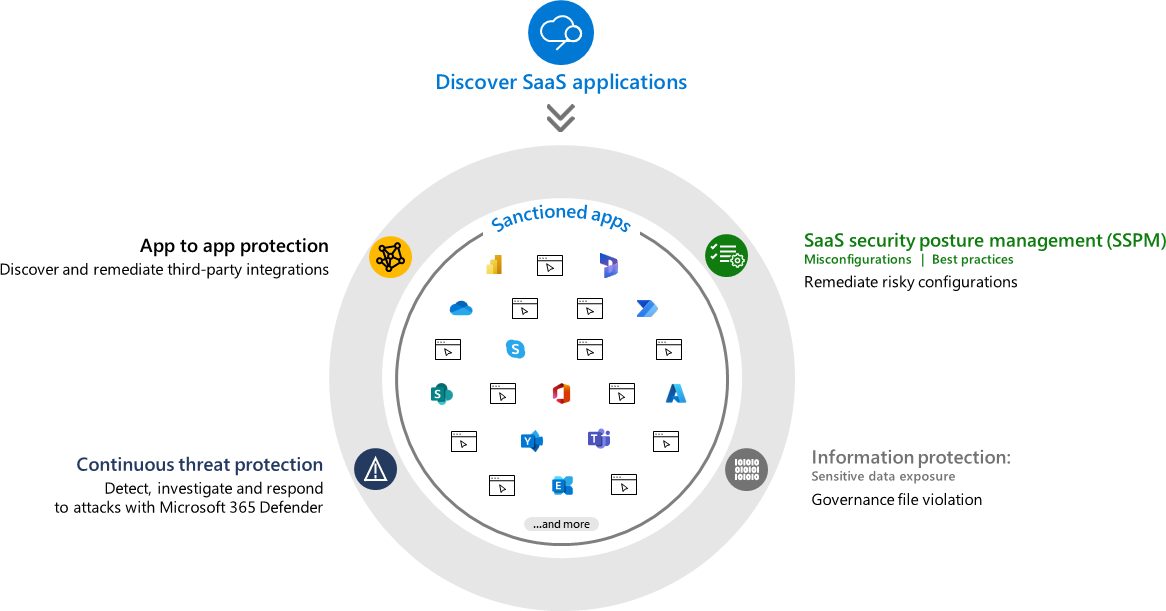 SaaS Applications
Detect Application Vulnerabilities
The security posture of many organisations depends largely on the security of the cloud applications used within the corporate environment. Defender for Cloud Apps allows administrators to easily survey the environment and identify every application used by end users that contains business data.
In addition, the tool provides a security information summary for each application, simplifying the decision of whether to sanction or block its use.
Protect Data Outside Your Own Environment
One of the principal advantages of Defender for Cloud Apps is the ability to develop and manage cloud applications securely. The tool provides complete control not only over applications, but also over the APIs present in the environment. This means that the organisation’s IT team has full oversight of the cloud applications used by end users.
Defender for Cloud Apps allows teams to monitor, manage, and gain operational insights easily through its dashboard.
A particularly important aspect is that it enables the security team to see which cloud applications are being used and to authorise or revoke their use within the corporate environment. In this way, administrators can protect all cloud applications in the environment, choosing to permit or remove connections based on predefined security criteria.
Streamline Administration Through a Centralised Portal
The capabilities of Defender for Cloud Apps are accessible through the tool’s portal. A unique and useful component of the portal is the ability to easily view every active app connector in the corporate environment, showing which third-party applications are operational and their security posture.
The portal sends security alerts when risky behaviour is detected in the use of third-party tools, keeping administrators informed at all times and enabling rapid response in the event of an incident.
Additional information accessible from the portal includes a summary of at-risk identities, IP addresses accessing the environment, a summary of users and devices accessing the environment, compliance information for all cloud applications in use, security alerts associated with applications, and active policies.
Furthermore, Defender for Cloud Apps allows security staff to view and monitor all events occurring within an application, providing a continuously updated summary of investigation priorities. For instance, if a login attempt occurs outside a user’s typical behaviour or location, the tool flags and documents the incident, assigning it a priority for review in the portal.
This functionality not only simplifies the management of potential threats, but also generates detailed information for incident reports, a fundamental aspect of the ongoing improvement of the organisation’s security posture.
Counter Shadow IT
Microsoft Defender for Cloud Apps offers a range of policies and controls that organisations can implement to prevent shadow IT and improve their cloud security posture. These policies and controls include monitoring cloud applications for unauthorised use, blocking access to high-risk applications, enforcing data loss prevention policies, and identifying and mitigating threats.
Through these policies and controls, organisations can reduce the risk of data breaches, ensure compliance with regulatory requirements, and gain greater visibility and control over their cloud environments.
Below are some examples of the policies and controls enabled by Defender for Cloud Apps:
- Monitor cloud applications for unauthorised use. - Block access to high-risk applications. - Enforce data loss prevention (DLP) policies. - Identify and mitigate threats. - Create and enforce access policies for users. - Monitor and manage third-party applications and services. - Conduct regular security assessments and audits.
Create App-Based Event Policies
Natively, Defender for Cloud Apps not only allows organisations to leverage all of Microsoft’s predefined policies, but also enables the creation of new policies based on application-specific events. These conditional access policies offer more dynamic and fluid IT management processes, making detection-based responses straightforward to implement.
Microsoft Defender for Cloud Apps: Integration Options
Microsoft Defender for Cloud Apps offers a wide range of integration options with third-party cloud applications and services, as well as those belonging to the Microsoft ecosystem. Among the most notable integrations are:
- Microsoft 365. - Microsoft Entra ID (formerly known as Azure Active Directory). - Dynamics 365. - Google Workspace (Drive, Gmail, Docs, Sheets, etc.). - Amazon Web Services (AWS). - Dropbox. - Salesforce. - Slack. - ServiceNow. - Zoom.
The list of supported firewalls and proxies is too extensive to reproduce here in full, but it can be found in its entirety in the official Microsoft documentation (available here). It includes all the most common names, as well as cloud-based firewalls such as Zscaler and iboss. You can also use Syslog or FTP with a container appliance to upload custom logs to MDCA and, if required, customise the log parser.
It is important to note that Microsoft Defender for Cloud Apps integrates natively with related products within Microsoft 365 Defender (now Microsoft Defender XDR). This means that organisations choosing to adopt this solution have the ability to monitor endpoint security, SaaS application security, and cloud service security in real time.
In particular, the integration with Defender for Endpoint and Defender for Identity makes it possible to protect business data regardless of the device used to access it, and to ensure the security of user identities when using cloud applications. This level of comprehensive integration gives organisations more robust control over the security of their data and cloud resources, helping to ensure consistent, end-to-end protection across every area of operation.
 Integrated ecosystem of Microsoft Defender for Cloud Apps
Conclusions
As we have seen, Defender for Cloud Apps is a powerful and versatile tool. Its comprehensive capabilities, ranging from shadow IT discovery to the enforcement of robust policies and integration with a wide range of cloud services, make it an indispensable asset for any organisation operating in the cloud.
Through cloud application discovery, data control, user behaviour analytics, threat investigation, compliance and governance, and conditional access control, Microsoft Defender for Cloud Apps stands out as an excellent solution for addressing the cybersecurity challenges of an increasingly complex and dynamic cloud computing landscape.
This solution not only enhances security, but also simplifies compliance, offering a well-balanced combination of protection and practicality. The versatility of Defender for Cloud Apps is further underscored by its adaptability to diverse cloud environments, including AWS, GCP, and Azure. This adaptability ensures that organisations can maintain a high level of security whilst taking full advantage of the flexibility that cloud services provide.
With its effective combination of advanced technology and intuitive functionality, this tool gives organisations the confidence and peace of mind they need to thrive in a continuously evolving digital environment.
{ “@context”: “https://schema.org”, “@type”: “FAQPage”, “mainEntity”: [ { “@type”: “Question”, “name”: “What is Microsoft Defender for Cloud Apps?”, “acceptedAnswer”: { “@type”: “Answer”, “text”: “Microsoft Defender for Cloud Apps is a Microsoft cloud security solution designed to protect cloud data and applications. It is part of the Microsoft Security ecosystem and enables organisations to gain visibility, control, and protection over activities and data across SaaS, IaaS, and PaaS applications.” } }, { “@type”: “Question”, “name”: “What is Microsoft Defender for Cloud Apps used for?”, “acceptedAnswer”: { “@type”: “Answer”, “text”: “Microsoft Defender for Cloud Apps is used to monitor cloud application usage, protect business data, identify risky behaviour, counter shadow IT, and enforce security and compliance policies. It helps organisations reduce the risks associated with cloud adoption and hybrid working.” } }, { “@type”: “Question”, “name”: “What is a CASB and why is it important?”, “acceptedAnswer”: { “@type”: “Answer”, “text”: “A CASB (Cloud Access Security Broker) is a solution that acts as a control point between users and cloud services. It provides visibility into cloud application usage, protects sensitive data, detects threats, and supports regulatory compliance. It is essential because it allows organisations to extend their security policies beyond the boundaries of the traditional network.” } }, { “@type”: “Question”, “name”: “Is Microsoft Defender for Cloud Apps a CASB?”, “acceptedAnswer”: { “@type”: “Answer”, “text”: “Yes. Microsoft Defender for Cloud Apps fulfils the role of a Cloud Access Security Broker (CASB), acting as an intermediary between users and cloud applications and enabling real-time control over activities, data, and sessions.” } }, { “@type”: “Question”, “name”: “Which cloud applications can Defender for Cloud Apps protect?”, “acceptedAnswer”: { “@type”: “Answer”, “text”: “Microsoft Defender for Cloud Apps supports a wide range of cloud applications, including Microsoft 365, Google Workspace, AWS, Azure, Salesforce, Dropbox, Slack, ServiceNow, Zoom, and many more. It can also analyse unknown cloud applications through its Cloud Discovery capabilities.” } } ] }
FAQ on Defender for Cloud Apps
1. What is Microsoft Defender for Cloud Apps?
Microsoft Defender for Cloud Apps is a Microsoft cloud security solution designed to protect cloud data and applications. It is part of the Microsoft Security ecosystem and enables organisations to gain visibility, control, and protection over activities and data across SaaS, IaaS, and PaaS applications.
2. What is Microsoft Defender for Cloud Apps used for?
Defender for Cloud Apps is used to monitor cloud application usage, protect business data, identify risky behaviour, counter shadow IT, and enforce security and compliance policies. It helps organisations reduce the risks associated with cloud adoption and hybrid working.
3. What is a CASB and why is it important?
A CASB (Cloud Access Security Broker) is a solution that acts as a control point between users and cloud services. It provides visibility into cloud application usage, protects sensitive data, detects threats, and supports regulatory compliance. It is essential because it allows organisations to extend their security policies beyond the boundaries of the traditional network.
4. Is Microsoft Defender for Cloud Apps a CASB?
Yes. Microsoft Defender for Cloud Apps fulfils the role of a Cloud Access Security Broker (CASB), acting as an intermediary between users and cloud applications and enabling real-time control over activities, data, and sessions.
5. Which cloud applications can Defender for Cloud Apps protect?
Defender for Cloud Apps supports a wide range of cloud applications, including Microsoft 365, Google Workspace, AWS, Azure, Salesforce, Dropbox, Slack, ServiceNow, Zoom, and many more. It can also analyse unknown cloud applications through its Cloud Discovery capabilities.

Written by
Emanuele Rossi
Infra & Security · Dev4Side
Dev4Side Software · Microsoft Gold Partner
Need help implementing this in your company?
Our specialist teams have delivered 200+ Microsoft implementations across Italy. Contact us for a free, no-obligation evaluation of your project.
Related articles
Microsoft Entra ID is the new Azure AD: How does it work?
Microsoft Entra ID is the evolution of Azure Active Directory, the solution for identity and access management. Here are differences, features, and costs.
Microsoft Purview Compliance Manager: Simple Compliance
Microsoft Purview Compliance Manager: assess risks, track improvement actions, and meet regulatory requirements — all managed from one central dashboard.
Microsoft Security Awareness Training: all the official resources
Discover the official Microsoft resources for Security Awareness Training and how to strengthen the company's security posture starting with employees.