
6 Features of Microsoft Defender for Endpoint, and its weaknesses
Learn how to protect your company's IT infrastructure with Microsoft Defender for Endpoint. Here's our guide for a complete defense against cyber threats.
.png)
Microsoft Defender for Endpoint: Introduction
Microsoft Defender for Endpoint is Microsoft’s enterprise endpoint detection and response (EDR) platform for Windows, macOS, Linux, iOS, and Android devices. It provides behavioural-based threat detection, automated investigation and remediation, attack surface reduction rules, and device isolation capabilities — all managed centrally from the Microsoft Defender portal and integrated with Microsoft Sentinel and Entra ID conditional access.
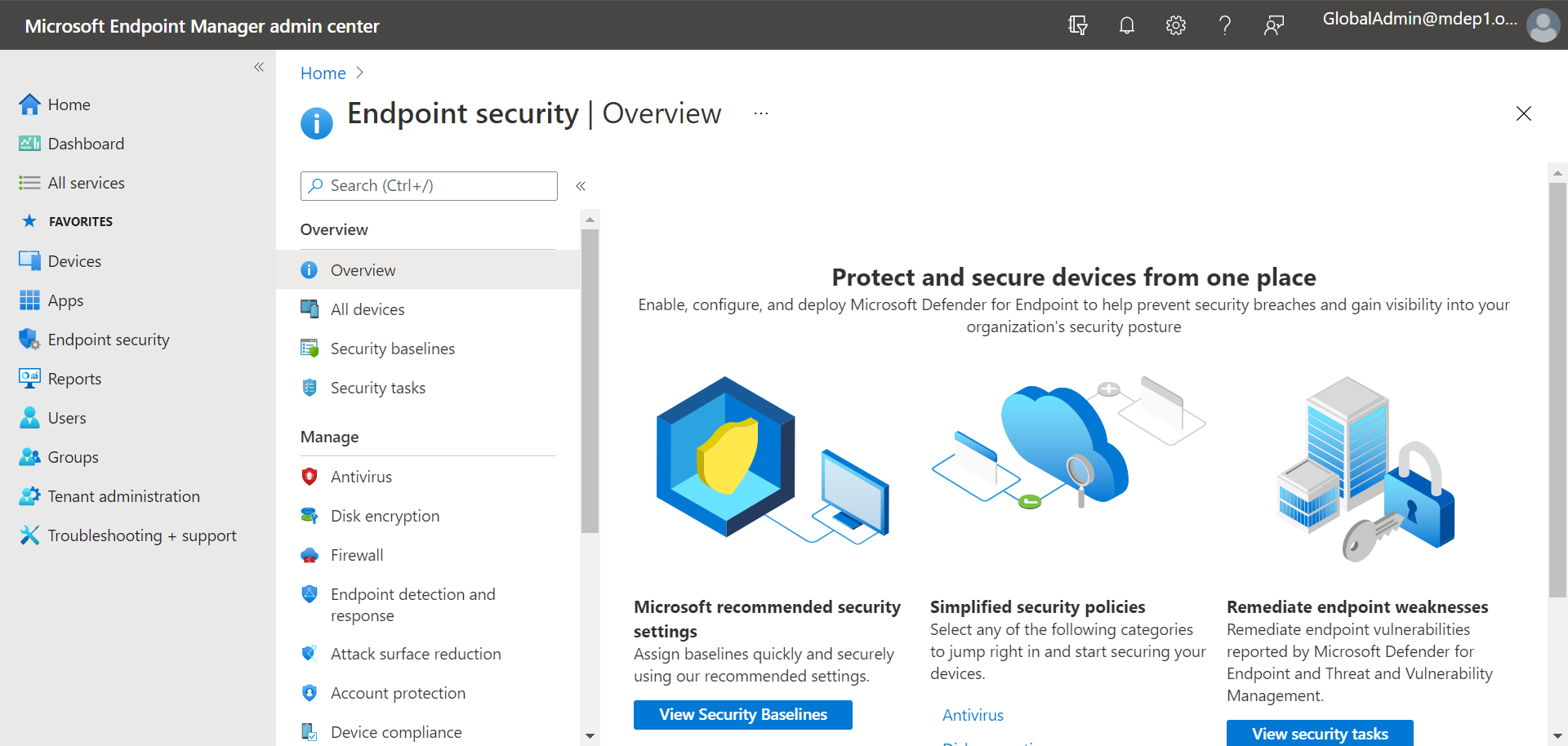 Microsoft Defender for Endpoint: Homepage
Microsoft Defender for Endpoint: Objectives and Course of Action
Defender for Endpoint specializes in the protection of laptops, PCs, servers and mobile devices, that is, the most sensitive and vulnerable points of access to corporate data. His task is therefore to monitor them in a proactive, intelligent and coordinated way with the activities of all the services that accompany him on the platform.
Defender for Endpoint can help an organization respond to potential threats, such as malware or ransomware, using tools built into Windows 10, 11 and Azure services. These tools provide automated investigation, detection, and response to preventive and post-breach threats.
Microsoft Defender for Endpoint aims to: preventive protection, post-violation detection and the proactive and unified response across endpoints.
His intervention therefore translates into a significant reduction in exposure to threats, as well as the impact that incidents can have on the corporate security system. But it’s important to stress how these results are achieved.
In fact, Defender for Endpoint follows a precise course of action, based on:
- Artificial intelligence and machine learning: Defender for Endpoint uses powerful artificial intelligence (AI) and machine learning (ML) algorithms to detect unknown and advanced threats. These tools analyze huge amounts of data to identify suspicious patterns or abnormal activity that may escape traditional methods of detection, thus improving the accuracy and speed of protection.
- The behavioral analysis of endpoints: Defender for Endpoint constantly monitors the behavior of endpoints (such as computers, mobile devices, and servers) to detect activity that could indicate an ongoing attack. By analyzing behavior in real time, such as the execution of suspicious processes or communication with unauthorized servers, the system is able to detect threats even without a specific signature, quickly adapting to new attack techniques.
- Real-time monitoring: Defender for Endpoint provides constant monitoring of all endpoints, with the ability to detect malicious activity as soon as it occurs. Real-time surveillance allows immediate action, minimizing damage caused by attacks. This approach offers continuous protection against threats, with detailed reporting to allow for a quick response from system administrators.
- The automated response: One of the distinctive features of Defender for Endpoint is the ability to automatically respond to identified threats. If an attack is detected, the system can isolate the compromised endpoint, block access to sensitive resources, and initiate corrective actions without the need for immediate human intervention. This not only accelerates the containment of threats, but also reduces the risk of extensive damage or secondary infections within the corporate network.
Starting from the first point, Defender for Endpoint makes use of AI to identify tools, techniques, and procedures in business endpoints. He then compares them with the behavioral patterns he has learned over time to recognize abnormal activities and trace them back to malicious users.
It then analyzes the threats and sends the reports with the relevant information in a sandbox. Here, the Threat Investigation is carried out to trace the attack chain and view forensic data on the attacks identified.
Finally, the system isolates the compromised endpoint to eradicate the current threat and restore its security state. It is a complete and effective intervention, which simultaneously and constantly involves the different endpoints of a company.
Microsoft Defender for Endpoint: Key Requirements
The main requirements for using Microsoft Defender for Endpoint can be divided into two sections: licensing requirements and software on Windows Server:
Licensing requirements must include one of the following:
-
Windows 10/11 Enterprise E5
-
Windows 10/11 Education A5
-
Microsoft 365 E5 (including Windows 10/11 Enterprise E5 features)
-
Microsoft 365 E5 Security
-
Microsoft 365 A5 Security
-
Microsoft Defender for Endpoint The software on Windows Server must include one of the following:
-
Microsoft Defender for Servers Plan 1 or Plan 2 (part of Defender for Cloud)
-
Microsoft Defender for Endpoint for Windows Server (or standalone MDE Server license) In addition, Microsoft Defender for Endpoint is compatible with most Windows operating systems and servers, including virtual desktops, as well as Android, iOS, Linux, and macOS. Browser requirements include Microsoft Edge, Google Chrome, and other modern Chromium-based browsers.
The 6 key features of Microsoft Defender for Endpoint
Together with the other products on the Microsoft Defender XDR platform, Defender for Endpoint guarantees the complete, intelligent and proactive protection of corporate data and identities.
At the core of MDE is a suite of complementary capabilities that work together to provide end-to-end protection for macOS, iOS, Windows, Android, Linux, and IoT devices. This holistic approach allows security and IT teams to collaborate seamlessly, unify endpoint management, and implement detailed security policies, while using powerful threat detection, investigation, and remediation capabilities.
So what are these functionalities that allow it to contribute to this holistic protection system, starting with the endpoints? Let’s see the main ones in the list below:
- Microsoft Defender Vulnerability Management: The system identifies and protects endpoints from attacks based on the vulnerabilities of each operating system and individual applications. It can mitigate these specific threats thanks to continuous updates released by Microsoft and its machine learning and threat intelligence capabilities.
- Attack Surface Reduction: Provides the infrastructure’s first line of defense with capabilities that are resistant to attacks and exploits. These include specific network and web protection sets that regulate access to potentially harmful IP addresses, domains, and URLs.
- Next-generation protection: Uses machine learning algorithms and artificial intelligence models to detect abnormal behavior and identify all types of emerging threats.
- Endpoint Detection and Response: It provides detailed information on the endpoints, regarding the apps installed, the processes that are running and the network events that characterize them. The advanced system detection also offers a proactive and customizable query-based threat search tool.
- Automated Investigation and Remediation: It allows you to automate incident response, as well as the isolation of compromised endpoints, the blocking of ongoing attacks and the removal of threats.
- Defender Experts for XDR: The threat detection service managed by Microsoft Defender for Endpoint provides proactive threat hunting, prioritization, and additional context and information to support Security Operations Centers (SOC) in identifying and responding to threats quickly and accurately.
 Summary of Microsoft Defender for Endpoint features
Microsoft Defender for Endpoint: advantages and benefits of use
As with any service or method dedicated to this specific area of cybersecurity, the main advantage of using Microsoft Defender for Endpoint is that your endpoints, and by extension your network, are protected from cyberattacks.
This tool takes a proactive approach to security, minimizing all areas that could represent an access point for cybercriminals. From preventing access to untrusted applications and websites to reviewing all device settings and providing recommendations, protecting devices starts with putting them in the best possible security position.
Unlike other endpoint protection solutions, the Microsoft Defender for Endpoint dashboard provides users and teams with complete visibility and allows them to observe the overall security score of their endpoints, the evidence analyzed and related verdicts, the actions taken and much more. You’ll never have to wonder if endpoint protection is actually working, as you can monitor everything that happened in the last 180 days.
The capabilities described above allow Microsoft Defender for Endpoint to have distinctive advantages designed to make optimal cybersecurity a continuous reality.
Users can save time and resources, since they don’t have to deploy additional agents or infrastructure. Extended visibility, signals, and human intelligence are integrated into the product to address the latest and most advanced cyber threats.
Being based on cloud technologies, MDE has the ability to scale in a single tenant for more than 1 million endpoints, allowing customers to divide that tenant among hundreds of sub-tenants. In addition, it can use cloud-based and client-based machine learning and behavioral algorithms to identify and counter threats.
Security teams can search for anomalies in historical data for up to 180 days and create customized queries and detections for threat hunting. To stay updated on emerging threats, organizations can obtain threat analysis reports that help them assess how exposed or affected they are and what to do to mitigate those risks.
To provide threat management, MDE monitors both Microsoft and third-party software vulnerabilities and security configuration issues, then examines 180 days of historical data to identify anomalies and build customized detections and queries for threat hunting. To stay updated on emerging threats, organizations can obtain analysis reports that can help them assess how exposed or affected they are, taking steps to reduce the risk and exposure deriving from these issues.
An additional added value is that Microsoft Defender for Endpoint can now integrate with the generative artificial intelligence capabilities of Microsoft Security Copilot to detect and defend against ransomware and other cyberthreats on multiple platforms. In particular, Copilot for Security is integrated into the Defender for Endpoint portal to allow security teams to easily summarize incidents and device information, analyze scripts, codes, and files, apply guided responses to resolve incidents, create incident reports, and generate KQL queries.
The weaknesses of Microsoft Defender for Endpoint, and how to fix them
We have reached the final part of our overview of Microsoft Defender for Endpoint and let’s try to close with some points of attention and best practices useful for those who have never used this or other Microsoft Defender XDR services.
- Zero-day exploits: Zero-day exploits are unknown security vulnerabilities that are commonly difficult to prevent. Even if the machine learning and threat intelligence capabilities make Defender for Endpoint rather secure against these vulnerabilities, it is good to always keep the system updated to mitigate the risk.
- False Positives: Defender for Endpoint may occasionally generate false positives, i.e. recognize threats files and activities that are instead legitimate. To avoid the problem, you must carefully configure the detection rules and monitor their logs frequently.
- Internet connection addiction: Some Defender for Endpoint features require an internet connection to activate. For example, sending alerts in real time or accessing the most recent security intelligence updates. The simplest (and perhaps the only feasible) solution is to integrate external offline security measures into the system.
- Managing Configurations: As with the entire Microsoft Defender XDR ecosystem, it is necessary to correctly configure the service configurations to avoid a reduction in performance or, on the contrary, an increase in exposure to attacks and threats. To do this, you can follow the guidelines indicated by Microsoft in its documentation. The best choice, however, remains to rely on people who are experts in the sector or specialized consultants.
Conclusions
In today’s rapidly evolving threat landscape, where hybrid work models, personal device usage (BYOD) policies, and cloud-oriented environments have become the norm, endpoint security has become a crucial concern for organizations of all sizes. The widespread adoption of remote and distributed workforces has expanded the attack surface, making endpoints the weakest point in the cybersecurity chain. This is where Microsoft Defender for Endpoint excels.
Defender for Endpoint is a robust and holistic form of endpoint protection, perfect for organizations of all sizes. From proactive actions to strengthen security to remediation if malware is detected, Defender for Endpoint will continuously take action to keep you safe. Paired with Microsoft Defender Antivirus (included with Windows), you’ll have better protection, more meaningful information, and a unique, stronger platform.
Although there are some licensing and operating system requirements, Defender for Endpoint can be used on most operating systems and purchased as a stand-alone license if not already included in your licenses. Overall, the key features and benefits of this endpoint protection make it an excellent choice for any organization.
FAQs about Microsoft Defender for Endpoint
1. What is Microsoft Defender for Endpoint?
Microsoft Defender for Endpoint is an Endpoint Protection and Endpoint Detection & Response (EDR) solution that protects corporate devices such as PCs, laptops, servers, and mobile devices from malware, ransomware, and advanced attacks. It is part of the Microsoft Defender XDR platform and is designed to prevent, detect, and respond to threats in a centralized manner.
2. Which devices are protected by Microsoft Defender for Endpoint?
Microsoft Defender for Endpoint protects Windows, macOS, Linux, iOS, Android, and server environments, including virtual desktops and cloud-based scenarios. It therefore covers most endpoints used in modern and hybrid work environments.
3. What is the difference between Microsoft Defender Antivirus and Defender for Endpoint?
Microsoft Defender Antivirus is the basic antimalware protection included with Windows. Microsoft Defender for Endpoint goes beyond traditional antivirus by offering advanced behavioral detection, post-breach investigation, automated incident response, and centralized endpoint visibility. Used together, they provide significantly more comprehensive protection.
4. What are the main features of Microsoft Defender for Endpoint?
The main features of Microsoft Defender for Endpoint include Microsoft Defender Vulnerability Management, Attack Surface Reduction, Next-generation protection, Endpoint Detection and Response (EDR), Automated Investigation and Remediation, and Defender Experts for XDR. These capabilities work together to cover threat prevention, detection, and response.
5. Is Microsoft Defender for Endpoint effective against ransomware and advanced attacks?
Yes. Thanks to behavioral monitoring, automated response, and integration with Microsoft Security Copilot, Microsoft Defender for Endpoint is particularly effective against ransomware, fileless attacks, advanced exploits, and lateral movement within the network. It can automatically isolate compromised endpoints and stop threat propagation.

Written by
Emanuele Rossi
Infra & Security · Dev4Side
Dev4Side Software · Microsoft Gold Partner
Need help implementing this in your company?
Our specialist teams have delivered 200+ Microsoft implementations across Italy. Contact us for a free, no-obligation evaluation of your project.
Related articles
GitHub Advanced Security: Features, Benefits and Limitations
GitHub Advanced Security protects code and secrets with CodeQL, Copilot Autofix and secret scanning. Features of GitHub Code Security and Secret Protection, pricing and real-world limitations.
Microsoft Entra ID is the new Azure AD: How does it work?
Microsoft Entra ID is the evolution of Azure Active Directory, the solution for identity and access management. Here are differences, features, and costs.
Microsoft Purview Compliance Manager: Simple Compliance
Microsoft Purview Compliance Manager: assess risks, track improvement actions, and meet regulatory requirements — all managed from one central dashboard.